Dell VxRail:如何解決「內部雙 SD 模組 SD1 偵測到故障」
Summary: 如何解決「內部雙 SD 模組 SD1 偵測到故障」
This article applies to
This article does not apply to
This article is not tied to any specific product.
Not all product versions are identified in this article.
Instructions
如何解決「Internal Dual SD Module SD1 偵測到故障」
問題,請檢查所有節點的 iDRAC 主控台。
VxRail 節點已在系統上回報嚴重警示。
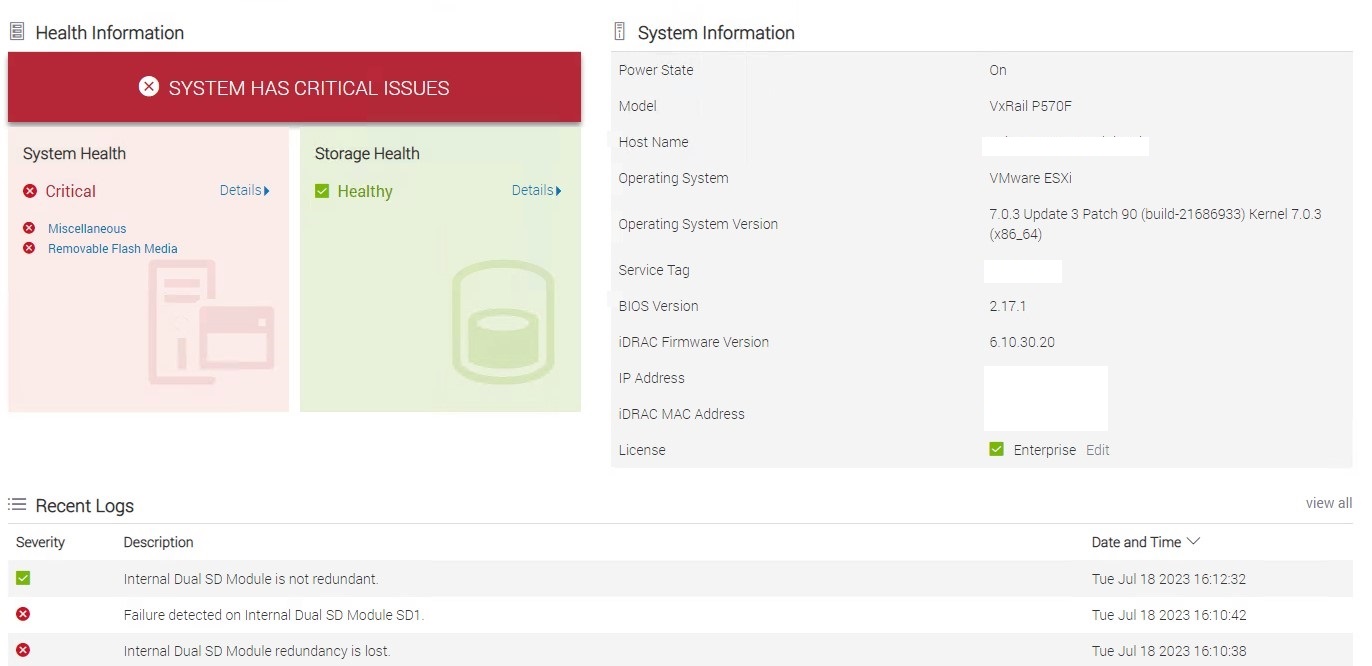
後續步驟:
1.聯絡 Dell 支援,並要求開啟服務要求,並顯示錯誤訊息。假設 Dial Home 尚未開啟。
2.將 ESXi 節點置於維護模式,並讓節點準備好進行活動。
3.工程師在現場後,請關閉 ESXi 伺服器。
4.保持 iDRAC 頁面開啟。
5.更換零件後,請檢查系統在背景重新建置 SD 模組時應回報警告。
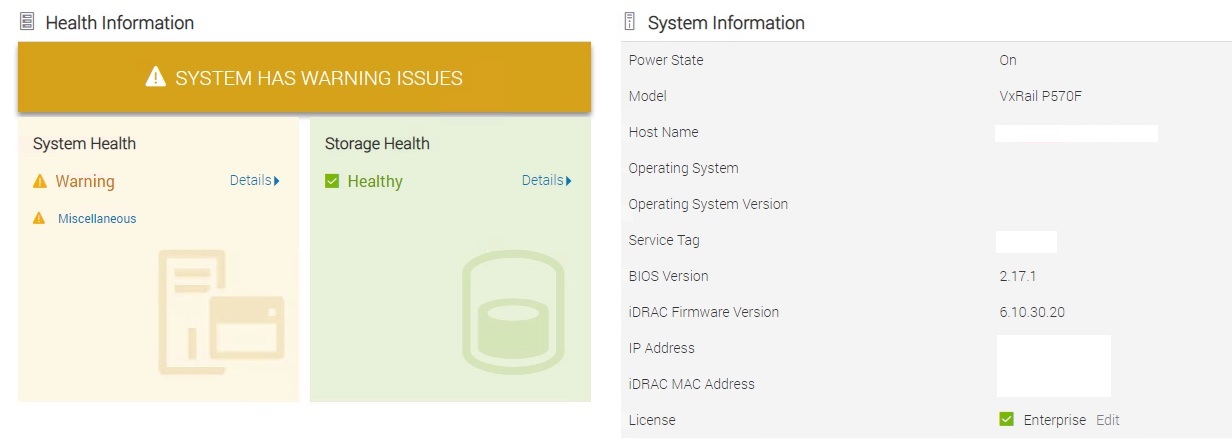
6.流覽至「Maintenance」,按一下 Lifecycle 記錄,然後檢查事件代碼「RRDU0006」,確認已啟動重建。

7.監視記錄,並找到事件代碼「RRDU0007」,表示重建已成功完成。

問題,請檢查所有節點的 iDRAC 主控台。
VxRail 節點已在系統上回報嚴重警示。
後續步驟:
1.聯絡 Dell 支援,並要求開啟服務要求,並顯示錯誤訊息。假設 Dial Home 尚未開啟。
2.將 ESXi 節點置於維護模式,並讓節點準備好進行活動。
3.工程師在現場後,請關閉 ESXi 伺服器。
4.保持 iDRAC 頁面開啟。
5.更換零件後,請檢查系統在背景重新建置 SD 模組時應回報警告。
6.流覽至「Maintenance」,按一下 Lifecycle 記錄,然後檢查事件代碼「RRDU0006」,確認已啟動重建。
7.監視記錄,並找到事件代碼「RRDU0007」,表示重建已成功完成。
8.重新開啟伺服器電源,並確認一切正常。
9.將主機從維護模式移除。
9.將主機從維護模式移除。
Affected Products
VxRail, VxRail 460 and 470 Nodes, VxRail Appliance Family, VxRail Appliance SeriesArticle Properties
Article Number: 000215964
Article Type: How To
Last Modified: 09 Aug 2023
Version: 1
Find answers to your questions from other Dell users
Support Services
Check if your device is covered by Support Services.