Precision 或带坞站的 XPS 上出现电源不足错误
Summary: 与 WD19DCS 配合使用的 Precision 7550 或 Precision 7750,或者与 WD19TB 配合使用的 Precision 5750 或 XPS 17 9700 可能会出现电量不足错误。
This article applies to
This article does not apply to
This article is not tied to any specific product.
Not all product versions are identified in this article.
Symptoms
将 BIOS 更新到版本 1.24.0 后,与 WD19DCS配合使用的 Precision 7550 或 Precision 7750 可能会遇到功率不足的错误。将 BIOS 更新到版本 1.25.0 后,与 WD19TB 配合使用的 Precision 5750 或 XPS 17 9700 可能会出现电量不足错误。错误消息显示:“您已插入功率较低的电源适配器、USB-C 充电设备或电流直通设备。您的系统将继续工作,但可能无法发挥最佳性能。”
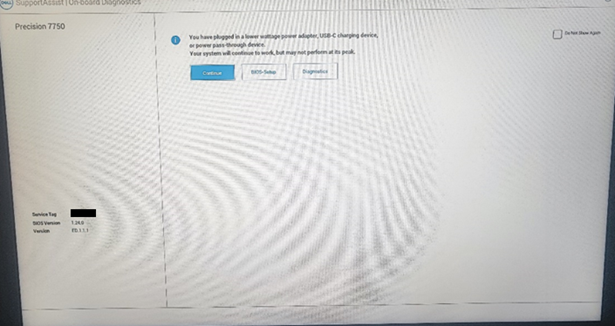
受影响的平台:
- 配合使用戴尔 Thunderbolt 坞站 WD19TB 的 Precision 5750
- 与戴尔高性能坞站配合使用的 Precision 7550 — WD19DCS
- 与戴尔高性能坞站配合使用的 Precision 7750 — WD19DCS
- XPS 17 9700 与戴尔 Thunderbolt 坞站 WD19TB 配合使用
Cause
不适用
Resolution
Precision 7550 和 Precision 7750
将计算机上的 BIOS 版本更新到 1.25 或更高版本可解决此问题。要下载并安装 BIOS,请参阅 BIOS 更新指南。
Precision 5750 和 XPS 17 9700
在计算机上更新到 BIOS 版本 1.26.1 或更高版本可解决此问题。要下载并安装 BIOS,请参阅 BIOS 更新指南。
Affected Products
Dell Performance Dock – WD19DCS, Dell Thunderbolt Dock - WD19TB, Precision 7550, Precision 5750, Precision 7750, XPS 17 9700Article Properties
Article Number: 000216812
Article Type: Solution
Last Modified: 13 Nov 2025
Version: 10
Find answers to your questions from other Dell users
Support Services
Check if your device is covered by Support Services.