Dell APEX Cloud Platform: Cannot add/repair server with long domain name
Summary: Node add or node repair will fail if the cluster DNS domain name exceeds 15 characters.
This article applies to
This article does not apply to
This article is not tied to any specific product.
Not all product versions are identified in this article.
Symptoms
Performing node add or node repair, the operation fails if the cluster DNS domain name exceeds 15 characters.
For example:
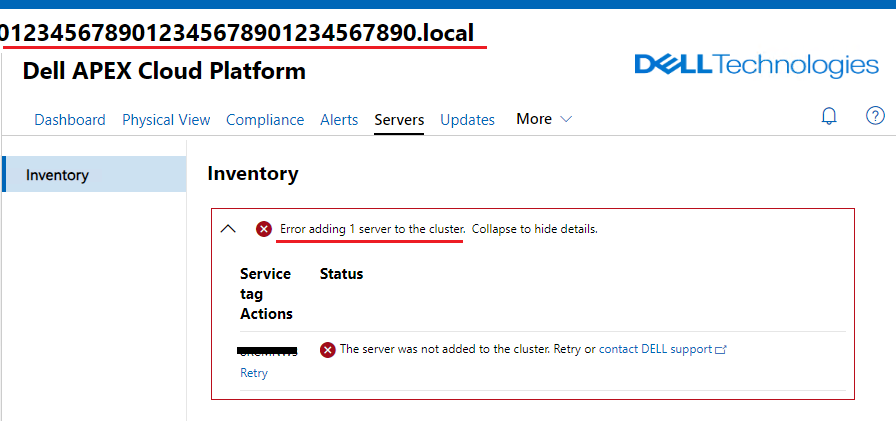
Check Microsoft ECE log, there are errors like:
For example:
Check Microsoft ECE log, there are errors like:
ActionPlanInstanceID: 1e779c57-e119-4ac8-9826-4402c17d7f95 WarningMessage:[L03123456787-03]:Task: Invocation of interface 'AddEceUserToLocalAdmin' of role 'Cloud\Infrastructure\BareMetal' failed:
Type 'AddEceUserToLocalAdmin' of Role 'BareMetal' raised an exception:
Principal t1234567890123456789012345678901234567890\abcde-EceSA$ was not found.
at <ScriptBlock>, <No file>: line 9 - 7/5/2023 12:46:21 AM
ActionPlanInstanceID: 1e779c57-e119-4ac8-9826-4402c17d7f95 ErrorMessage:[L03123456787-03]:Task: Invocation of interface 'AddEceUserToLocalAdmin' of role 'Cloud\Infrastructure\BareMetal' failed:
Type 'AddEceUserToLocalAdmin' of Role 'BareMetal' raised an exception:
Principal t1234567890123456789012345678901234567890\abcde-EceSA$ was not found.
at <ScriptBlock>, <No file>: line 9 - 7/5/2023 12:46:21 AM
ActionPlanInstanceID: 1e779c57-e119-4ac8-9826-4402c17d7f95 ErrorMessage:[L03123456787-03]:Task: Invocation of interface 'AddEceUserToLocalAdmin' of role 'Cloud\Infrastructure\BareMetal' failed:
Cause
This is a known issue of the node add/repair process in Microsoft workflow.
Resolution
If cluster DNS domain name is longer than 15 characters, please update the Microsoft Supplemental Package to 10.2306.3.6 or higher version after cluster bring-up.
Affected Products
APEX Cloud Platform for Microsoft AzureArticle Properties
Article Number: 000217264
Article Type: Solution
Last Modified: 19 Feb 2026
Version: 3
Find answers to your questions from other Dell users
Support Services
Check if your device is covered by Support Services.