暗螢幕或亮度控制無法增加
Summary: 客戶可能會遇到螢幕變暗或亮度控制無法增加的情況。自動亮度控制功能無法運作。
This article applies to
This article does not apply to
This article is not tied to any specific product.
Not all product versions are identified in this article.
Symptoms
受影響的產品:
- Dell U2724D 顯示器
- Dell U2724DE 顯示器
- Dell U2424H 顯示器
- Dell U2424HE 顯示器
Cause
自動亮度控制感應器遭擋住。
Resolution
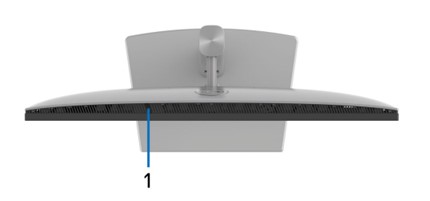
檢查感應器是否可見
移除可能附著於顯示器頂部 (距離顯示器中央中央左側約 5.8 公分 (2 吋) 處,可能擋住自動亮度控制感應器的任何障礙物。
若要啟用或停用感應器
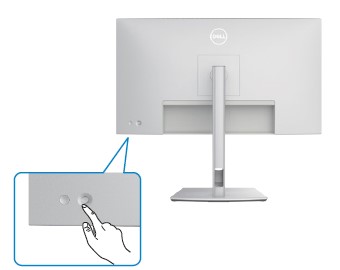
- 按下 搖桿 按鈕, 螢幕顯示 (OSD) 功能表啟動器隨即出現。
功能 說明 
按下操縱桿以開啟 OSD 功能表啟動器。 
用於向左和向右導航 
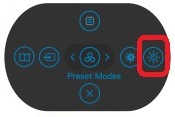
進行向上和向下導覽 - 使用操縱桿選取 OSD 功能表右側的自動 亮度啟用 或 停用 功能
- 按下 操縱桿 按鈕以啟用或 停用自動亮度調整。
Affected Products
Dell U2424H, Dell U2424HE, Dell U2724D, Dell U2724DEArticle Properties
Article Number: 000217955
Article Type: Solution
Last Modified: 24 Apr 2025
Version: 5
Find answers to your questions from other Dell users
Support Services
Check if your device is covered by Support Services.