PowerStore: Unable to replicate quiesced Read-Write snapshots of vVol based VMs (User correctable)
Summary: PowerStore does not support replication of Read-Write vVol snapshots. This causes various issues with replication of quiesced snapshots of vVol-based VMs.
This article applies to
This article does not apply to
This article is not tied to any specific product.
Not all product versions are identified in this article.
Symptoms
- VMware Site Recovery Manager (SRM) does not support adding a VM to a protection group and raises the error ''Virtual machine '<VM name>' file '<file path>' of type 'diskDescriptor' is not replicated" :

- If the VM has already been added to SRM Protection Group its status switches to 'Not configured' with error ''Virtual machine '<VM name>' file '<file path>' of type 'diskDescriptor' is not replicated":


- Planned migration fails in SRM with error 'Cannot prepare protection group <protection group name> for failover. It contains non-recoverable virtual machines. The operation may cause data loss. Virtual machine '<VM name>' file '<file path>' of type 'diskDescriptor' is not replicated"

- Disaster recovery partially completes with error on step 'Prepare protected site VMs for migration': 'Cannot prepare protection group <protection group name> for failover. It contains non-recoverable virtual machines. The operation may cause data loss. Virtual machine '<VM name>' file '<file path>' of type 'diskDescriptor' is not replicated"
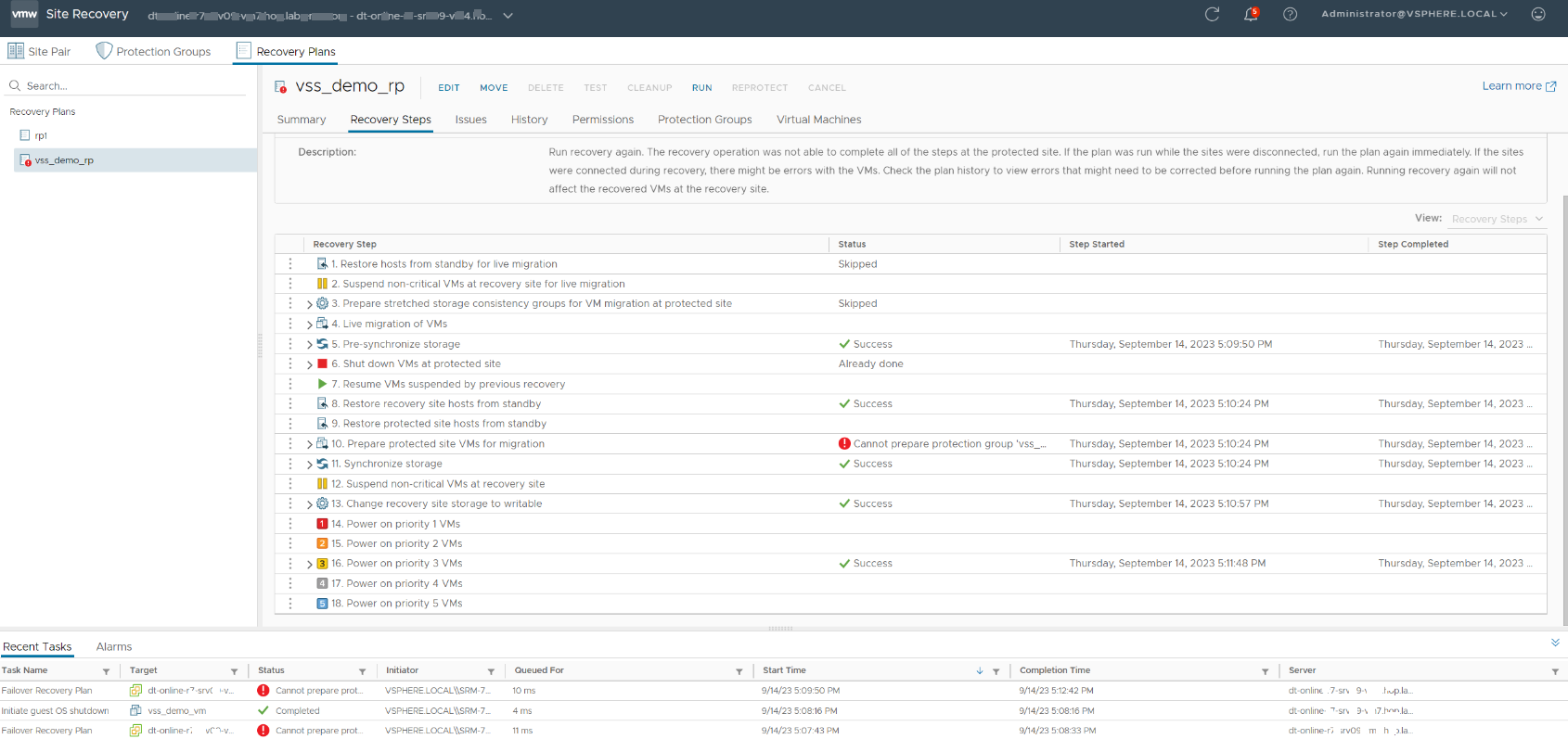
- Virtual Machine's snapshot list is empty after failover for a VM which had snapshots before failover
- VM snapshot list before failover:

- VM snapshot list after failover:

Cause
All of the above symptoms may be the result of the existence of read-write snapshots of VM disks. PowerStore does not support replication of read-write snapshots. This causes the VM snapshot tree being incomplete on the target site of replication. Due to this, it is not possible to recover the snapshot tree after failover operation which leads to loss of all the snapshots in case failover is performed for the VM with RW snapshots. The errors displayed in SRM are warning that snapshots will be lost in case there is a failover.
Note: The issue is not caused by SRM. The snapshots would be lost in case other kind of vVol replication orchestrator is used. That is, if failover of vVol based VMs is performed through another tool the snapshots would still be lost.
The errors above do not necessarily mean that the issues are due to RW snapshots existence. Similar errors would be displayed if some of the VM disks are not added to a replication group, or if they were added but not yet copied to the destination side.
In order to check if the errors are due to RW snaps of replicated vVols you can leverage PowerStore REST.
RW snapshots can be listed by performing GET request using the following URL: https://<powererstore ip>/virtual_volume?select=id,name,parent_id&type=eq.Snapshot&creator_type=eq.User&is_readonly=eq.false , where <powerstore ip> is a PowerStore cluster IP Example output:
Once you have a list of RW snapshots you can verify whether they are children of replicated vVols by looking into the replication_group_id property of their parent vVols. If replication_group_id is not null then the vVol is replicated. The following REST request can be used: https://<powererstore ip>/virtual_volume?select=id,name,replication_group_id&id=eq.<vvol id> where <vvol id> should be replaced with parent_id from the previous result.
Below is an example of bash script which prints the name of all replicated vVols which have RW snapshots.
Example output:
This data can be used to identify the VM the vVol belongs to. The following two options are available.
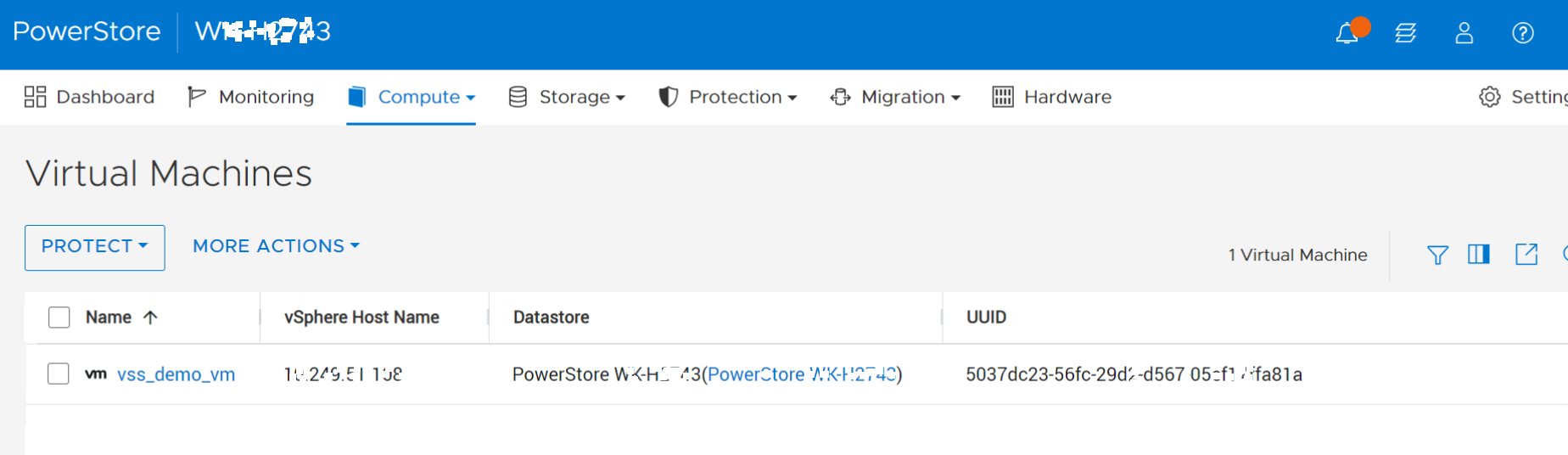
PowerStore REST: VM can be found by performing GET request to /api/rest/virtual_machine with filter instance_uuid=eq.<uuid>. For example:
Note: The issue is not caused by SRM. The snapshots would be lost in case other kind of vVol replication orchestrator is used. That is, if failover of vVol based VMs is performed through another tool the snapshots would still be lost.
The errors above do not necessarily mean that the issues are due to RW snapshots existence. Similar errors would be displayed if some of the VM disks are not added to a replication group, or if they were added but not yet copied to the destination side.
In order to check if the errors are due to RW snaps of replicated vVols you can leverage PowerStore REST.
RW snapshots can be listed by performing GET request using the following URL: https://<powererstore ip>/virtual_volume?select=id,name,parent_id&type=eq.Snapshot&creator_type=eq.User&is_readonly=eq.false , where <powerstore ip> is a PowerStore cluster IP Example output:
[
  {
    "id": "13ecfcef-8676-4605-ac83-478703346824",
    "name": "vss_demo_vm.vmdk",
    "parent_id": "8f9d26b9-007e-4d51-8255-3dad7fc243d1"
  }
]
Once you have a list of RW snapshots you can verify whether they are children of replicated vVols by looking into the replication_group_id property of their parent vVols. If replication_group_id is not null then the vVol is replicated. The following REST request can be used: https://<powererstore ip>/virtual_volume?select=id,name,replication_group_id&id=eq.<vvol id> where <vvol id> should be replaced with parent_id from the previous result.
Below is an example of bash script which prints the name of all replicated vVols which have RW snapshots.
#!/bin/bash
powerstore_rest_ip=10.249.51.38 # define IP of the PowerStore
credentials=admin:Password123! # define powerstore credentials
set -e
## helper function to execute a REST request
function rest_request() {
    url=$1
    if [[ -z $url ]]; then
      echo No url provided >&2
      exit 1
    fi
    curl -f -s --insecure -u $credentials -H 'Content-Type: application/json' "https://$powerstore_rest_ip/api/rest/$url"
}

# Step 1: collect all the RW snapshots
snap_list='[]'
offset=0
# loop is used here because PowerStore REST has a limit on number of entities returned in a single response
# if the number of snapshots is more than a limit then not all the snapshots are returned and we need to request others by using offset parameter
while : ; do
    tmp=$(rest_request "virtual_volume?select=id,name,parent_id,creation_timestamp,naa_name&type=eq.Snapshot&creator_type=eq.User&is_readonly=eq.false&order=creation_timestamp&offset=$offset")
    len=$(jq length <<< "$tmp")
    if [[ "$len" -eq "0" ]]; then break; fi
    offset=$((offset+len))
    snap_list=$(echo -e "$snap_list\n$tmp" | jq -s 'add')
done
# Step 2: Filter out vVols which are not replicated
for i in $(jq -r '.[].parent_id' <<< "$snap_list" | sort | uniq); do
  replicated_parent=$(rest_request "virtual_volume?select=id,name,replication_group_id,virtual_machine_uuid&id=eq.$i&replication_group_id=not.is.null")
  if [[ $(jq length <<< "$replicated_parent") != 0 ]]; then
    vvol_name=$(jq '.[0].name' <<< "$replicated_parent")
    vvol_id=$(jq -r '.[0].id' <<< "$replicated_parent")
    vm_uuid=$(jq -r '.[0].virtual_machine_uuid' <<< "$replicated_parent")
    vvol_rw_snap_count=$(jq "[ .[] | select(.parent_id==\"$i\") ] | length" <<< "$snap_list")
    echo "Replicated vVol $vvol_name has $vvol_rw_snap_count RW snapshots. vVol id: $vvol_id, VM uuid: $vm_uuid"
    echo "RW Snapshots:"
    echo "name,naa_name,creation_timestamp"
    jq -r '.[] | select(.parent_id=="'$i'") | [.name, .naa_name, .creation_timestamp] | @csv' <<< "$snap_list" | tr -d '"'
  fi
done
Example output:
Replicated vVol "vss_demo_vm.vmdk" has 2 RW snapshots. vVol id: e0173e85-8dc2-4104-a11d-d670ac419f88, VM uuid: 50379fa2-dda5-6a20-3156-c31bcbe30fb4
RW Snapshots:
name,naa_name,creation_timestamp
vss_demo_vm.vmdk,naa.68ccf09800f030ce0bc208d40cfbacb3,2023-09-21T15:05:59.242+00:00
vss_demo_vm.vmdk,naa.68ccf098004b0ad8048b1c326ab341a8,2023-09-21T15:39:16.518+00:00
This data can be used to identify the VM the vVol belongs to. The following two options are available.
-
Find a VM by name
-
Find a VM by uuid in PowerStore GUI or REST. This option is available in case vCenter server is registered on PowerStore. If this is the case you can find the VM as follows:
PowerStore REST: VM can be found by performing GET request to /api/rest/virtual_machine with filter instance_uuid=eq.<uuid>. For example:
curl -u $credentials 'https://$powerstore_rest_ip/api/rest/virtual_machine?instance_uuid=eq.5037dc23-56fc-29d2-d567-05ef17ffa81a&select=id,name'
[{"id":"550d0148-d123-4303-9bcc-85ef26377851","name":"vss_demo_vm"}]
Resolution
In order to be able to recover the snapshots on the target site of replication we recommend to never create quiesced snapshots of replicated vVol-based VMs. Quiesced VM snapshot creation causes creation of RW snapshots of vVols which causes issues mentioned above.
The problem solution consists of 2 parts:
This can be done by migrating a VM to a temporary datastore and then back to the original one.
Steps:

The problem solution consists of 2 parts:
- Remove existing RW snapshots or convert RW vVol snapshots to ReadOnly vVol snapshots
- Avoid creating of RW snapshots in future
Convert RW snapshots to RO snapshots
This can be done by migrating a VM to a temporary datastore and then back to the original one.
Steps:
- Create a temporary storage container on PowerStore
- Mount the temporary storage container to ESXi hosts
- Perform storage vMotion operation to the temporal datastore. More details in VMware documentation https://docs.vmware.com/en/VMware-vSphere/7.0/com.vmware.vsphere.vcenterhost.doc/GUID-A15EE2F6-AAF5-40DC-98B7-0DF72E166888.html
- Migrate the VMs back to the original datastore
Remove existing RW snapshots
- Identify the replicated Virtual Machines having RW snapshots. The instructions on how to do this are provided in the 'Cause' section
- In vSphere GUI: Click on the VM and open it's 'Snapshots' list
- Delete snapshots having 'Yes' in the 'Quiesce guest file system' field
Avoid creation of RW snapshots in future
vSphere creates RW snapshots of vVol in case of creation of quiesced VM snapshots, therefore in order to avoid creation of RW snapshots you can set the quiesce flag to false when creating a VM snapshot.
The screenshot below demonstrates 'Take Snapshot' window in the vSphere GUI. The snap will not be quiesced if the checkbox is not checked.
The quiesce flag is available in vSphere createSnapshot API as well as in New-Snapshot cmdlet in PowerCLI
Affected Products
PowerStoreArticle Properties
Article Number: 000218057
Article Type: Solution
Last Modified: 14 Jun 2025
Version: 4
Find answers to your questions from other Dell users
Support Services
Check if your device is covered by Support Services.