NetWorker: NMM Hyper-v Backup unsupported configuration version for RCT
Summary: NMM Hyper-v Backup would fail with error: Savesets Failed = 1 APPLICATIONS:\Microsoft Hyper-V\VMname, - Reason: Saveset contains VM with configuration version that is unsupported for RCT. ...
This article applies to
This article does not apply to
This article is not tied to any specific product.
Not all product versions are identified in this article.
Symptoms
The User Guide states that virtual machines with a configuration version earlier than 6.2 cannot be backed up.
NMM does not support RCT-based backups of Hyper-V virtual machines with a configuration version earlier than 6.2.
After upgrading the operating system from 2012 R2 to 2016, 2019, or 2022, upgrade the virtual machine configuration version to 6.2 or later.
To upgrade multiple virtual machines,
Run the following PowerShell command: get-vm | Update-VMVersion –A
When you check the virtual machine version, it is higher than 6.2 which should be supported.
Despite that backup fails with error:
Savesets Failed = 1
APPLICATIONS:\Microsoft Hyper-V\VMname, - Reason: Saveset contains VM with configuration version that is unsupported for RCT
Cause
This is happening because of a virtual machine naming conflict:
It could be that Hyper-v Manager and Failover cluster manager having different names.
Or, both have the same name but the Failover cluster manager reports cluster resource name different than the group name when you query the VM name.
However when you query the cluster resources.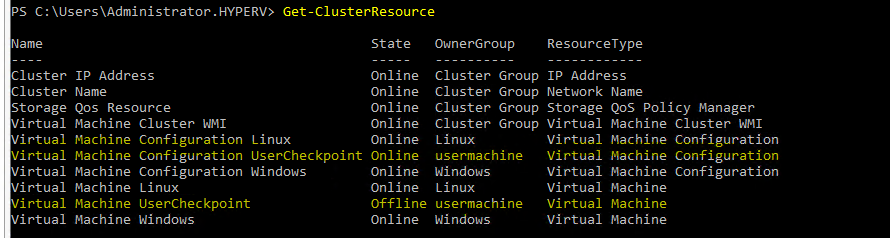
When listing the Savesets using nsrnmmsv -P command, it shows the name reported in the get-VM output.
 nsrnmmsv -P -A NSR_FEDERATED_BACKUP=yes -A NSR_APP_TYPE=HYPERV
"APPLICATIONS:\Microsoft Hyper-V\usermachine"
Resolution
Make sure the virtual machine name is the same in Hyper-v Manager and Failover Custer Manager.
Both commands should return the same name of the virtual machine
Both commands should return the same name of the virtual machine
get-VM
get-custeresrource
Additional Information
Products
NetWorker Module for MicrosoftArticle Properties
Article Number: 000218347
Article Type: Solution
Last Modified: 21 Jan 2026
Version: 4
Find answers to your questions from other Dell users
Support Services
Check if your device is covered by Support Services.