vProtect: "Cannot read from the device: /dev/sdX - vProtect 사용자 권한 확인"
Summary: "Cannot read from the device /dev/sdX - check vProtect user privileges"라는 사용 권한 문제로 백업이 실패합니다. 이 문제는 vProtect 공유 및 vProtect 사용자의 사용 권한이 올바른 권한이 있는 경우에도 발생합니다.
This article applies to
This article does not apply to
This article is not tied to any specific product.
Not all product versions are identified in this article.
Symptoms
"Cannot read from the device /dev/sdX - check vProtect user privileges"라는 사용 권한 문제로 백업이 실패합니다. 이 문제는 vProtect 공유 및 vProtect 사용자의 사용 권한이 올바른 권한이 있는 경우에도 발생합니다.
이 오류는 백업에 연결된 디스크가 분리되지 않은 경우에 생성됩니다. 이는 하이퍼바이저가 분리 요청에 따라 작동하지 않거나 LVM 필터가 올바르게 구성되지 않고 운영 체제가 디스크를 보존하기 때문일 수 있습니다.
Cause
/etc/lvl/lvm.conf 파일이 올바르게 구성되지 않았습니다. 구성된 LVM 필터가 없습니다.
# cat lvm.conf | grep filter

# is used to drive LVM filtering like MD component detection, multipath
        # Configuration option devices/filter.
        # Run vgscan after changing the filter to regenerate the cache.
        # filter = [ "a|.*|" ]
        # filter = [ "r|/dev/cdrom|" ]
        # filter = [ "a|loop|", "r|.*|" ]
        # filter = [ "a|loop|", "r|/dev/hdc|", "a|/dev/ide|", "r|.*|" ]
        # filter = [ "a|^/dev/hda8$|", "r|.*|" ]
        # filter = [ "a|.*|" ]
        # Configuration option devices/global_filter.
        # Because devices/filter may be overridden from the command line, it is
        # not suitable for system-wide device filtering, e.g. udev.
        # Use global_filter to hide devices from these LVM system components.
        # The syntax is the same as devices/filter. Devices rejected by
        # global_filter are not opened by LVM.
        # global_filter = [ "a|.*|" ]
        # This is a quick way of filtering out block devices that are not
        # the LVs with device filters. Also, when this setting is enabled,
        # filtered), which can cause performance problems on systems with
        # an LV. The LVs are ignored using a built in device filter that
        # Configuration option activation/mlock_filter.
        # mlock_filter = [ "locale/locale-archive", "gconv/gconv-modules.cache" ]
운영 체제에는 필수이며 필요한 드라이브는 lvm.conf 파일의 디바이스 섹션에 있는 필터에 있어야 합니다.
Resolution
vProtect 노드는 잠재적으로 자체 클론인 VM 디스크를 연결합니다(예: 템플릿에서 구축된 노드). 디스크가 연결되어 있는 LVM 볼륨을 검사하지 않도록 노드에서 LVM을 구성해야 합니다.
- 디바이스 섹션의 /etc/lvm/lvm.conf에서 다음 변수를 설정하여 LVM 데몬이 시스템 볼륨만 감지하도록 합니다(이 예에서는 파티션이 2개인 SDA 디스크, sda1 및 sda2).
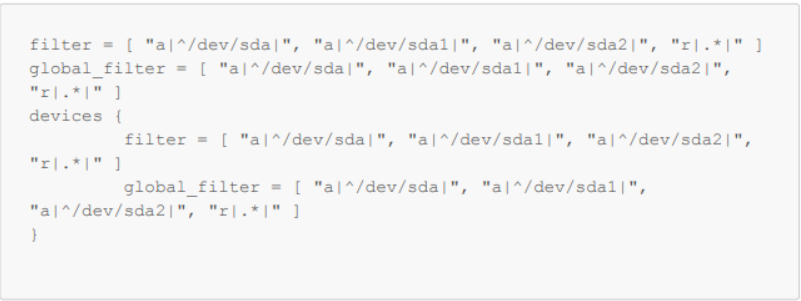
그림 1: /etc/lvm/lvm.conf에서 변수 설정
- vgscan에 운영 체제 볼륨이 여전히 감지되고 있는지 확인합니다.
-vvv

그림 2: 운영 체제 볼륨이 감지되는지 확인합니다.
- 재부팅
Affected Products
vProtectArticle Properties
Article Number: 000218735
Article Type: Solution
Last Modified: 31 Oct 2023
Version: 2
Find answers to your questions from other Dell users
Support Services
Check if your device is covered by Support Services.