vProtect: Back-ups mislukken met "Cannot read from the device: /dev/sdX - controleer vProtect-gebruikersrechten'
Summary: Back-ups mislukken met een machtigingsprobleem "Cannot read from the device /dev/sdX - check vProtect user privileges." Dit gebeurt zelfs als de machtigingen van de vProtect share en de vProtect-gebruiker de juiste bevoegdheden hebben. ...
This article applies to
This article does not apply to
This article is not tied to any specific product.
Not all product versions are identified in this article.
Symptoms
Back-ups mislukken met een machtigingsprobleem "Cannot read from the device /dev/sdX - check vProtect user privileges." Dit gebeurt zelfs als de machtigingen van de vProtect share en de vProtect-gebruiker de juiste bevoegdheden hebben.
Deze fout wordt gegenereerd wanneer schijven die zijn aangesloten voor back-up niet zijn losgekoppeld. Dit kan komen doordat de hypervisor niet werkt op een ontkoppelingsverzoek of LVM-filters niet correct zijn geconfigureerd en het besturingssysteem de schijven behoudt.
Cause
/etc/lvl/lvm.conf-bestand is niet correct geconfigureerd. Er zijn geen LVM-filters geconfigureerd.
# cat lvm.conf | grep filter

# is used to drive LVM filtering like MD component detection, multipath
        # Configuration option devices/filter.
        # Run vgscan after changing the filter to regenerate the cache.
        # filter = [ "a|.*|" ]
        # filter = [ "r|/dev/cdrom|" ]
        # filter = [ "a|loop|", "r|.*|" ]
        # filter = [ "a|loop|", "r|/dev/hdc|", "a|/dev/ide|", "r|.*|" ]
        # filter = [ "a|^/dev/hda8$|", "r|.*|" ]
        # filter = [ "a|.*|" ]
        # Configuration option devices/global_filter.
        # Because devices/filter may be overridden from the command line, it is
        # not suitable for system-wide device filtering, e.g. udev.
        # Use global_filter to hide devices from these LVM system components.
        # The syntax is the same as devices/filter. Devices rejected by
        # global_filter are not opened by LVM.
        # global_filter = [ "a|.*|" ]
        # This is a quick way of filtering out block devices that are not
        # the LVs with device filters. Also, when this setting is enabled,
        # filtered), which can cause performance problems on systems with
        # an LV. The LVs are ignored using a built in device filter that
        # Configuration option activation/mlock_filter.
        # mlock_filter = [ "locale/locale-archive", "gconv/gconv-modules.cache" ]
Het is essentieel voor het besturingssysteem en de vereiste schijven bevinden zich in een filter in het gedeelte Apparaten in het lvm.conf-bestand.
Resolution
vProtect-knooppunt koppelt VM-schijven die mogelijk zelf klonen zijn (bijvoorbeeld als het knooppunt is geïmplementeerd vanuit de sjabloon). U moet LVM op het knooppunt configureren, zodat het niet scant op LVM-volumes waarop schijven worden aangesloten.
- Stel de volgende variabelen in in het gedeelte /etc/lvm/lvm.conf in het gedeelte Apparaten zodat LVM daemon alleen systeemvolumes detecteert (in dit voorbeeld SDA-schijf met twee partities; sda1 en sda2):
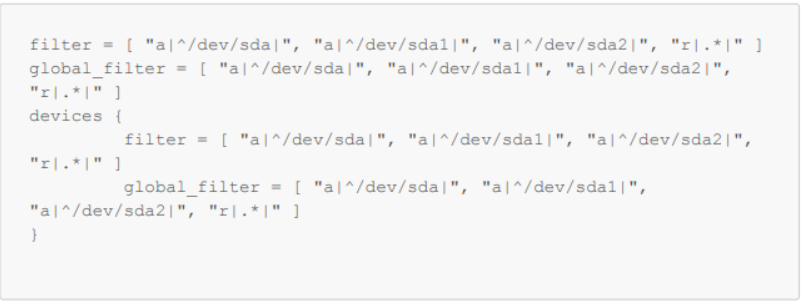
Afbeelding 1: Variabelen instellen in /etc/lvm/lvm.conf
- Controleer met vgscan of uw besturingssysteemvolumes nog steeds worden gedetecteerd:
-vvv

Afbeelding 2: Controleren of volumes van het besturingssysteem worden gedetecteerd.
- Reboot
Affected Products
vProtectArticle Properties
Article Number: 000218735
Article Type: Solution
Last Modified: 31 Oct 2023
Version: 2
Find answers to your questions from other Dell users
Support Services
Check if your device is covered by Support Services.