VxRail: 검증 'PrimaryStorageReadyForExpansionValidator'에서 노드 확장이 실패합니다.
Summary: 검증 시 노드 확장이 실패하고 'PrimaryStorageReadyForExpansionValidator' 오류가 표시됩니다.
This article applies to
This article does not apply to
This article is not tied to any specific product.
Not all product versions are identified in this article.
Symptoms
검증 시 노드 확장이 실패하고 다음 오류가 표시됩니다.
General Error
An unknown validation error occurred in PrimaryStorageReadyForExpansionValidator
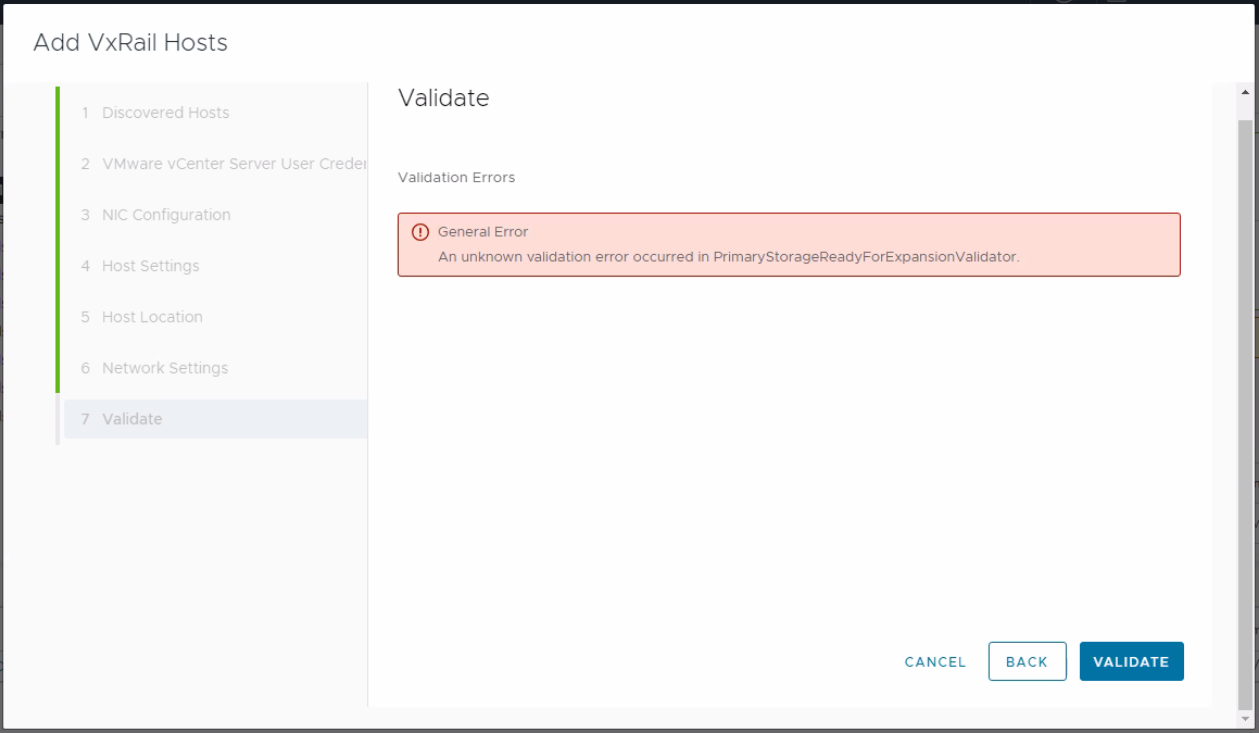
그림 1: 오류 메시지 스크린샷
를 볼 때 Dayone.log 또는 shortterm.log로 설정된 get_customized_vibs 구성된 호스트에 장애가 발생합니다. 이는 새 노드와 구성된 노드를 비교하는 데 사용됩니다.
"2023-10-18 09:30:03,412" microservice.do-host "2023-10-18T09:30:02.599693731Z stderr F 2023-10-18 09:30:02,599 [ERROR] <Dummy-52:140561398021704> esxcli_client2.py run() (154): Error occurred when running: esxcli.software.component.list"
"2023-10-18 09:31:01,413" microservice.do-host "2023-10-18T09:31:01.21374762Z stderr F 2023-10-18 09:31:01,213 [ERROR] <Dummy-60:140561395805768> esxcli_client2.py run() (154): Error occurred when running: esxcli.hardware.platform.get"

"2023-10-18 09:30:05,898" microservice.workflow-engine "2023-10-18T09:30:05.791005812Z stdout F INFO [wfengine.status] task host_customized_driver_validation_False____exp67b67ad3_d786_508bd1f536 failure"
"2023-10-18 09:30:05,898" microservice.workflow-engine "2023-10-18T09:30:05.809971889Z stdout F INFO [wfengine.status] notify {'level': 'step', 'id': 'host_customized_driver_validation', 'state': 'FAILED', 'progress': 97, 'status': {'id': 'host_customized_driver_validation', 'internal_id': 'host_customized_driver_validation_False____exp67b67ad3_d786_508bd1f536', 'internal_family': 'host_customized_driver_validation', 'status': 'FAILED', 'startTime': 1697621394266, 'stage': '', 'params':

{'has_customized_component': False}
, 'error':

{'result': 'FAILED'}
}}"
"2023-10-18 09:30:05,898" microservice.workflow-engine "2023-10-18T09:30:05.863154343Z stdout F INFO [luigi-interface] Informed scheduler that task host_customized_driver_validation_False____exp67b67ad3_d786_508bd1f536 has status FAILED"
노드 상태 점검 스크립트가 쿼리, 구성된 노드 프로세스에서 중단되고 node-health-check 로그에 504 게이트웨이 시간 초과를 반환한 것으로 표시됩니다.
23-10-19 02:59 - DEBUG - curl --unix-socket /var/lib/vxrail/nginx/socket/nginx.sock -H "Content-Type: application/json" http://127.0.0.1/rest/vxm/internal/do/v1/host/query -d '{"query": "{configuredHosts { moid, name, hardware{ sn, psnt, applianceId, model}, runtime{ agent {ready ,backend },  connectionState, powerState, inMaintenanceMode, overallStatus}, summary { config { product { version }}}, config { diskgroup{current{type}},network{vnic{device portgroup mtu interfaceTags}},biosUUID, isPrimary, product {name, version, build} }}}"}'
23-10-19 03:09 - DEBUG - <html>
<head><title>504 Gateway Time-out</title></head>
<body>
<center><h1>504 Gateway Time-out</h1></center>
<hr><center>nginx</center>
</body>
</html>
shortterm.log
"2023-10-18 09:29:53,891" microservice.storage-service "2023-10-18T09:29:53.602210134Z stdout F 2023-10-18 09:29:53,602 ERROR [StorageDeviceService.py:352] get_configured_hosts_model_dg_map: Failed to get current hosts info by do-host graphql."
"2023-10-18 09:29:53,891" microservice.storage-service "2023-10-18T09:29:53.602593053Z stdout F 2023-10-18 09:29:53,602 ERROR [validator.py:68] execute: Validator MultiDGConfigurationValidator raise a Exception {'message': ""(vmodl.fault.SystemError) {\n   dynamicType = <unset>,\n   dynamicProperty = (vmodl.DynamicProperty) [],\n   msg = 'A general system error occurred: Too many outstanding operations',\n   faultCause = <unset>,\n   faultMessage = (vmodl.LocalizableMessage) [],\n   reason = 'Too many outstanding operations'\n}"", 'locations': [\{'line': 11, 'column': 9}], 'path': ['configuredHosts', 2, 'config', 'diskgroup', 'options']}"

"2023-10-18 09:29:53,891" microservice.storage-service "2023-10-18T09:29:53.602603034Z stdout F Traceback (most recent call last):"
"2023-10-18 09:29:53,891" microservice.storage-service "2023-10-18T09:29:53.602606355Z stdout F   File ""/home/app/common/validator.py"", line 66, in execute"
"2023-10-18 09:29:53,891" microservice.storage-service "2023-10-18T09:29:53.602608952Z stdout F     self.perform(*args, **kwargs)"
"2023-10-18 09:29:53,891" microservice.storage-service "2023-10-18T09:29:53.602611897Z stdout F   File ""/home/app/multidiskgroupconfigurationvalidator/multi_disk_group_configuration_validator.py"", line 70, in perform"
"2023-10-18 09:29:53,891" microservice.storage-service "2023-10-18T09:29:53.602616418Z stdout F     model_dg_map = StorageDeviceService().get_configured_hosts_model_dg_map()"
...........
...........
Unknown macro: {n   dynamicType = <unset>,n   dynamicProperty = (vmodl.DynamicProperty) [],n   msg = 'A general system error occurred}
"", 'locations': [\{'line': 11, 'column': 9}], 'path': ['configuredHosts', 2, 'config', 'diskgroup', 'options']}"
"2023-10-18 09:29:53,891" microservice.storage-service "2023-10-18T09:29:53.603258112Z stdout F 2023-10-18 09:29:53,603 INFO [utils.py:131] wrapper: log_call 72 return: [{'result': {'result': 'FAILED', 'name': 'MultiDGConfigurationValidator', 'context':

Unknown macro: {'invalid_fields'}
, 'errors': [{'type': 'THOROUGH-VALIDATOR', 'field': 'General Error ', 'code': 'config.validation.common.unknown.error', 'placeholders': ['MultiDGConfigurationValidator'], 'message': 'An unknown validation error occurred in MultiDGConfigurationValidator.'}], 'warnings': []}}]"
Cause
이 문제는 특정 루틴 작업(vScheduleCheckVsanConfigLro)은 vCenter의 LRO 작업 대기열이 이미 대기 중인 작업으로 가득 찬 경우에 시작됩니다. 이로 인해 vCenter의 vpxd 서비스가 응답을 중지합니다. 이로 인해 do-host가 구성된 노드에서 정보를 가져오지 못할 수 있습니다.
자세한 내용은 
Resolution
이 문제는 vCenter Server 7.0 업데이트 3i(빌드 번호 20845200)에서 해결되었습니다.
해결:
특정 매개 변수 변경 config.vmacore.threadPool.TaskMax vCenter에서 200보다 크거나 비슷한 값으로 설정합니다.
vCenter에서 모든 서비스를 재시작하고 vpxa 및 hostd 서비스입니다. 명령을 실행하기 전에 각 호스트를 유지 보수 모드로 전환합니다.
On ESXi hosts:
#Rolling restart the ESXi host daemon and vCenter Agent services using these commands:
/etc/init.d/hostd restart
/etc/init.d/vpxa restart

On vCenter
#take a snapshot of vcenter server
#service-control --stop --all
#service-control --start --all
Affected Products
VxRailArticle Properties
Article Number: 000218805
Article Type: Solution
Last Modified: 19 Feb 2026
Version: 3
Find answers to your questions from other Dell users
Support Services
Check if your device is covered by Support Services.