VxRail:節點擴充在驗證「PrimaryStorageReadyForExpansionValidator」時失敗
Summary: 節點擴充在驗證時失敗,並出現「PrimaryStorageReadyForExpansionValidator」錯誤。
This article applies to
This article does not apply to
This article is not tied to any specific product.
Not all product versions are identified in this article.
Symptoms
節點擴充在驗證時失敗,並顯示錯誤:
General Error
An unknown validation error occurred in PrimaryStorageReadyForExpansionValidator
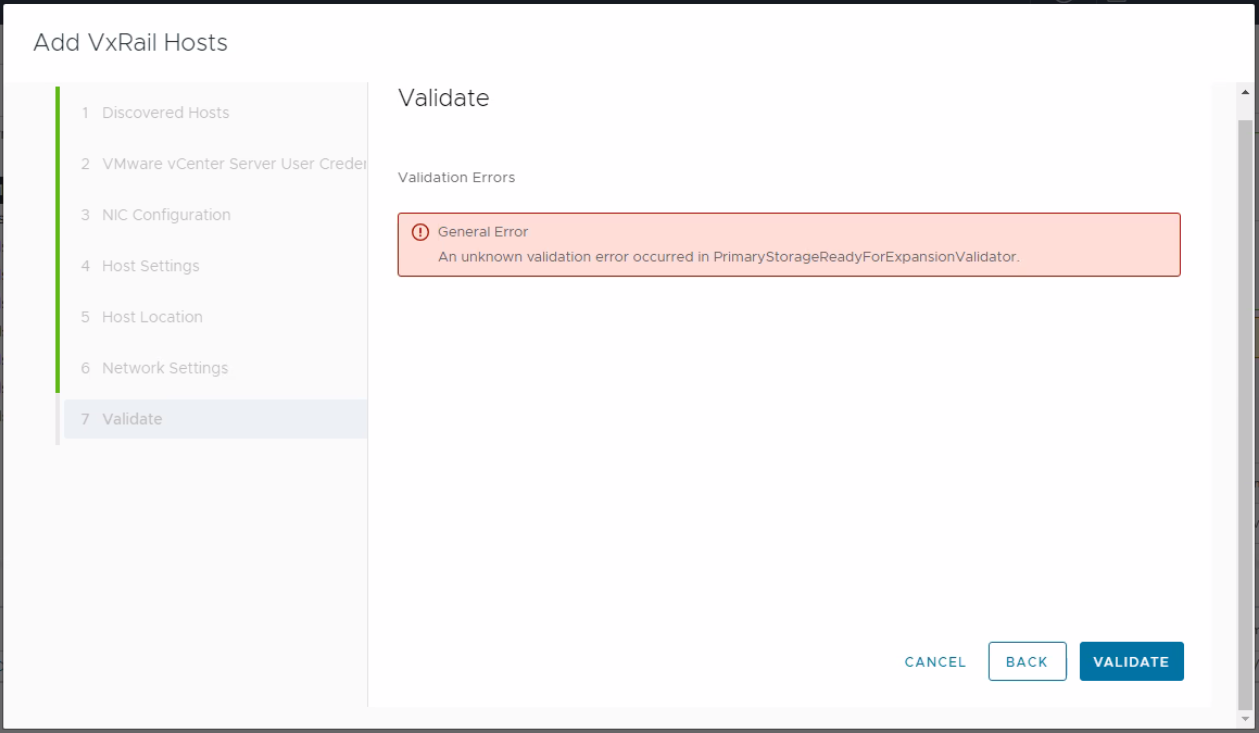
圖 1:錯誤訊息的螢幕擷取畫面
檢視 Dayone.log 或 shortterm.log,具有所選get_customized_vibs的已配置主機將失敗。這用於比較新節點和已設定節點。
"2023-10-18 09:30:03,412" microservice.do-host "2023-10-18T09:30:02.599693731Z stderr F 2023-10-18 09:30:02,599 [ERROR] <Dummy-52:140561398021704> esxcli_client2.py run() (154): Error occurred when running: esxcli.software.component.list"
"2023-10-18 09:31:01,413" microservice.do-host "2023-10-18T09:31:01.21374762Z stderr F 2023-10-18 09:31:01,213 [ERROR] <Dummy-60:140561395805768> esxcli_client2.py run() (154): Error occurred when running: esxcli.hardware.platform.get"

"2023-10-18 09:30:05,898" microservice.workflow-engine "2023-10-18T09:30:05.791005812Z stdout F INFO [wfengine.status] task host_customized_driver_validation_False____exp67b67ad3_d786_508bd1f536 failure"
"2023-10-18 09:30:05,898" microservice.workflow-engine "2023-10-18T09:30:05.809971889Z stdout F INFO [wfengine.status] notify {'level': 'step', 'id': 'host_customized_driver_validation', 'state': 'FAILED', 'progress': 97, 'status': {'id': 'host_customized_driver_validation', 'internal_id': 'host_customized_driver_validation_False____exp67b67ad3_d786_508bd1f536', 'internal_family': 'host_customized_driver_validation', 'status': 'FAILED', 'startTime': 1697621394266, 'stage': '', 'params':

{'has_customized_component': False}
, 'error':

{'result': 'FAILED'}
}}"
"2023-10-18 09:30:05,898" microservice.workflow-engine "2023-10-18T09:30:05.863154343Z stdout F INFO [luigi-interface] Informed scheduler that task host_customized_driver_validation_False____exp67b67ad3_d786_508bd1f536 has status FAILED"
節點執行狀況檢查指令檔卡在查詢上、設定的節點程序上,節點執行狀況檢查記錄顯示其傳回 504 閘道逾時。
23-10-19 02:59 - DEBUG - curl --unix-socket /var/lib/vxrail/nginx/socket/nginx.sock -H "Content-Type: application/json" http://127.0.0.1/rest/vxm/internal/do/v1/host/query -d '{"query": "{configuredHosts { moid, name, hardware{ sn, psnt, applianceId, model}, runtime{ agent {ready ,backend },  connectionState, powerState, inMaintenanceMode, overallStatus}, summary { config { product { version }}}, config { diskgroup{current{type}},network{vnic{device portgroup mtu interfaceTags}},biosUUID, isPrimary, product {name, version, build} }}}"}'
23-10-19 03:09 - DEBUG - <html>
<head><title>504 Gateway Time-out</title></head>
<body>
<center><h1>504 Gateway Time-out</h1></center>
<hr><center>nginx</center>
</body>
</html>
shortterm.log
"2023-10-18 09:29:53,891" microservice.storage-service "2023-10-18T09:29:53.602210134Z stdout F 2023-10-18 09:29:53,602 ERROR [StorageDeviceService.py:352] get_configured_hosts_model_dg_map: Failed to get current hosts info by do-host graphql."
"2023-10-18 09:29:53,891" microservice.storage-service "2023-10-18T09:29:53.602593053Z stdout F 2023-10-18 09:29:53,602 ERROR [validator.py:68] execute: Validator MultiDGConfigurationValidator raise a Exception {'message': ""(vmodl.fault.SystemError) {\n   dynamicType = <unset>,\n   dynamicProperty = (vmodl.DynamicProperty) [],\n   msg = 'A general system error occurred: Too many outstanding operations',\n   faultCause = <unset>,\n   faultMessage = (vmodl.LocalizableMessage) [],\n   reason = 'Too many outstanding operations'\n}"", 'locations': [\{'line': 11, 'column': 9}], 'path': ['configuredHosts', 2, 'config', 'diskgroup', 'options']}"

"2023-10-18 09:29:53,891" microservice.storage-service "2023-10-18T09:29:53.602603034Z stdout F Traceback (most recent call last):"
"2023-10-18 09:29:53,891" microservice.storage-service "2023-10-18T09:29:53.602606355Z stdout F   File ""/home/app/common/validator.py"", line 66, in execute"
"2023-10-18 09:29:53,891" microservice.storage-service "2023-10-18T09:29:53.602608952Z stdout F     self.perform(*args, **kwargs)"
"2023-10-18 09:29:53,891" microservice.storage-service "2023-10-18T09:29:53.602611897Z stdout F   File ""/home/app/multidiskgroupconfigurationvalidator/multi_disk_group_configuration_validator.py"", line 70, in perform"
"2023-10-18 09:29:53,891" microservice.storage-service "2023-10-18T09:29:53.602616418Z stdout F     model_dg_map = StorageDeviceService().get_configured_hosts_model_dg_map()"
...........
...........
Unknown macro: {n   dynamicType = <unset>,n   dynamicProperty = (vmodl.DynamicProperty) [],n   msg = 'A general system error occurred}
"", 'locations': [\{'line': 11, 'column': 9}], 'path': ['configuredHosts', 2, 'config', 'diskgroup', 'options']}"
"2023-10-18 09:29:53,891" microservice.storage-service "2023-10-18T09:29:53.603258112Z stdout F 2023-10-18 09:29:53,603 INFO [utils.py:131] wrapper: log_call 72 return: [{'result': {'result': 'FAILED', 'name': 'MultiDGConfigurationValidator', 'context':

Unknown macro: {'invalid_fields'}
, 'errors': [{'type': 'THOROUGH-VALIDATOR', 'field': 'General Error ', 'code': 'config.validation.common.unknown.error', 'placeholders': ['MultiDGConfigurationValidator'], 'message': 'An unknown validation error occurred in MultiDGConfigurationValidator.'}], 'warnings': []}}]"
Cause
當特定的例行工作 (vScheduleCheckVsanConfigLro) 會在 vCenter 的 LRO 工作佇列已充滿佇列工作時啟動。這會導致 vCenter 上的 vpxd 服務停止回應。這可能會進一步導致 do-host 無法從設定的節點取得資訊。
如需詳細資訊
Resolution
此問題已在 vCenter Server 7.0 Update 3i (組建號碼 20845200) 中解決。
因應措施:
變更特定參數 config.vmacore.threadPool.TaskMax 在 vCenter 中,值高於或類似 200。
重新啟動 vCenter 上的所有服務,以及 vpxa 和 hostd 每個主機上的服務。讓每個主機進入維護模式,再在其上執行命令。
On ESXi hosts:
#Rolling restart the ESXi host daemon and vCenter Agent services using these commands:
/etc/init.d/hostd restart
/etc/init.d/vpxa restart

On vCenter
#take a snapshot of vcenter server
#service-control --stop --all
#service-control --start --all
Affected Products
VxRailArticle Properties
Article Number: 000218805
Article Type: Solution
Last Modified: 19 Feb 2026
Version: 3
Find answers to your questions from other Dell users
Support Services
Check if your device is covered by Support Services.