NetWorker:对于某些虚拟机,多个虚拟机的 NMM Hyper-V 并行还原失败
Summary: NetWorker:用于多个虚拟机的 NMM Hyper-V 并行还原,
This article applies to
This article does not apply to
This article is not tied to any specific product.
Not all product versions are identified in this article.
Symptoms
如果 Hyper-V 虚拟机已损坏并且需要恢复多个虚拟机:
NMM 允许将多个虚拟机恢复到其原始(源)位置。
前提条件:
● 要将虚拟机恢复到源 Hyper-V 服务器,请确保源服务器上存在虚拟机的原始驱动器号或装载点。
系统会自动创建目录路径。将虚拟机恢复到源服务器会覆盖源虚拟机。
● 由于 Hyper-V 使用内部 GUID 识别虚拟机,因此请确保在恢复作期间不要移动或重命名虚拟机。
对多个虚拟机执行并行还原时,某些虚拟机的还原失败。
nsrnmmrc: Restore failed with the error: Failed to complete BBB restore.
Cause
在恢复过程中,NMM 会尝试使用 PowerShell 命令停止虚拟机并将其从 Hyper-V 管理器中删除。 Get-VM -ComputerName '<hostname>' | Where-Object {$_.name -eq '<VMName>' } | Stop-VM -Force
此作无法停止和删除某些虚拟机,从而导致恢复失败。
事件日志 > Hyper-V VMMS 管理员日志显示以下错误:
Failed to perform the operation. The virtual machine is currently performing another operation
<VMName> failed to perform the 'Turning Off' operation. The virtual machine is currently performing the following operation: 'Shutting Down'.(Virtual machine ID GUID)
PowerShell 尝试停止 VM 失败,并显示:
Get-VM -ComputerName '<hostname>' | Where-Object {$_.name -eq '<VMName>' } | Stop-VM -Force
Stop-VM : '<VMName>' failed to shut down. (Virtual machine ID <GUID>)
Failed to perform the operation. The virtual machine is currently performing another operation.
+ ... '<hostname>' | Where-Object {$_.name -eq <VMName> } | Stop-VM -Force
+                                                            ~~~~~~~~~~~~~~
    + CategoryInfo          : NotSpecified: (:) [Stop-VM], VirtualizationException
    + FullyQualifiedErrorId : OperationFailed,Microsoft.HyperV.PowerShell.Commands.StopVM

PS C:\Using VHD> Get-VM -ComputerName '<hostname>' | Where-Object {$_.name -eq '<VMName>' } | Remove-VM -Force
Remove-VM : Deleting '<VMName>' failed.
Resolution
解决方法:
如果遇到此问题,请手动停止并移除虚拟机,然后执行还原。
从 Powershell
步骤 1:- 关闭虚拟机。Get-VM -ComputerName '<hostname>' | Where-Object {$_.name -eq '<VMName>' } | Stop-VM -TurnOff
提醒:关闭虚拟机 <VMName>。
此作相当于断开虚拟机的电源,并且可能会导致丢失未保存的数据。
步骤 2:- 删除虚拟机。 Get-VM -ComputerName '<hostname>' | Where-Object {$_.name -eq '<VMName>' } | remove-VM
从 Hyper-V Manager
步骤 1:- 打开 Hyper-V 管理器,右键单击 虚拟机 ,然后单击“关闭”。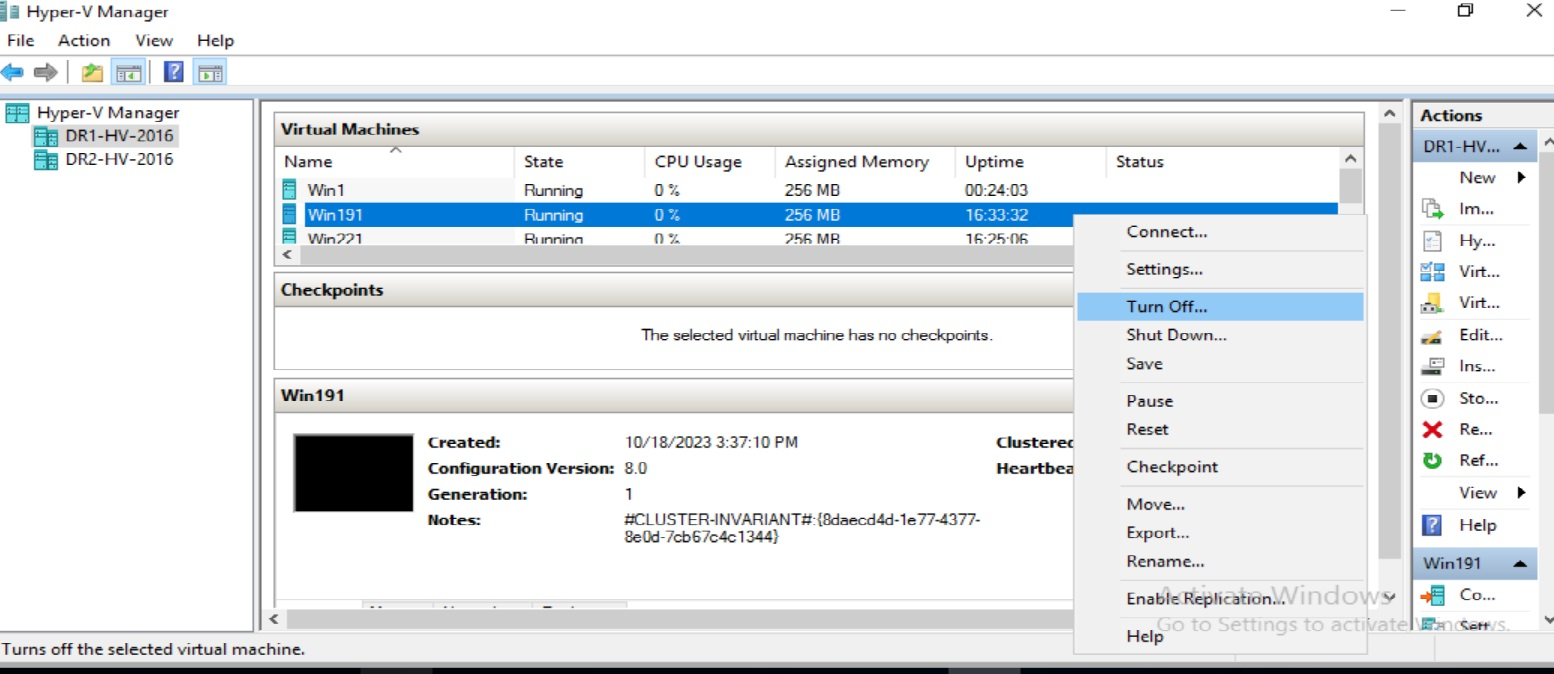
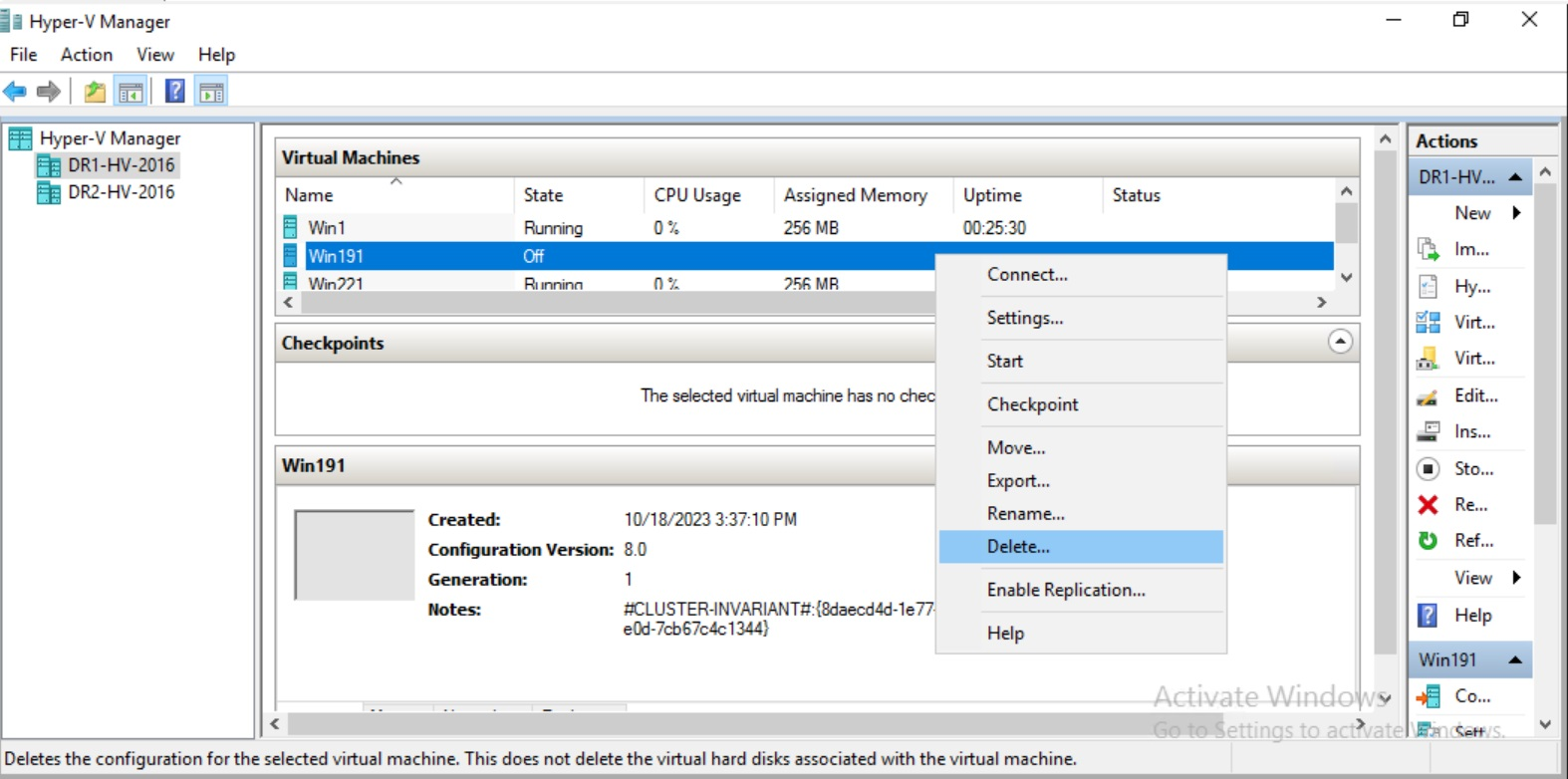
步骤 2:- “关闭”后,右键单击虚拟机,然后单击“删除”
Affected Products
NetWorker Module for MicrosoftArticle Properties
Article Number: 000218962
Article Type: Solution
Last Modified: 31 Jul 2025
Version: 5
Find answers to your questions from other Dell users
Support Services
Check if your device is covered by Support Services.