SCG:vCenter 7.0エラー: OVFパッケージ導入の失敗
Summary: この記事では、次のエラーを解決する方法について説明します。セキュア コネクト ゲートウェイ仮想エディションをvCenter 7.0に導入しようとすると、OVFパッケージの導入に失敗することがあります。
This article applies to
This article does not apply to
This article is not tied to any specific product.
Not all product versions are identified in this article.
Instructions
トピック: OVFパッケージの導入に失敗しました。ThrowableProxy.cause 一般的なシステムエラーが発生しました: 転送に失敗しました: サーバが信頼されていない: certificate_unknown(46) HTTP/s プロキシが転送用に構成されています。
エラーのスクリーンショット:
Cause: VMwareの設定でプロキシが有効になっているため、OVFの導入中にエラーが発生し、転送に失敗しました
解決:
- root認証情報を使用して https://vcentrename:5480 に移動して、VAMIにログインします。
- ナビゲーション メニューでネットワーキングをクリックします。
![[Networking]メニュー](https://supportkb.dell.com/img/ka0Do000000Zu4xIAC/ka0Do000000Zu4xIAC_ja_2.png)
- プロキシ設定の横にある編集をクリックします。
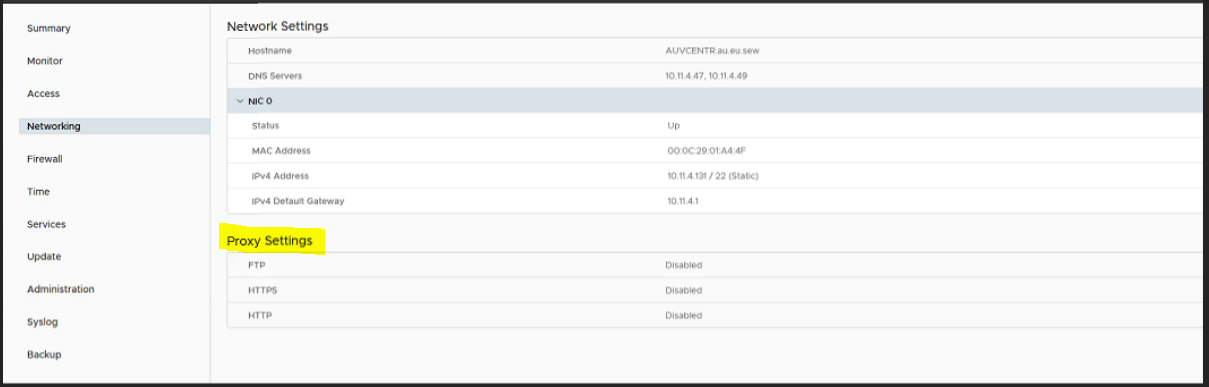
- ここでは、プロキシ設定の[Enable]を編集して[Disable]にし、[Save]をクリックする必要があります。
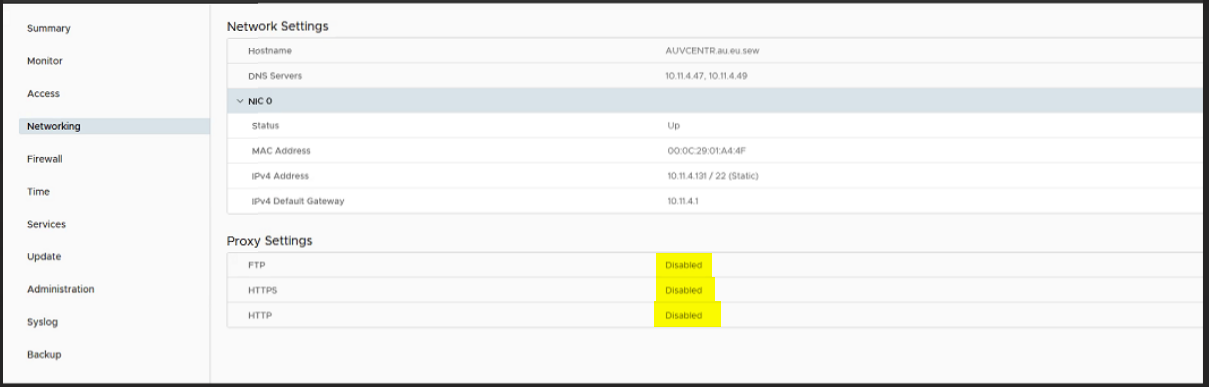
- ここで、VMの導入を再試行します。
Affected Products
Secure Connect Gateway, Secure Connect Gateway - Virtual Edition, VMware ESXi 7.xProducts
C Series, Modular Infrastructure, Rack Servers, Tower ServersArticle Properties
Article Number: 000219268
Article Type: How To
Last Modified: 20 May 2025
Version: 3
Find answers to your questions from other Dell users
Support Services
Check if your device is covered by Support Services.