PowerFlex 4.X - 依存パッケージのインストール タスクでゲートウェイ リソースのアップデートに失敗した
Summary: PowerFlex 4.X - 依存パッケージのインストール タスクでゲートウェイ リソースのアップデートに失敗しました。
This article applies to
This article does not apply to
This article is not tied to any specific product.
Not all product versions are identified in this article.
Symptoms
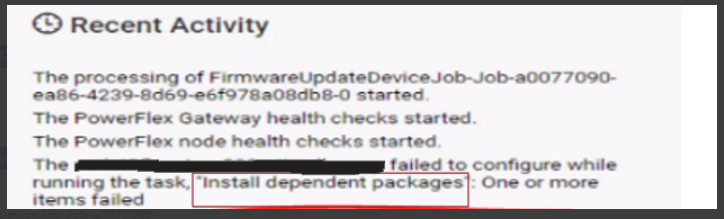
PowerFlex Gatewayリソースをアップデートしようとすると、「依存パッケージのインストール」タスク中に問題が発生し、失敗します。
失敗したアップグレード タスクを示すPFxM UIのスクリーンショット:
依存パッケージのインストールを担当するThin-Deployerポッド ジョブからのログ:
"item": "java-11-headless",
"msg": "Failure talking to yum: failure: repodata/repomd.xml from centos_extras: [Errno 256] No more mirrors to try.\nhttps://<ip>/httpshare/download/8aaa80e58b494957018b49a837c81ac4/os/VxFlex4.5.0RHEL7Repo/centos_extras/repodata/repomd.xml: [Errno 14] HTTPS Error 404 - Not Found"
上記の出力は、PowerFlexバックエンド ノードの1つがhttpshareでrepomd.xml ファイルを見つけることができないことを示しています。
問題
PowerFlexゲートウェイ リソースをアップグレードできません。
Cause
コンプライアンス ファイルのアップロード プロセス中に、アップロードするファイルを格納するための複数のディレクトリが生成されます。ソフトウェア コードに問題があると、アップロードされたファイルが意図せず重複し、その結果、ディレクトリ名が変更される可能性があります。
たとえば、PFxMによって予期されるディレクトリー構造は次のようになります。
../8aaa80e58b494957018b49a837c81ac4/os/VxFlex4.5.0RHEL7Repo/と似ていますが、現在は存在しない可能性があります。
コンプライアンス ファイルのアップロード フェーズ中に、ディレクトリー名を次のように変更できます。
../8aaa80e58b494957018b49a837c81ac4/os/VxFlex4.5.0RHEL7Repo2/ を潜在的な末尾の番号(この場合は2)に置き換えて、インクリメントできます。
依存パッケージをインストールするためのアップグレード タスクのコンテキストで、PFxMは適切なリポジトリー マネージャー用のリポジトリーをPowerFlexノード上に作成します。このリポジトリーには、依存パッケージのインストールに必要なファイルのURLを含む「scaleio.repo」という名前のファイルが含まれています。特に、PFxM は末尾の番号を除いた URL パスを使用します。具体的な例については、現象セクションのコード スニペットを参照してください。
Resolution
httpshare上のファイル名は、PFxMの期待に合うように手動で調整できます。
1)PowerFlex Managerプラットフォーム(PFMP)サーバーにSSH接続します
2)httpshareポッドがホストされているプライマリーPFMPノードを特定します。
|
3)ステップ2で特定したPFMPサーバーにSSHで接続します。
4)ディレクトリーを、リポジトリー ファイルを格納するhttpshareに変更します。
|
リポジトリ ID は環境ごとに異なることに注意してください。この環境でのリポジトリ ID は 8aaa80e58b494957018b49a837c81ac4 です。
5)..をリストアップします。/os/ ディレクトリにある場合は、次の出力のようになります。
pfmp1:/opt/platform/fileshare/8aaa80e58b494957018b49a837c81ac4/os # ls -al
drwxr-xr-x 1 root root  230 Oct 19 18:35 CLC7.1.8OSOVA2
drwxr-xr-x 1 root root  272 Oct 19 18:33 DellEMCPowerFlexEmbeddedOS3
drwxr-xr-x 1 root root  722 Oct 19 18:34 DellEMCPowerFlexEmbeddedOS4
drwxr-xr-x 1 root root 2312 Oct 19 18:34 ESXi7.0219305082
drwxr-xr-x 1 root root  156 Oct 19 18:34 VxFlex4.5.0RHEL7Repo2
drwxr-xr-x 1 root root   12 Oct 19 18:34 VxFlex4.5.0SDC2
drwxr-xr-x 1 root root   82 Oct 19 18:34 VxFlex4.5.0SLES15.3Repo2
drwxr-xr-x 1 root root  294 Oct 19 18:35 VxFlex4.5.0SVMOVA3
drwxr-xr-x 1 root root 294 Oct 19 18:36 VxFlex4.5.0SVMOVA46)コピーを作成します。このリポジトリー内のディレクトリーを削除したり、名前を変更したりしないでください。ディレクトリーVxFlex4.5.0SLES15.3Repo2およびVxFlex450RHEL7Repo2のコピーのみを作成します。
|
上記では、末尾の番号を除いた各ディレクトリーの2番目のコピーが作成されます。
末尾の数字は環境ごとに異なる場合があることに注意してください。
手順6)が完了すると、目的の結果は次の出力のようになります。
|
7)PowerFlex Gatewayリソースの更新を続行します。
問題が発生するバージョン
PowerFlex 4.x
修正バージョン
TBD
Article Properties
Article Number: 000219399
Article Type: Solution
Last Modified: 24 Jun 2025
Version: 3
Find answers to your questions from other Dell users
Support Services
Check if your device is covered by Support Services.