PowerFlex 4.X - 閘道資源更新在安裝相依套裝工作時失敗
Summary: PowerFlex 4.X - 閘道資源更新在安裝相依套裝工作時失敗。
This article applies to
This article does not apply to
This article is not tied to any specific product.
Not all product versions are identified in this article.
Symptoms
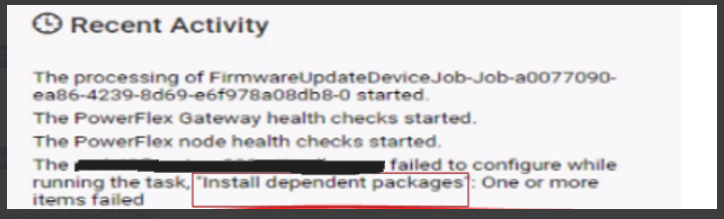
嘗試更新 PowerFlex Gateway 資源時,在「安裝相依套裝」工作期間遇到問題而失敗。
PFxM UI 的螢幕擷取畫面,顯示失敗的升級工作:
來自負責安裝相依套件的精簡型部署程式 Pod 工作的記錄:
"item": "java-11-headless",
"msg": "Failure talking to yum: failure: repodata/repomd.xml from centos_extras: [Errno 256] No more mirrors to try.\nhttps://<ip>/httpshare/download/8aaa80e58b494957018b49a837c81ac4/os/VxFlex4.5.0RHEL7Repo/centos_extras/repodata/repomd.xml: [Errno 14] HTTPS Error 404 - Not Found"
上述輸出指出其中一個 PowerFlex 後端節點無法在 httpshare 上找到repomd.xml檔案。
影響
無法升級 PowerFlex 閘道資源。
Cause
上傳相容性檔案的過程中,會產生多個目錄來存放要上傳的檔案。軟體代碼問題可能會導致上傳檔意外重複,從而導致目錄名稱發生變化。
例如,PFxM 的預期目錄結構可能是:
../8aaa80e58b494957018b49a837c81ac4/os/VxFlex4.5.0RHEL7Repo/,但可能已不存在。
在相容性檔案上傳階段,可按以下步驟重新命名目錄:
../8aaa80e58b494957018b49a837c81ac4/os/VxFlex4.5.0RHEL7Repo2/ 可能尾隨數字 (在本例中為 2),可遞增。
在安裝相依套裝的升級工作內容中,PFxM 會在相應儲存庫管理員的 PowerFlex 節點上建立儲存庫。此存儲庫包含一個名為“scaleio.repo”的檔,其中包含安裝依賴包所需檔的 URL。值得注意的是,PFxM 使用不帶尾隨數字的 URL 路徑。有關特定範例,請參閱癥狀部分中的代碼片段。
Resolution
您可以手動調整 httpshare 上的檔案名稱,以符合 PFxM 的期望。
1) SSH 至 PowerFlex Manager 平台 (PFMP) 伺服器
2) 識別託管 httpshare pod 的主要 PFMP 節點:
|
3) SSH 至步驟 2 識別的 PFMP 伺服器。
4) 將目錄變更為存放存放庫檔案的 httpshare:
|
請注意,每個環境的存儲庫 ID 都不同。在此環境中,儲存庫 ID 為 8aaa80e58b494957018b49a837c81ac4。
5)列出../os/ 目錄,可能類似於以下輸出:
pfmp1:/opt/platform/fileshare/8aaa80e58b494957018b49a837c81ac4/os # ls -al
drwxr-xr-x 1 root root  230 Oct 19 18:35 CLC7.1.8OSOVA2
drwxr-xr-x 1 root root  272 Oct 19 18:33 DellEMCPowerFlexEmbeddedOS3
drwxr-xr-x 1 root root  722 Oct 19 18:34 DellEMCPowerFlexEmbeddedOS4
drwxr-xr-x 1 root root 2312 Oct 19 18:34 ESXi7.0219305082
drwxr-xr-x 1 root root  156 Oct 19 18:34 VxFlex4.5.0RHEL7Repo2
drwxr-xr-x 1 root root   12 Oct 19 18:34 VxFlex4.5.0SDC2
drwxr-xr-x 1 root root   82 Oct 19 18:34 VxFlex4.5.0SLES15.3Repo2
drwxr-xr-x 1 root root  294 Oct 19 18:35 VxFlex4.5.0SVMOVA3
drwxr-xr-x 1 root root  294 Oct 19 18:36 VxFlex4.5.0SVMOVA4
6) 建立複本,請勿移除或重新命名此存放庫中的目錄。僅建立 VxFlex4.5.0SLES15.3Repo2 和 VxFlex450RHEL7Repo2 目錄的複本:
|
以上內容會建立每個目錄的第二個複本,不包含尾隨數字。
請注意,每個環境中的尾隨數位可能會有所不同。
完成步驟 6) 後,所需的結果應類似於以下輸出:
|
7) 繼續嘗試更新 PowerFlex Gateway 資源。
受影響的版本
PowerFlex 4.x
已修正問題的版本
TBD
Article Properties
Article Number: 000219399
Article Type: Solution
Last Modified: 24 Jun 2025
Version: 3
Find answers to your questions from other Dell users
Support Services
Check if your device is covered by Support Services.