PowerEdge: DSS7500 - Double Fault and How to Force Online Disk
Summary: This article addresses a DSS7500 double fault and how to force online disk.
This article applies to
This article does not apply to
This article is not tied to any specific product.
Not all product versions are identified in this article.
Instructions
DSS7500 configuration:
- SI9361-8i RAID card
- Replaced disk28
- Disk40 hot spare is rebuilding
- Disk22 is offline
- Disk40 rebuild failed due to source driver error, there are two hard drives failed and the VD failed
- Remote check disk22 HD offline, disk28 HD unconfigured good (missing)
- RAID card log checks the VD0 degraded when the disk22 is offline and VD0 failed

Figure 1: RAID Controller Information
1034450: 23-10-28,08:06:02 BG Work:CopyBack progress on PD b4(e0x64/s32) is 99.25%(116579s)
1034451: 23-10-28,08:53:56 Info:CopyBack complete on PD b4(e0x64/s32) from PD ba(e0x64/s40)
1034452: 23-10-28,08:53:57 Info:State change on PD b4(e0x64/s32) from COPYBACK(20) to
ONLINE(18)
1034453: 23-10-28,08:53:57 Info:Global Hot Spare created on PD ba(e0x64/s40) (global,rev)
1034454: 23-10-28,08:53:57 Info:State change on PD ba(e0x64/s40) from ONLINE(18) to HOT
SPARE(2)
1034459: 23-10-31,15:05:18 Info:State change on PD a0(e0x65/s28) from ONLINE(18) to
OFFLINE(10)
1034460: 23-10-31,15:05:18 Info:State change on VD 00/0 from OPTIMAL(3) to DEGRADED(2)
1034461: 23-10-31,15:05:18 CRITICAL:VD 00/0 is now DEGRADED.
1034475: 23-10-31,15:15:02 Info:Inserted: PD a0(e0x65/s28)
1034476: 23-10-31,15:15:02 Info:Inserted: PD a0(e0x65/s28) Info: enclPd=65, scsiType=0,
portMap=00, sasAddr=5f01faf0fd32821c,0000000000000000
1034477: 23-10-31,15:15:02 Info:PD a0(e0x65/s28) Inquiry info: Info- ATA  TOSHIBA MG07ACA1
T0A0CFF9SG 11 TB
1034478: 23-10-31,15:15:02 Info:State change on PD a0(e0x65/s28) from UNCONFIGURED_BAD(1) to
UNCONFIGURED_GOOD(0)
1034481: 23-10-31,16:29:22 BG Work:Rebuild progress on PD ba(e0x64/s40) is 0.99%(5040s)
…
1034534: 23-11-01,21:31:58 Info:Unexpected sense: PD 98(e0x65/s22) Path 5f01faf0fd328216,
CDB: 88 00 00 00 00 01 6e 67 88 98 00 00 00 08 00 00, Sense: 72 03 11 00 00 00 00 0C 00 0A
80 00 00 00 00 01 6E 67 88 98
1034585: 23-11-02,07:27:28 BG Work:Rebuild progress on PD ba(e0x64/s40) is 82.17%(145326s)
1034586: 23-11-02,07:48:59 Info:Unexpected sense: PD 98(e0x65/s22) Path 5f01faf0fd328216,
CDB: 88 00 00 00 00 03 c6 b3 20 00 00 00 02 00 00 00, Sense: 72 03 11 00 00 00 00 0C 00 0A
80 00 00 00 00 03 C6 B3 22 60
1034587: 23-11-02,07:48:59 Info:Error on PD 98(e0x65/s22) (Error 02)
1034588: 23-11-02,07:48:59 Info:State change on PD 98(e0x65/s22) from ONLINE(18) to SHIELD(90)
1034589: 23-11-02,07:48:59 Info:State change on VD 00/0 from DEGRADED(2) to OFFLINE(0)
1034590: 23-11-02,07:48:59 FATAL:Controller cache pinned for missing or offline VD 00/0
1034591: 23-11-02,07:48:59 FATAL:VD 00/0 is now OFFLINE
1034592: 23-11-02,07:48:59 Info:Error on PD 98(e0x65/s22) (Error 02)
1034593: 23-11-02,07:48:59 CRITICAL:Rebuild failed on PD by(e0x64/s40) due to source drive
 error
1034594: 23-11-02,07:48:59 Info:State change on PD ba(e0x64/s40) from REBUILD(14) to HOT
SPARE(2)
1034597: 23-11-02,07:49:02 WARNING:PD 98(e0x65/s22) Path 5f01faf0fd328216  reset (Type 03)
1034598: 23-11-02,07:49:04 Info:Unexpected sense: PD 98(e0x65/s22) Path 5f01faf0fd328216,
CDB: 28 00 00 00 00 00 00 00 04 00, Sense: 70 00 06 00 00 00 00 0A 00 00 00 00 29 00 00 00
00 00
1034599: 23-11-02,07:49:04 Info:Unexpected sense: PD 98(e0x65/s22) Path 5f01faf0fd328216,
CDB: 00 00 00 00 00 00, Sense: 70 00 02 00 00 00 00 0A 00 00 00 00 04 02 00 00 00 00
1034601: 23-11-02,07:55:14 Info:Diagnostics passed for PD 98(e0x65/s22)
1034602: 23-11-02,07:55:14 Info:State change on PD 98(e0x65/s22) from SHIELD(90) to
OFFLINE(10)
How to solve the issue
- Try to force online the last offline disk. If the disk goes online, the VD can recover to degraded status.
- In this case, online disk22 in RAID Controller AVAGO MegaRAID 9361-8i Human Interface Infrastructure (HII) configuration utility Below are the steps:
- Reboot the server. While the system is in startup, press <F2> to enter System Setup.
- Click Device Settings to access the Management menu for the controller AVAGO MegaRAID 9361-8i. Use the arrow keys or the mouse to move.

Figure 2: RAID 50 Status Offline

Figure 3: Drive Port 0 - 3:01:28 hard drive Unconfigured Good

Figure 4: Drive Port 0 - 3:01:28 missing

Figure 5: Drive Port 0 - 3:01:22 Offline

Figure 6: Drive Port 0 - 3:01:22 Offline
- Choose the "Drive Port 0 - 3:01:22 hard drive" > Operation > Place Drive Online > Confirm that the operation is OK.

Figure 7: Place Drive Online
- Check that the RAID 50 Status recovers to Degraded.
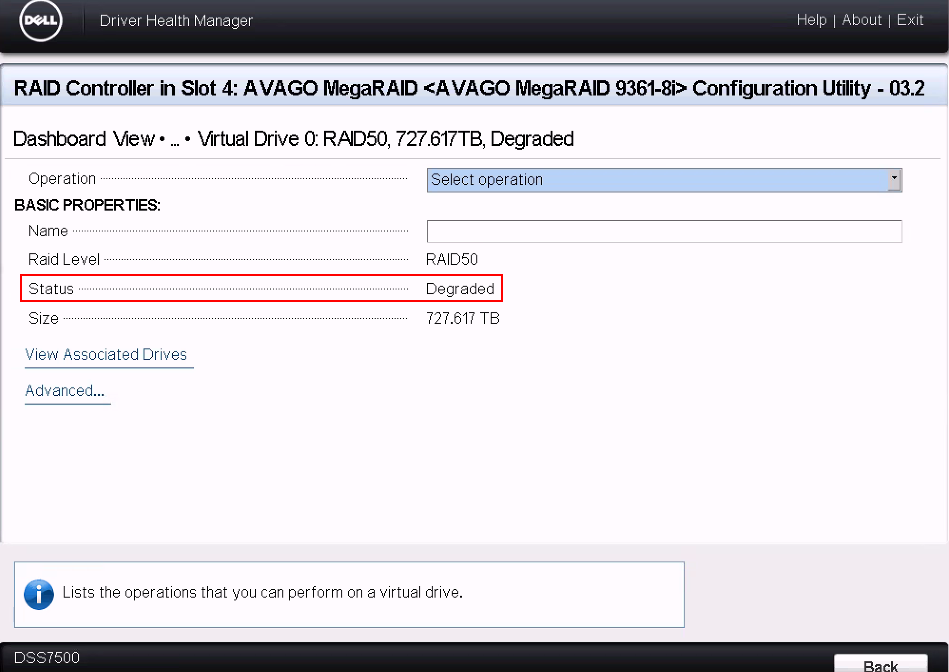
Figure 8: RAID 50 status degraded
- From the RAID Controller AVAGO MegaRAID 9361-8i management software, check that disk22 is online and that disk40 is rebuilding.
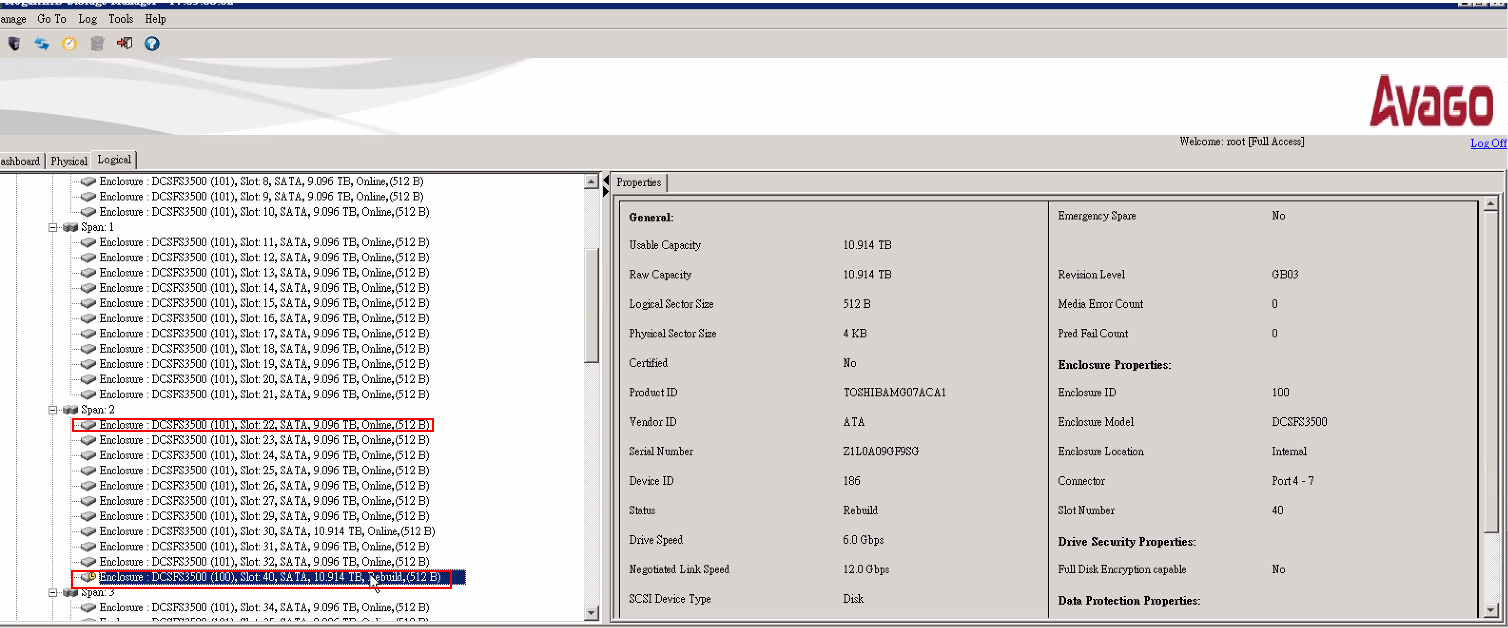
Figure 9: Disk22 is online, and disk40 is rebuilding.
- Check the disk slot information if you must replace a disk.

Figure 10: Disk Slot Information
Affected Products
DSS 7500Article Properties
Article Number: 000219727
Article Type: How To
Last Modified: 14 Apr 2025
Version: 4
Find answers to your questions from other Dell users
Support Services
Check if your device is covered by Support Services.