NetWorker:无法在 NMC 或 NWUI 中加载基于 XML 的许可证
Summary: 无法在 NetWorker Management Console (NMC) 或 NetWorker Web 用户界面 (NWUI) 中加载基于 XML 的许可证。
This article applies to
This article does not apply to
This article is not tied to any specific product.
Not all product versions are identified in this article.
Symptoms
无法在 NetWorker Management Console (NMC) 或 NetWorker Web 用户界面 (NWUI) 中加载基于 XML 的许可证。
错误:“选择了无效的文件”
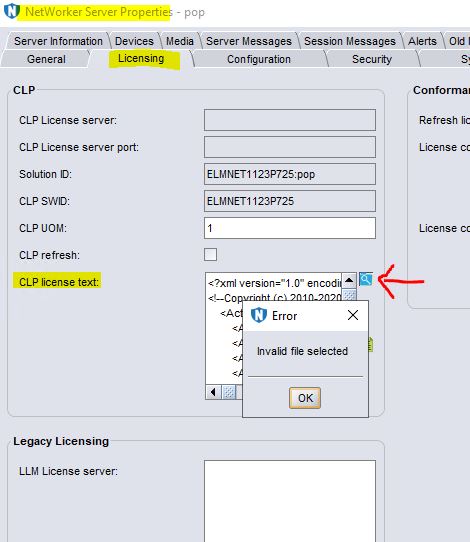 licspec.properties 已根据 NetWorker 许可指南进行了更新。
license.technology 设置为 XML。
license.path 设置为 dpa.xml。
错误:“选择了无效的文件”
license.technology 设置为 XML。
license.path 设置为 dpa.xml。
Cause
不支持在 NMC 或 NWUI 中以 XML 格式浏览许可证。
Resolution
解决方法是:
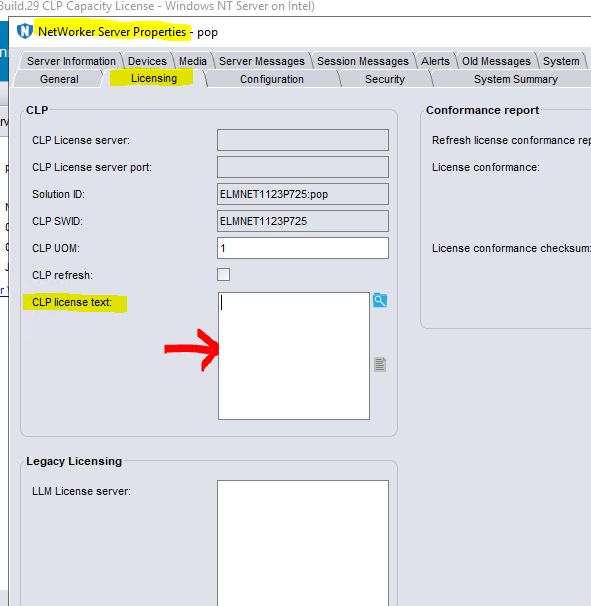
按dpa.xml方式复制许可证。生成的dpa.xml应放在默认许可证路径中,即 C:\Program Files\EMC NetWorker\nsr\lic。
- 将许可证复制并粘贴到 CLP 许可证字段中。
或
按dpa.xml方式复制许可证。生成的dpa.xml应放在默认许可证路径中,即 C:\Program Files\EMC NetWorker\nsr\lic。
- 重新启动 NetWorker 服务。
Linux: systemctl restart networker

Windows: net stop nsrd && net start nsrd
Article Properties
Article Number: 000221353
Article Type: Solution
Last Modified: 02 Feb 2024
Version: 2
Find answers to your questions from other Dell users
Support Services
Check if your device is covered by Support Services.