NetWorker : Impossible de charger une licence XML dans NMC ou NWUI
Summary: Impossible de charger une licence XML dans NetWorker Management Console (NMC) ou NetWorker Web User Interface (NWUI).
This article applies to
This article does not apply to
This article is not tied to any specific product.
Not all product versions are identified in this article.
Symptoms
Impossible de charger une licence XML dans NetWorker Management Console (NMC) ou NetWorker Web User Interface (NWUI).
Error: « Fichier non valide sélectionné »
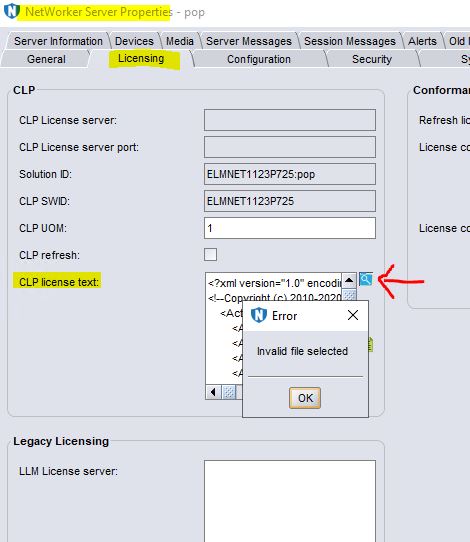 licspec.properties a été mis à jour conformément au Guide d’octroi de licence de NetWorker.
license.technology est défini sur XML.
license.path est défini sur dpa.xml.
Error: « Fichier non valide sélectionné »
license.technology est défini sur XML.
license.path est défini sur dpa.xml.
Cause
La navigation dans la licence au format XML dans NMC ou NWUI n’est pas prise en charge.
Resolution
Solution de contournement :

Copiez la licence telle qu’elle dpa.xml. Le dpa.xml résultant doit être placé dans le chemin de licence par défaut, autrement dit, C :\Program Files\EMC NetWorker\nsr\lic.
- Copiez et collez la licence dans le champ CLP License.
ou
Copiez la licence telle qu’elle dpa.xml. Le dpa.xml résultant doit être placé dans le chemin de licence par défaut, autrement dit, C :\Program Files\EMC NetWorker\nsr\lic.
- Redémarrez le service NetWorker.
Linux: systemctl restart networker

Windows: net stop nsrd && net start nsrd
Article Properties
Article Number: 000221353
Article Type: Solution
Last Modified: 02 Feb 2024
Version: 2
Find answers to your questions from other Dell users
Support Services
Check if your device is covered by Support Services.