PowerEdge: R750 is only able to POST without the left control panel and displays message Liquid Cooling setting capable system
Summary: Dell PowerEdge R750 system unable to POST and when customer/engineer performs a minimum to POST on the server then finds out that the server can POST without the left latch (LCP) component but displays a message on the POST screen stating, "Liquid Cooling setting capable system." The server might even continue booting to the operating system following that message. ...
This article applies to
This article does not apply to
This article is not tied to any specific product.
Not all product versions are identified in this article.
Symptoms
When the components are removed one-by-one OR a minimum to POST is set up, it is identified that the left control panel (LCP) stops the server from being able to complete POST and when it is re-attached it stops the POST from completing.
Use this article to determine if the server is experiencing no POST, no boot, or No Power.
Article: 000152161 Dell PowerEdge: Troubleshooting a Server that Does Not Start (No Power, No POST, No Boot and No Video)
Without the left control panel (LCP), the server can POST but displays an error stating "Liquid Cooling setting capable system" and then continue booting to the operating system.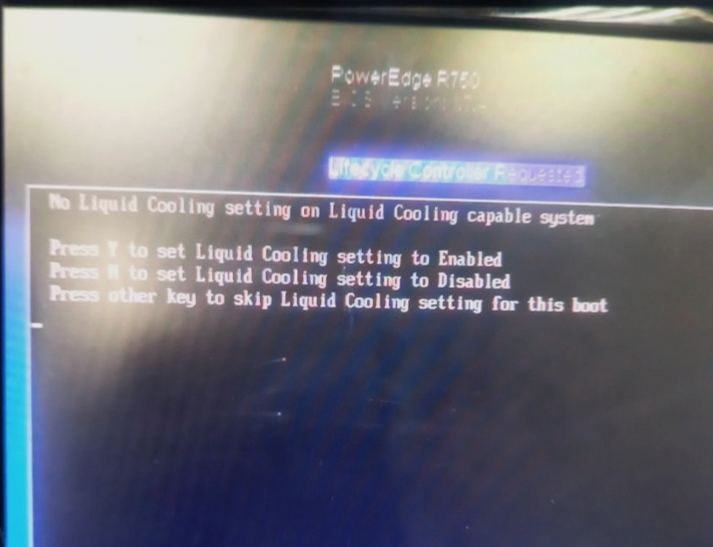
When checked against the Dell order there is no Liquid cooling component on the server that is reported with this alert.
Cause
The left control panel (LCP) component contains the information whether the system config is configured with Liquid cooling.
If this component causes no POST due to a fault and removed OR it is faulty, it might cause the alert above to be displayed during POST.
Customer can still press F1 during POST to continue booting the OS. This is expected behavior when the LCP is removed from the system for R750 is capable of liquid cooling.
Left control panel (LCP) part
FR1X9 - ASSY,LTCH,LF,QSYNC,R7525/R750

Resolution
Send a replacement left control panel (LCP) - FR1X9 - ASSY,LTCH,LF,QSYNC,R7525/R750 to remedy this alert.
The message will not re-appear after the LCP part replacement.
No further changes are required if the system originally came with an air-cooled identity module and no customization was done.
Affected Products
AX-750, Dell EMC XC Core XC750, OEMR R750, PowerEdge R750, Powerflex appliance R750, Dell EMC vSAN R750 Ready NodeArticle Properties
Article Number: 000221820
Article Type: Solution
Last Modified: 22 May 2025
Version: 4
Find answers to your questions from other Dell users
Support Services
Check if your device is covered by Support Services.