PowerEdge: R860 and R960 Servers Present No Option to Disable Virtualization Technology or x2APIC in BIOS Setup
Summary: No option to disable Virtualization Technology or x2APIC in F2 system setup under processor settings. This occurs when a system is populated with four processors.
This article applies to
This article does not apply to
This article is not tied to any specific product.
Not all product versions are identified in this article.
Symptoms
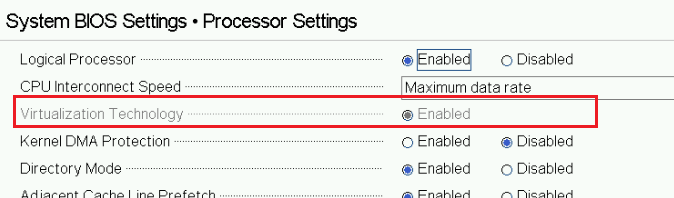
F2 system setup on an R960 or R860 server populated with four processors presents no option to disable Virtualization Technology (VT).
In addition, users find no option to disable Second-Generation Advanced Programmable Interrupt Controller (x2APIC) mode. A note is provided indicating the reasons why x2APIC must be enforced.
Figure 1: BIOS Setup Virtualization Technology
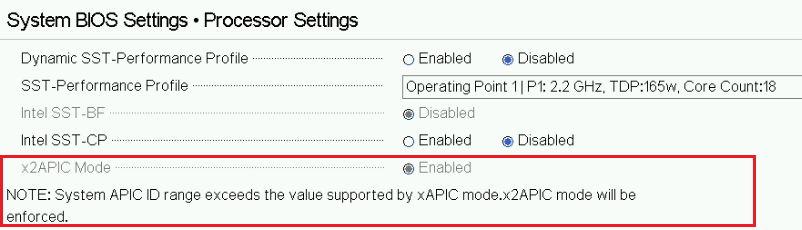
In addition, users find no option to disable Second-Generation Advanced Programmable Interrupt Controller (x2APIC) mode. A note is provided indicating the reasons why x2APIC must be enforced.
Figure 2: BIOS Setup x2APIC Mode
Cause
This is a limitation of Advanced Programmable Interrupt Controller (APIC) If core counts exceed 255, x2APIC must be enabled.
Resolution
This is working as designed and to be expected with systems configured with four processors. This is encountered with any CPU model. Due to the number of APIC IDs assigned per core, X2APIC mode is enforced.
This is not experienced with systems configured with only two processors.
This is not experienced with systems configured with only two processors.
Affected Products
PowerEdge R860, PowerEdge R960Products
OEMR R860, OEMR R960Article Properties
Article Number: 000221937
Article Type: Solution
Last Modified: 02 May 2025
Version: 3
Find answers to your questions from other Dell users
Support Services
Check if your device is covered by Support Services.