Alienware OLED Gaming Monitors Image Does Not Fill the Entire Viewing Area
Summary: This article provides information about why the image on the Alienware OLED Gaming Monitors does not fill the entire Viewing Area.
This article applies to
This article does not apply to
This article is not tied to any specific product.
Not all product versions are identified in this article.
Symptoms
The image on the Alienware OLED Gaming Monitors does not fill the entire Viewing Area.
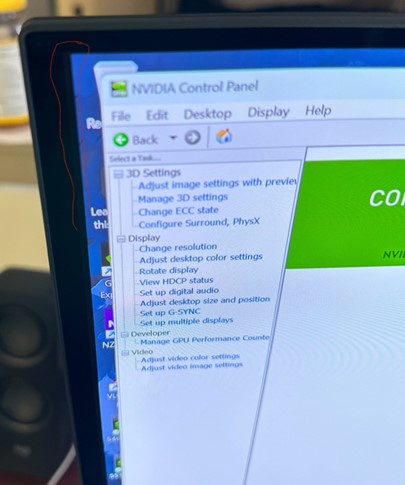
Affected Monitors:
- Alienware 27 280Hz QD-OLED Gaming Monitor AW2725D
- Alienware 27 360Hz QD OLED Gaming Monitor AW2725DF
- Alienware 27 4K QD-OLED Gaming Monitor AW2725Q
- Alienware 32 4K QD OLED Gaming Monitor AW3225QF
- Alienware 34 240Hz QD-OLED Gaming Monitor AW3425DW
- Alienware 34 Curved OLED Monitor AW3423DW
- Alienware 34 Curved QD OLED Gaming Monitor AW3423DWF
Cause
This is working as designed for an OLED panel. There are eight dummy pixels between the Active Area and the Viewing Area as shown in the image below. These pixels are required to accommodate the Pixel Shift function so that the image does not get clipped.
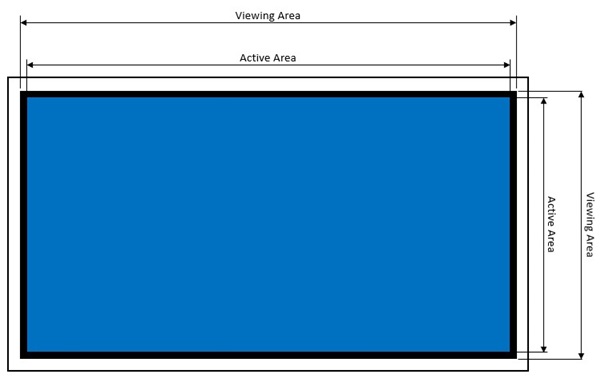
Note: Pixel shift is a function that moves the pixels of the screen to prevent image retention on OLED panels. See the Alienware OLED Monitor User Guide, Troubleshooting section for more information. See this article on how to find the User Guide for your monitor: Manuals and Documentation for your Dell Product.
Resolution
This is working as designed.
Affected Products
Alienware 27 280Hz QD-OLED Gaming Monitor AW2725D, Alienware 27 360Hz QD OLED Gaming Monitor AW2725DF, Alienware 27 4K QD-OLED Gaming Monitor AW2725Q, Alienware 32 4K QD OLED Gaming Monitor AW3225QF, Alienware 34 Curved OLED Monitor AW3423DW
, Alienware 34 Curved QD OLED Gaming Monitor AW3423DWF, Alienware 34 240Hz QD-OLED Gaming Monitor AW3425DW
...
Article Properties
Article Number: 000222059
Article Type: Solution
Last Modified: 09 May 2025
Version: 7
Find answers to your questions from other Dell users
Support Services
Check if your device is covered by Support Services.