PowerEdge: Intel 100G 2P E810-2C Adapter – umgekehrte Portzuordnung
Summary: Intel 100G 2P E810-2C Adapter Portnummern können im BIOS und iDRAC auf PowerEdge-Plattformen umgekehrt zugeordnet werden.
This article applies to
This article does not apply to
This article is not tied to any specific product.
Not all product versions are identified in this article.
Symptoms
Intel 100G 2P E810-2C Adapter Portnummern können im BIOS und iDRAC auf PowerEdge-Plattformen umgekehrt zugeordnet werden. Der physische Port A ist Port 2 zugeordnet und Port B ist Port 1 zugeordnet.
Nehmen Sie den Dell PowerEdge XR8620t als Beispiel.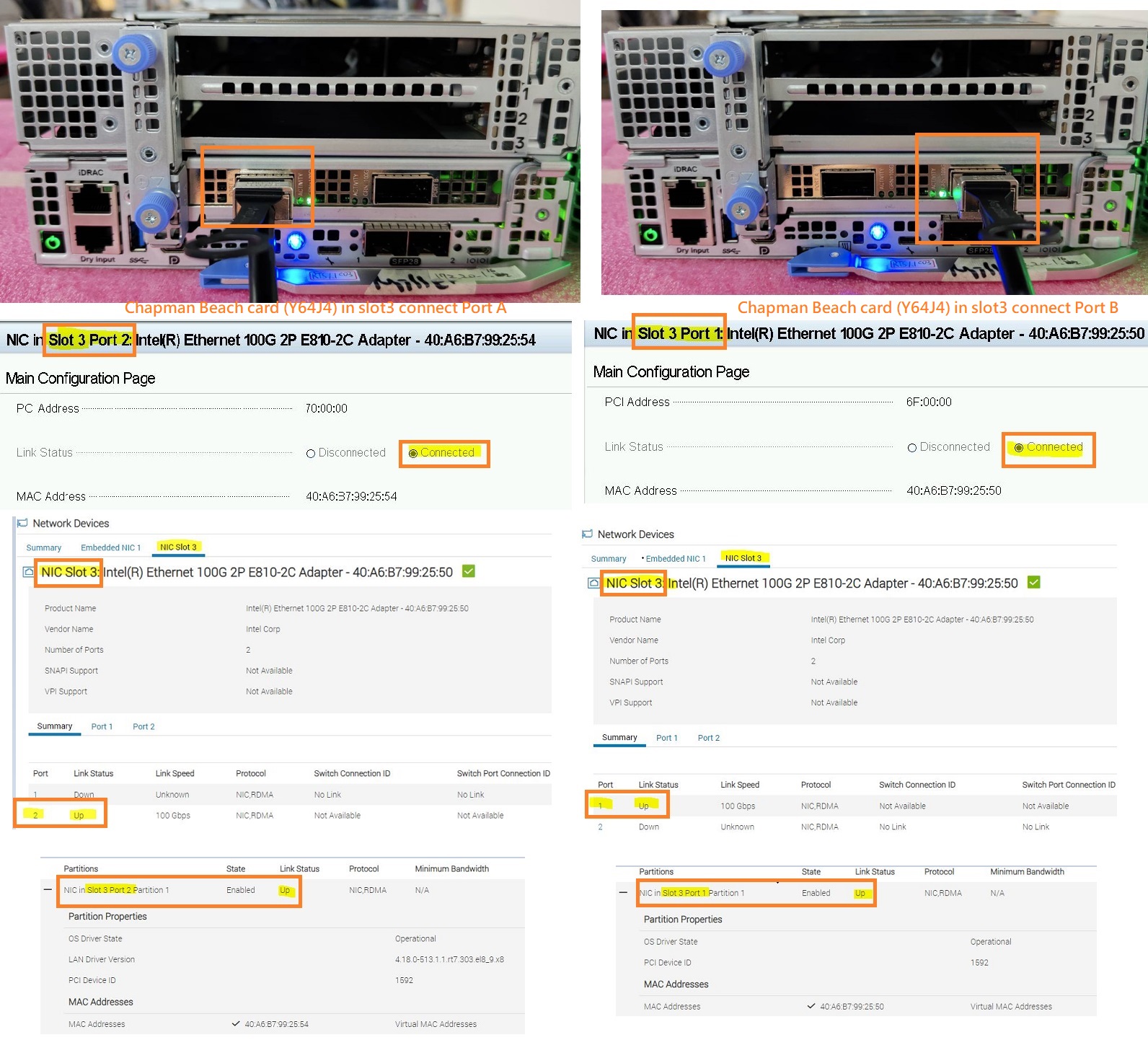 Dieses Verhalten der Portzuordnung kann je nach Serverplattform und PCIE-Steckplatz, in dem die Karte installiert ist, variieren.
Nehmen Sie den Dell PowerEdge XR8620t und XR8610t als Beispiel.
Platform |
PCIE Slot the card is installed |
Physical Port Number on the Card |
BIOS/iDRAC Port Mapping |
||
XR8620t |
PCIE Slot 1 |
Port A |
Port B |
Port A -> Port 2 |
Port B -> Port 1 |
XR8620t |
PCIE Slot 2 |
Port A |
Port B |
Port A -> Port 1 |
Port B -> Port 2 |
XR8620t |
PCIE Slot 3 |
Port A |
Port B |
Port A -> Port 2 |
Port B -> Port 1 |
XR8610t |
PCIE Slot 1 |
Port A |
Port B |
Port A -> Port 2 |
Port B -> Port 1 |
Hinweis: Abhängig von den verschiedenen Plattformkonfigurationen liefert und unterstützt Dell möglicherweise nur diesen Intel 100G 2P E810-2C-Adapter auf bestimmten PCIE-Steckplätzen als Standard.
Cause
Dieses Verhalten ist auf das Schaltungsdesign der Intel Karte zurückzuführen. Port A wird mit PCIe-LANE verbunden 8:15 und Port B wird mit PCIE-LANE verbunden 0:7aus.
Je nach den verschiedenen Plattformdesigns unterstützen einige PCIE-Steckplätze die umgekehrte LANE, andere jedoch nicht.
Resolution
Dabei handelt es sich um erwartetes Verhalten.
Affected Products
PowerEdge XR7620, PowerEdge XR8000r, PowerEdge XR8610t, PowerEdge XR8620tArticle Properties
Article Number: 000222339
Article Type: Solution
Last Modified: 23 Oct 2025
Version: 4
Find answers to your questions from other Dell users
Support Services
Check if your device is covered by Support Services.