PowerEdge: Intel 100G 2P E810-2C Adapter Reversed Port Mapping
Summary: Poortnummers van Intel 100G 2P E810-2C adapter kunnen omgekeerd worden toegewezen in BIOS en iDRAC op PowerEdge platforms.
This article applies to
This article does not apply to
This article is not tied to any specific product.
Not all product versions are identified in this article.
Symptoms
Poortnummers van Intel 100G 2P E810-2C adapter kunnen omgekeerd worden toegewezen in BIOS en iDRAC op PowerEdge platforms. De fysieke poort A is toegewezen aan poort 2 en poort B is toegewezen aan poort 1.
Neem de Dell PowerEdge XR8620t als voorbeeld.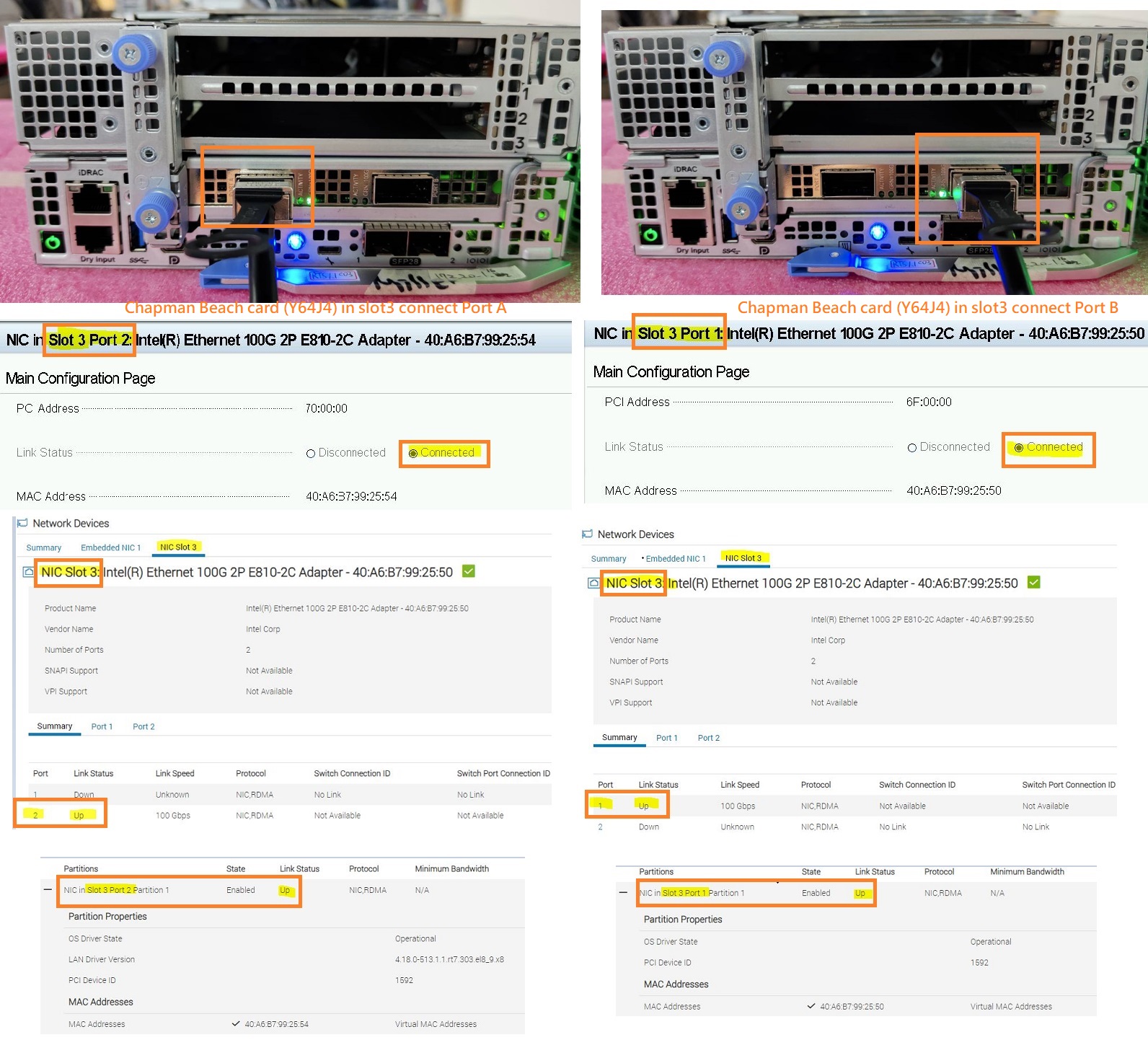 Dit gedrag van poorttoewijzing kan variëren, afhankelijk van het serverplatform en het PCIE-slot waarin de kaart is geïnstalleerd.
Neem de Dell PowerEdge XR8620t en XR8610t als voorbeeld.
Platform |
PCIE Slot the card is installed |
Physical Port Number on the Card |
BIOS/iDRAC Port Mapping |
||
XR8620t |
PCIE Slot 1 |
Port A |
Port B |
Port A -> Port 2 |
Port B -> Port 1 |
XR8620t |
PCIE Slot 2 |
Port A |
Port B |
Port A -> Port 1 |
Port B -> Port 2 |
XR8620t |
PCIE Slot 3 |
Port A |
Port B |
Port A -> Port 2 |
Port B -> Port 1 |
XR8610t |
PCIE Slot 1 |
Port A |
Port B |
Port A -> Port 2 |
Port B -> Port 1 |
Opmerking: Afhankelijk van de verschillende platformconfiguraties kan Dell deze Intel 100G 2P E810-2C-adapter standaard alleen op bepaalde PCIE-slots leveren en ondersteunen.
Cause
Dit gedrag is te wijten aan het ontwerp van de Intel-kaartcircuits. Poort A maakt verbinding met PCIE LANE 8:15 en poort B maakt verbinding met PCIE LANE 0:7.
Afhankelijk van de verschillende platformontwerpen ondersteunen sommige PCIE-slots de Reversed LANE, maar andere niet.
Resolution
Dit is normaal gedrag.
Affected Products
PowerEdge XR7620, PowerEdge XR8000r, PowerEdge XR8610t, PowerEdge XR8620tArticle Properties
Article Number: 000222339
Article Type: Solution
Last Modified: 23 Oct 2025
Version: 4
Find answers to your questions from other Dell users
Support Services
Check if your device is covered by Support Services.