PowerEdge: Intel 100G 2P E810-2C-adapter Omvendt portkartlegging
Summary: Intel 100G 2P E810-2C-adapterportnumre kan tilordnes omvendt i BIOS og iDRAC på PowerEdge-plattformer.
This article applies to
This article does not apply to
This article is not tied to any specific product.
Not all product versions are identified in this article.
Symptoms
Intel 100G 2P E810-2C-adapterportnumre kan tilordnes omvendt i BIOS og iDRAC på PowerEdge-plattformer. Den fysiske port A tilordnes til port 2, og port B tilordnes til port 1.
Ta Dell PowerEdge XR8620t som et eksempel.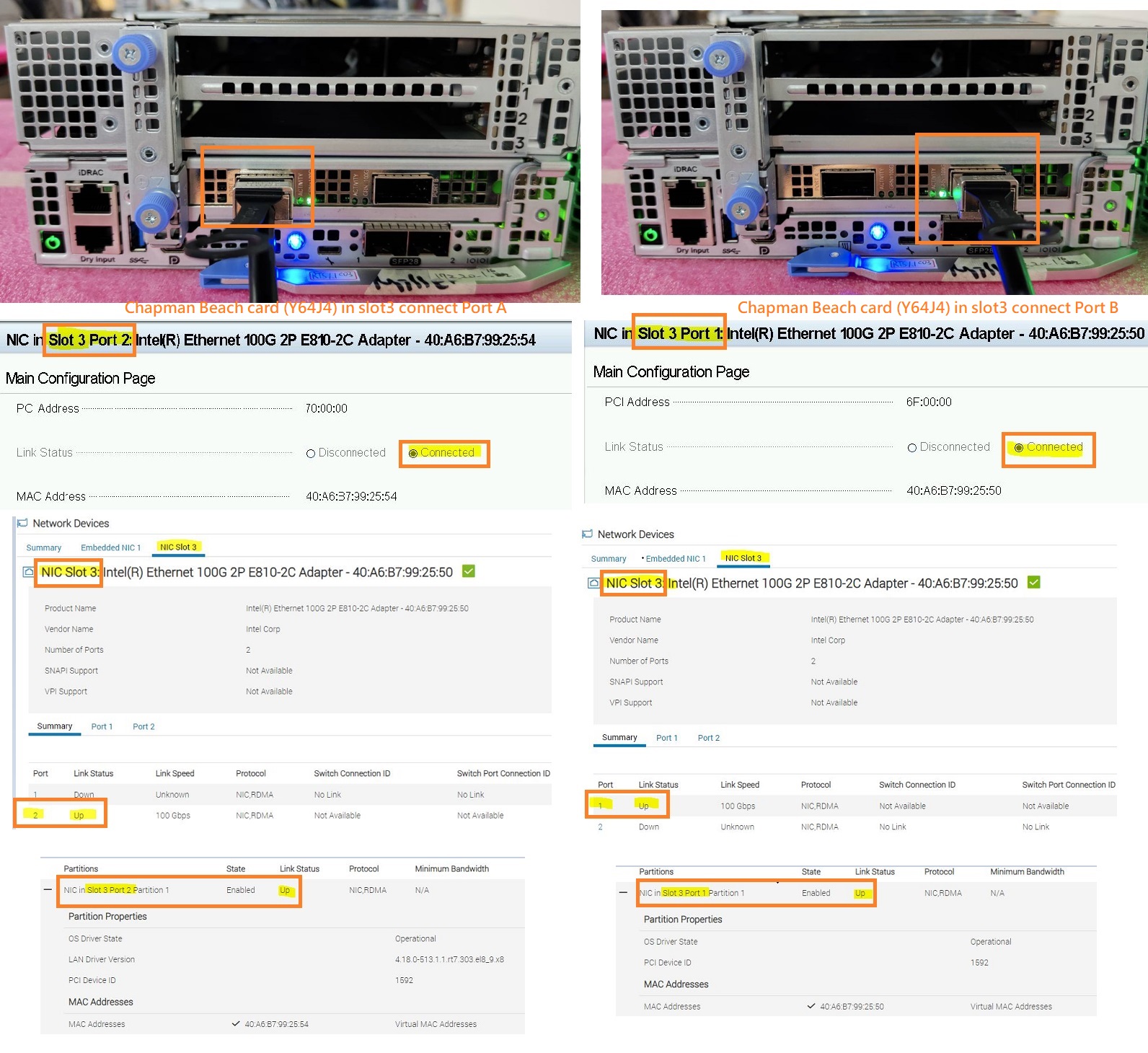 Denne virkemåten for porttilordning kan variere avhengig av serverplattformen og PCIE-sporet kortet er installert i.
Ta Dell PowerEdge XR8620t og XR8610t som eksempel.
Platform |
PCIE Slot the card is installed |
Physical Port Number on the Card |
BIOS/iDRAC Port Mapping |
||
XR8620t |
PCIE Slot 1 |
Port A |
Port B |
Port A -> Port 2 |
Port B -> Port 1 |
XR8620t |
PCIE Slot 2 |
Port A |
Port B |
Port A -> Port 1 |
Port B -> Port 2 |
XR8620t |
PCIE Slot 3 |
Port A |
Port B |
Port A -> Port 2 |
Port B -> Port 1 |
XR8610t |
PCIE Slot 1 |
Port A |
Port B |
Port A -> Port 2 |
Port B -> Port 1 |
Merk: Avhengig av de ulike plattformkonfigurasjonene kan Dell bare sende og støtte denne Intel 100G 2P E810-2C-adapteren på visse PCIE-spor som standard.
Cause
Denne virkemåten skyldes utformingen av Intel-kortkretsen. Port A kobles til PCIE LANE 8:15 og port B kobles til PCIE LANE 0:7.
Avhengig av de forskjellige plattformdesignene, støtter noen PCIE-spor omvendt LANE, men noen gjør det ikke.
Resolution
Dette er en forventet atferd.
Affected Products
PowerEdge XR7620, PowerEdge XR8000r, PowerEdge XR8610t, PowerEdge XR8620tArticle Properties
Article Number: 000222339
Article Type: Solution
Last Modified: 23 Oct 2025
Version: 4
Find answers to your questions from other Dell users
Support Services
Check if your device is covered by Support Services.