NVP vProxy: VM이 FLR 웹 클라이언트에서 타겟으로 나타나지 않음
Summary: VM(Virtual Machine)은 NVP(NetWorker VMware Protection) vProxy 어플라이언스에 의해 백업됩니다. FLR(File Level Restore) 웹 클라이언트에서 VM을 소스로 선택할 수 있습니다. 그러나 VM은 대상으로 나열되지 않습니다.
This article applies to
This article does not apply to
This article is not tied to any specific product.
Not all product versions are identified in this article.
Symptoms
Data Protection Restore Client(FLR 클라이언트)를 사용하는 경우 VM을 소스 선택에 사용할 수 있습니다.
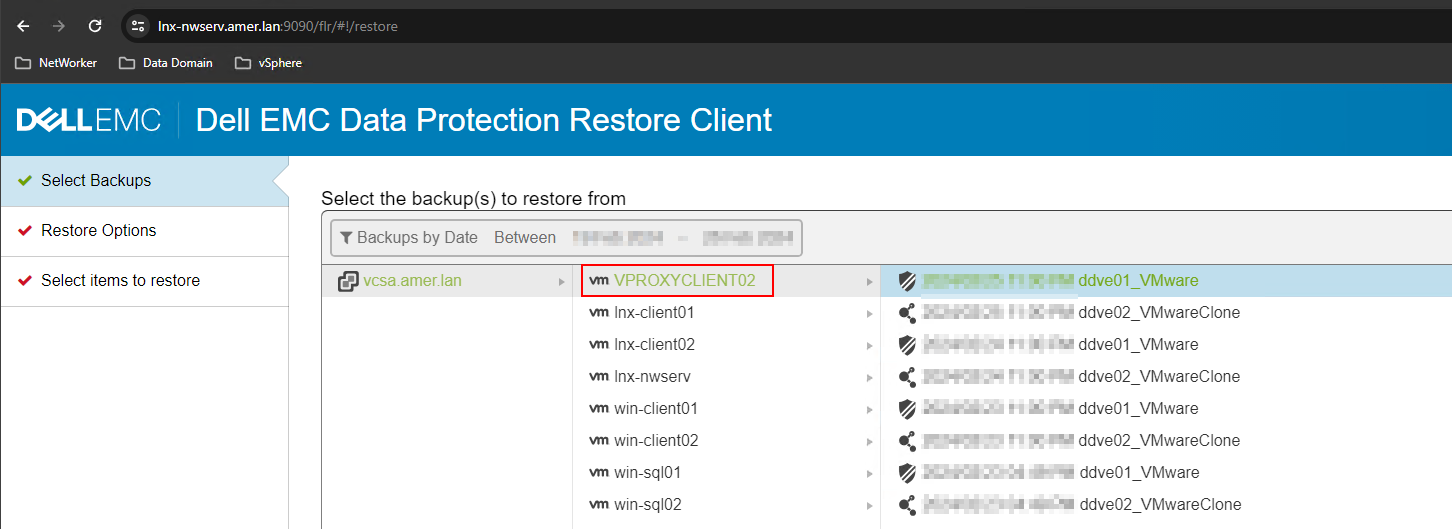
VM이 사용 가능한 FLR 타겟으로 나열되지 않습니다.
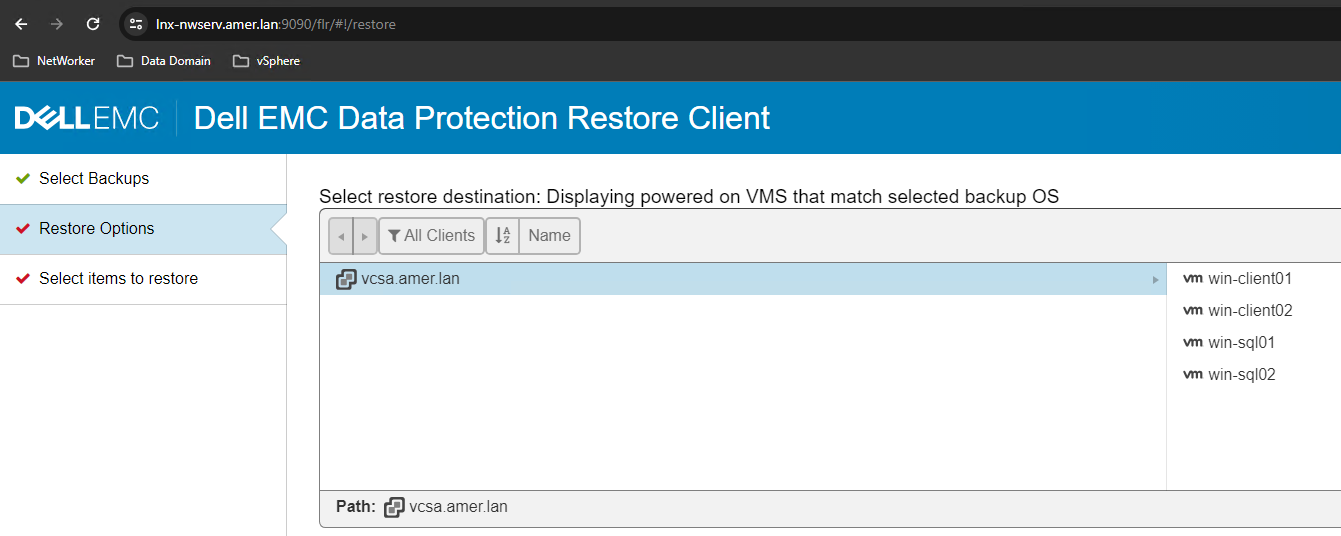
타겟 VM:
- 소스(또는 동일한 VM)와 동일한 운영 체제 유형입니다.
- VMware에서 전원이 켜져 있는 경우
- NMC(NetWorker Management Console) 또는 NWUI(NetWorker Web User Interface)에서 FLR을 수행할 때 사용 가능한 타겟으로 나열됩니다.
Cause
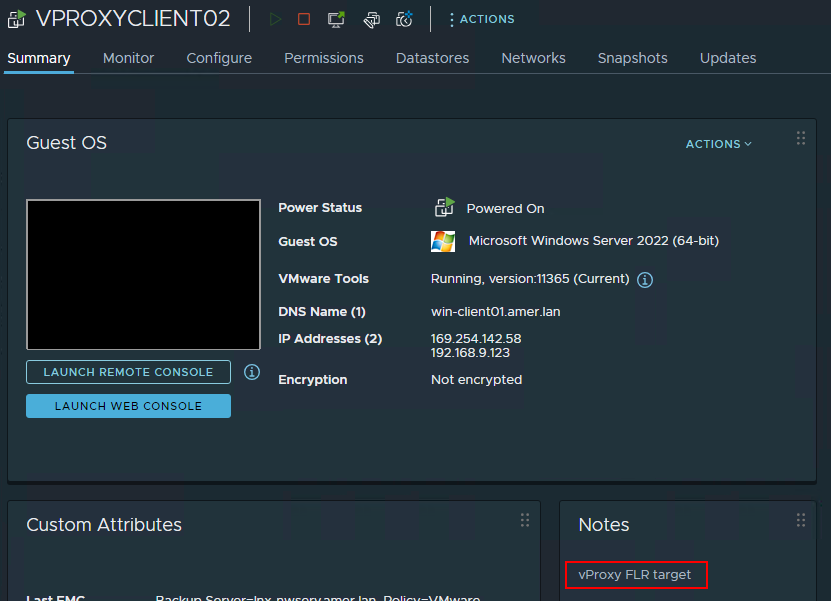
VMware에서 타겟 VM에 "vProxy"라는 단어가 포함된 "참고"가 포함되어 있습니다.
Resolution
- VMware에서 "vProxy"라는 단어가 포함된 VM의 "참고"를 제거합니다.
- NMC(NetWorker Management Console)에서 VMware View 새로 고침을 수행합니다.
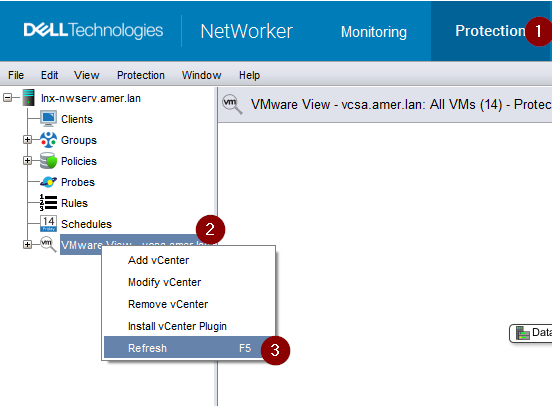
- FLR 웹 클라이언트에서 로그아웃했다가 다시 로그인합니다.
- VM의 전원이 켜져 있고 소스 VM과 동일한 운영 체제 플랫폼이 있는 한 VM은 FLR의 타겟으로 나열됩니다.
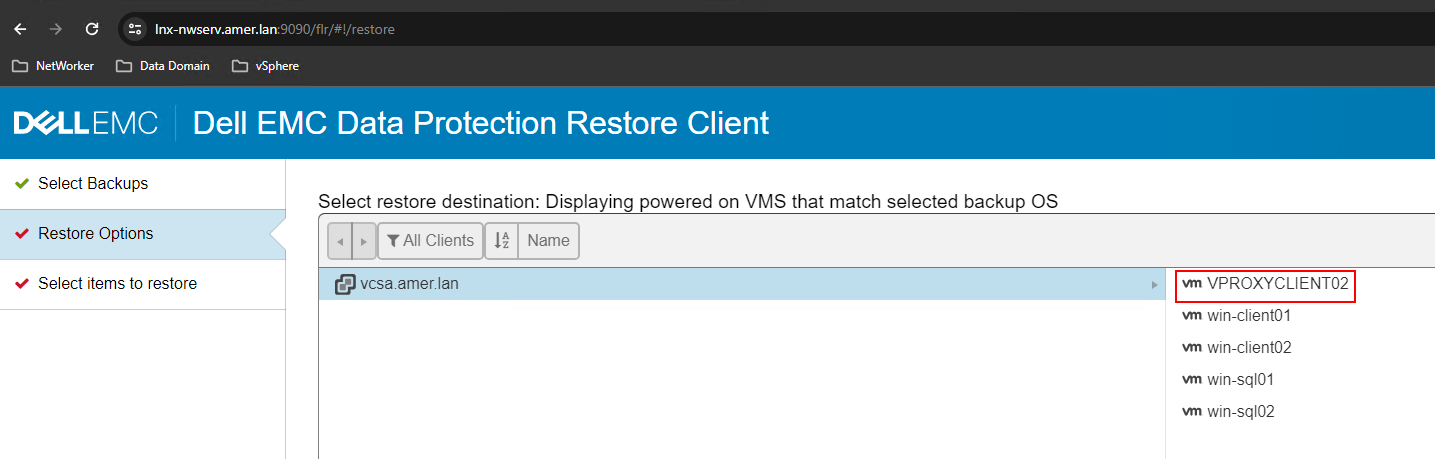
참고: NVP(NetWorker VMware Protection) vProxy 어플라이언스가 아닌 VM의 이름 또는 메모 필드에 "vProxy"를 사용하지 마십시오.
Additional Information
VMware vCenter에 대한 액세스 권한이 없는 경우 NetWorker Server에서 다음 명령을 실행할 수 있습니다.
nsrvim -d --names VCENTER_NAME
이 명령은 NetWorker Server의 다음 아래에 세 개의 .xml 파일을 생성합니다.
Linux: /nsr/cores/nsrvim
Windows: C:\Program Files\EMC NetWorker\nsr\cores\nsrvim
root@lnx-nwserv:~# ls -l /nsr/cores/nsrvim/
total 48
-rw-r--r--. 1 root root    47 Feb 26 13:27 VCENTER_NAME-cat_tags.xml
-rw-r--r--. 1 root root  2527 Feb 26 13:27 VCENTER_NAME-mapping.xml
-rw-r--r--. 1 root root 40242 Feb 26 13:27 VCENTER_NAME.xml
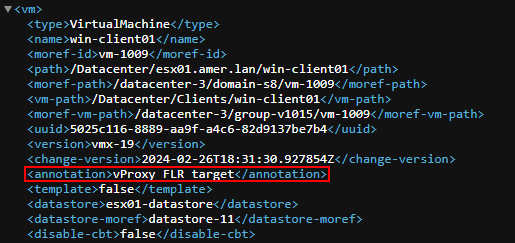
VCENTER_NAME 엽니다.Xml. VM에 메모(주석)가 설정되어 있는지 표시됩니다.
Affected Products
NetWorkerProducts
NetWorker Family, NetWorker SeriesArticle Properties
Article Number: 000222467
Article Type: Solution
Last Modified: 02 Apr 2025
Version: 2
Find answers to your questions from other Dell users
Support Services
Check if your device is covered by Support Services.