VxRail: Failed to set customized depots due to vLCM add component for solution components
Summary: Do not use VxRail add component function to import solution components, it causes issue that cannot complete the configuration of the vSphere HA agent on the host. This KB is used to clean up the imported solution component and recover from the incorrect operation. ...
This article applies to
This article does not apply to
This article is not tied to any specific product.
Not all product versions are identified in this article.
Symptoms
Upgrade the cluster by vLCM, using add component function to import solution components like VMware NSX, vSAN, vSphere with Tanzu, Rub-IOFilter, so on. The upgrade failed at "Failed to set customized depots."
Check vmware-vum-server-log4cpp logs under vCenter path /var/log/vmware/vmware-updatemgr/vum-server/
There is a conflict between components and solutions.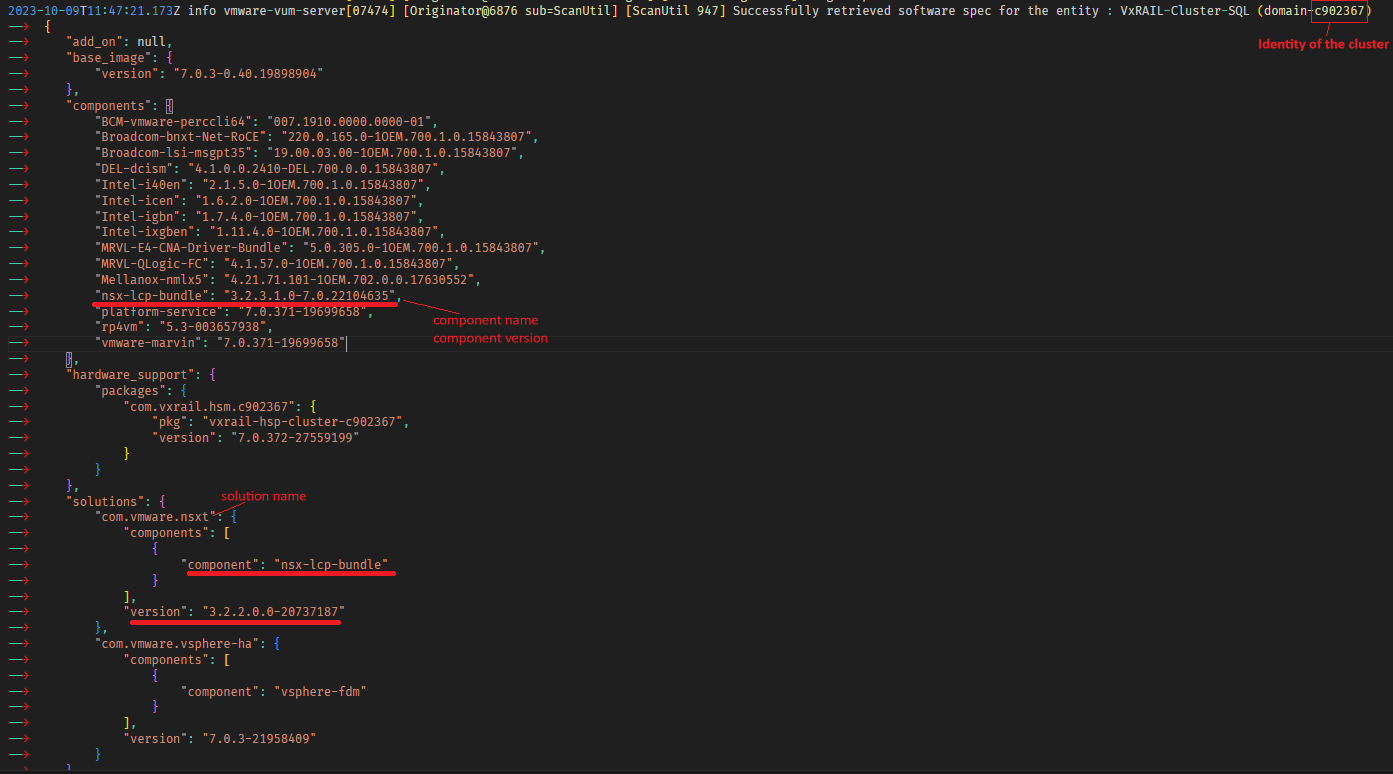
Cause
There are two types of components: "Solution Components" and "Individual Components."
vLCM can handle Individual Components upgrade like GPU or HBA VIBs.
For Solution Components like VMware NSX, vSAN, vSphere with Tanzu, Rub-IOFilter, so on, must follow VMware procedure to upgrade.
Resolution
-
Remove the related customized component section and files from the VxRail manager.
- /var/lib/vmware-marvin/customized-component.json
- /data/store2/customized/tmp/components/<added solution component files>
-
Follow KB 000222486 to complete the upgrade.
Article Properties
Article Number: 000222487
Article Type: Solution
Last Modified: 15 Jul 2025
Version: 4
Find answers to your questions from other Dell users
Support Services
Check if your device is covered by Support Services.