Dell Networking SONiC How to configure SNMP v2c
Summary: This article explains about how to configure SNMP v2c in Dell Networking SONiC.
This article applies to
This article does not apply to
This article is not tied to any specific product.
Not all product versions are identified in this article.
Instructions
PrerequisitesWe are using standard interface naming to demonstrate the Concepts. See the article Dell Networking S-Series: Basic Interface Configuration - SONiC 4.0 for more information regarding interface naming |
Index
What is SNMP?
SNMP v2c Configuration
SNMP communities
SNMP notifications
SNMP Groups (Optional)
SNMP Engine ID (Optional)
SNMP contact and location (Optional)
Source Interface (optional)
VRF (Optional)
Sample Configuration
What is SNMP?
Network management stations use simple network management protocol (SNMP) to retrieve and modify software configurations for managed objects on an agent in network devices. A managed object is a datum of management information.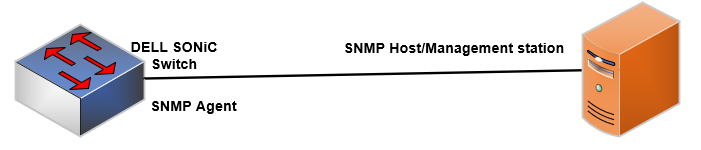
The SNMP agent in a managed switch maintains the data for managed objects in management information bases (MIBs). Managed objects are identified by their object identifiers (OIDs). A remote SNMP agent performs an SNMP walk on the OIDs stored in MIBs on the local switch to view and retrieve information.
The local SNMP agent sends notifications of system events to be configured by management stations called hosts. SNMP notifications are sent for events, such as system reloads and loss of connection with neighboring devices.
SNMP notifications can be traps or informs.
- An SNMP trap is sent when a change of state is detected in a management object. No acknowledgment is required from a management station that receives the trap message.
- An SNMP inform sends the trap content and requests confirmation of receipt from a management station. The inform is resent if no response is received. A management station sends its response as a protocol data unit (PDU).
NOTE:
Dell SONiC supports SNMP v2c and SNMP v3
Dell SONiC supports standards MIBs, including all get requests.
Dell SONiC does not support SNMP SET operations.
Dell SONiC supports SNMP v2c and SNMP v3
Dell SONiC supports standards MIBs, including all get requests.
Dell SONiC does not support SNMP SET operations.
This article explains for to configure SNMP v2c in Dell SONiC.
SNMP v2c Configuration
Below are the main configuration for SNMPv2.
SNMP communities
SNMP v2c uses community strings to authenticate SNMP management stations. SNMP messages are sent without encryption in plain text. In SNMP v2c, A community string serves as a password that is included in Get requests to allow user access to a managed switch, and that allows the switch to send SNMP messages to an authenticated user.
Command Syntax
Configure SNMP communities
admin@DELLSONiC:~$ sonic-cli
DELLSONiC# configure
DELLSONiC(config)# snmp-server community {SNMP-COMMUNITY-NAME} |
A community string supports all alphanumeric and special characters except space, comma, and @; 32 characters maximum. A minimum of four characters is required. In addition, using # as the first character in a community string (for example, snmp-server community #public) is not supported.
SNMP notifications
To send SNMP notifications as traps, enter traps and a security level. To send SNMP notifications as informs, enter informs and a security level. By default traps and informs are sent on UDP port 162 and the default VRF.
Command Syntax
admin@DELLSONiC:~$ sonic-cli
DELLSONiC# configure
DELLSONiC(config)# snmp-server host {ipv4–address | ipv6–address} community community-name {traps v2c | informs [timeout seconds] [retries number]} [source-interface {Eth slot/port[/breakout-port] | Vrf vrf-name] [port udp-port-number] |
To remove a remote management station from receiving SNMP v2 notifications use below command.
Command Syntax
admin@DELLSONiC:~$ sonic-cli
DELLSONiC# configure
DELLSONiC(config)# no snmp-server host {ipv4–address | ipv6–address} community community-name |
Enable all SNMP traps and informs that are generated on switch interfaces to be sent to an SNMP management station from the local agent.
Command Syntax
admin@DELLSONiC:~$ sonic-cli DELLSONiC# configure DELLSONiC(config)# snmp-server enable trap |
Verify
DELLSONiC# show snmp-server DELLSONiC# show snmp-server host |
SNMP Groups (Optional)
Specify a group name to use a community string to authenticate an individual or group of users.
Command Syntax
The group name is 32 character long. admin@DELLSONiC:~$ sonic-cli DELLSONiC# configure DELLSONiC(config)# snmp-server community SNMP-COMMUNITY-NAME group GROUP-NAME v2c notify no_view |
Verify
Use the following commands.
DELLSONiC # show snmp-server community DELLSONiC # show snmp-server group |
SNMP Engine ID (Optional)
An engine ID identifies the SNMP local agent on a switch. The engine ID is an octet number. By default, the SNMP engine ID is derived from the MAC address.Command Syntax
admin@DELLSONiC:~$ sonic-cli
DELLSONiC# configure
DELLSONiC (config)# snmp-server engine {ENGINE-ID} |
Verify
Use the following command
DELLSONiC # show snmp-server |
SNMP contact and location (Optional)
For system troubleshooting, configure contact information (for example, phone number, email, tech support name) and the physical location (campus building, floor, room) of the local SNMP agent, use the snmp-server engineID command. Enter up to 32 characters for each string. Enclose each text in double quotes (").
Command Syntax
admin@DELLSONiC:~$ sonic-cli DELLSONiC# configure DELLSONiC(config)# snmp-server contact "CONTACT-STRING" DELLSONiC(config)# snmp-server location "LOCATION-STRING" |
Verify
Use the following command
DELLSONiC # show snmp-server |
Source Interface (optional)
We can specify a source interface for a host. Use the following command admin@DELLSONiC:~$ sonic-cli
DELLSONiC# configure
DELLSONiC(config)# snmp-server host {HOST IP or NAME} community DELL-SNMP source-interface {Interface}
Interface options
Eth Ethernet interface
Loopback Loopback interface
Management Management interface
PortChannel PortChannel interface
Vlan VLAN interface |
VRF (Optional)
If, the host is reachable over a VRF, use below command.
admin@DELLSONiC:~$ sonic-cli
DELLSONiC# configure
DELLSONiC(config)# snmp-server host {HOST IP or NAME} community DELL-SNMP vrf {VRF_NAME}
VRF-NAME Options
mgmt Management VRF
VRF name (prefixed by Vrf, Max: 15 characters) VRF name (up to 15 characters) |
Sample Configuration
Lets assume we have a host 10.0.0.1, in the default vrf, receiving the trap. The community string is DELL-SNMP. Contact is SUPPORT-CONTACT and the location is BUILDING_NAME. admin@DELLSONiC:~$ sonic-cli DELLSONiC# configure DELLSONiC(config)# snmp-server community DELL-SNMP DELLSONiC(config)# snmp-server contact "SUPPORT-CONTACT" DELLSONiC(config)# snmp-server location "BUILDING_NAME" DELLSONiC(config)# snmp-server enable trap DELLSONiC(config)# snmp-server host 10.0.0.1 community DELL-SNMP |
Lets verify the configuration.
DELLSONiC# show snmp-server

Location   : "BUILDING_NAME"
Contact    : "SUPPORT-CONTACT"
EngineID   : XX:XX:XX:XX:XX:XX:XX:XX:XX:XX:XX
Traps : enable |
DELLSONiC# show snmp-server host

             Target Address              Port  Type    Community    Ver T-Out Retries    VRF     Source-Interface
--------------------------------------- ----- ------ -------------- --- ----- ------- ---------- ---------------
10.0.0.1                                162   trap   DELL-SNMP      v2c 15    3


             Target Address              Port  Type    User Name        Security    T-Out Retries    VRF     Source-interface
--------------------------------------- ----- ------ -------------- --------------- ----- ------- ---------- -----------
|
Affected Products
Enterprise SONiC Distribution, Dell EMC Networking N3200-ON, PowerSwitch S5212F-ON, PowerSwitch S5224F-ON, PowerSwitch S5232F-ON, PowerSwitch S5248F-ON, PowerSwitch S5296F-ON, PowerSwitch Z9100-ON, PowerSwitch Z9264F-ON, PowerSwitch Z9332F-ON
, PowerSwitch Z9432F-ON
...
Article Properties
Article Number: 000222508
Article Type: How To
Last Modified: 28 Feb 2024
Version: 2
Find answers to your questions from other Dell users
Support Services
Check if your device is covered by Support Services.