IDPA: 펌웨어 작업 실패 오류: 대기 중 9029 시간 초과
Summary: 이 문서에서는 ESXi 검사 단계에서 PowerProtect-DP-Rapid-Upgrade-Checker(RUCK) 오류를 실행할 때 발생할 수 있는 문제의 해결 방법을 설명합니다. 이 오류는 노드 이벤트 서비스 또는 IRAC 서비스 모듈 또는 IDRAC 상태와 관련이 있습니다. 펌웨어 작업 실패, 오류: 9029 내부 작업이 완료되기를 기다리는 동안 시간 초과 ...
This article applies to
This article does not apply to
This article is not tied to any specific product.
Not all product versions are identified in this article.
Symptoms
firmware_readiness 검사 중에 RUCK 툴이 실패하고 다음 메시지가 표시됩니다.
Firmware pre-upgrade checks failed. Firmware task failed with error: [9029] timeout while waiting for an internal task to complete. Check Node Event service/IRAC Service Module/IDRAC status and check logs for details.
Cause
ESXi의 iDRAC Service Module(ISM) 상태는 다음과 같은 상태일 수 있습니다.
- Inactive-Active
(실행중아님)
-Active(실행중)-Active(실행중)
처음 두 상태(비활성, 활성(실행중아님))인 경우 업그레이드가 시작되지 않습니다.
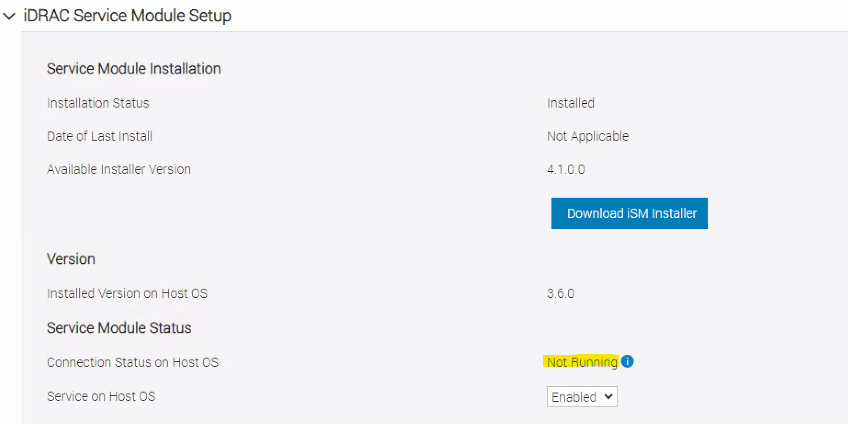
아래와 같이ISM 서비스가 iDRAC에서 "실행되지 않음"으로 표시됩니다.
- Inactive-Active
(실행중아님)
-Active(실행중)-Active(실행중)
처음 두 상태(비활성, 활성(실행중아님))인 경우 업그레이드가 시작되지 않습니다.
아래와 같이ISM 서비스가 iDRAC에서 "실행되지 않음"으로 표시됩니다.
Resolution
ISM 서비스를 "실행 중" 상태로 변경하려면 다음 지침을 따르십시오.
1 - 오류를 보고하는 ESXi에 root로 로그인합니다.
2- 실행 /etc/init.d/dcism-netmon-watchdog status ESXi 호스트에서ISM 서비스의 상태를 확인하려면 다음과 같이 하십시오.
root@idpahypervisor1:~> /etc/init.d/dcism-netmon-watchdog status
iSM is active (not running)
3 - iDRAC 설정/설정 탭에서 iDRAC 사용자 인터페이스를 확인하여 "실행 중이 아님" 상태를 확인합니다.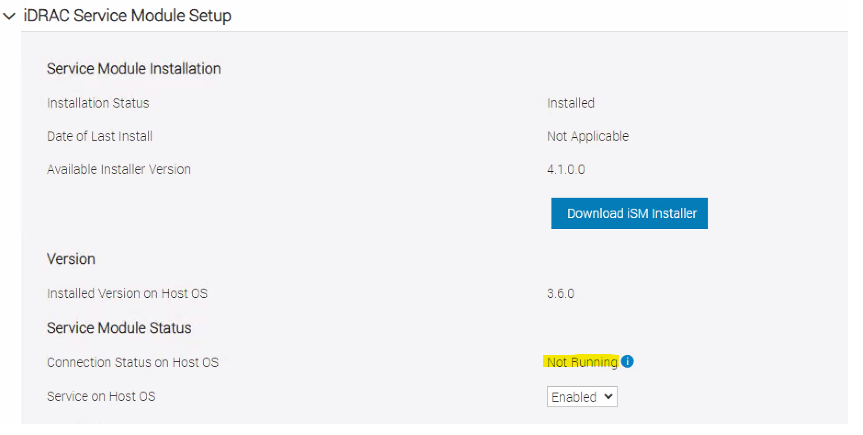
두 서비스가 모두 "실행되지 않음" 상태인 경우 다음 작업 계획을 진행합니다. 다운타임이 필요하지 않습니다.
1. ESXi server에 루트로 로그인합니다.
2. ESXi에서 dcism 서비스를 중지합니다.
/etc/init.d/dcism-netmon-watchdog stop
- sfcdb-watchdog 서비스를 중지합니다.
/etc/init.d/sfcbd-watchdog stop
- iDRAC 재부팅:
/opt/dell/DellPTAgent/tools/ipmitool_static mc reset cold
- iDRAC가 다시 나타날 때까지 기다립니다.
- sfcg-watchdog 서비스를 시작합니다.
/etc/init.d/sfcbd-watchdog start
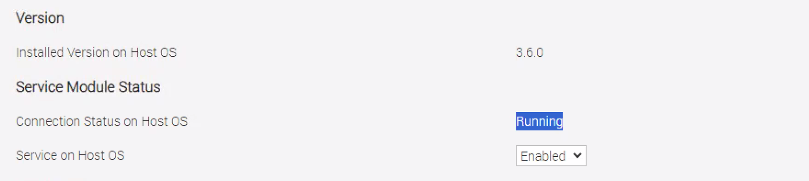
- 몇 분 정도 기다린 후 ESXi 및 iDRAC에서ISM 서비스의 상태를 확인합니다. "running"으로 표시되어야 합니다.
Additional Information
iDRAC IP는 다음 명령을 사용하여 얻을 수 있습니다.
esxcli hardware ipmi bmc get
iDRAC IP가 기본값인 경우 터널을 생성합니다.
PowerProtect DP Series 어플라이언스 및 IDPA: DP4400 ESXi에서 SSH 터널을 통해 iDRAC UI에 액세스하는 방법
또는 ssh를 통해 IDRAC에 연결하고 다음 명령을 실행합니다.
racadm get idrac.servicemodule
다음 문서에서는 동일한 오류에 대한 다른 시나리오를 설명했습니다.
PowerProtect DP Series 및 IDPA: 신속한 업그레이드 ChecKer 유틸리티가 "firmware_readiness" 검사 실패를 표시함
Affected Products
PowerProtect Data Protection ApplianceArticle Properties
Article Number: 000222521
Article Type: Solution
Last Modified: 17 Feb 2025
Version: 2
Find answers to your questions from other Dell users
Support Services
Check if your device is covered by Support Services.