IDPA:固件任务失败错误:9029 等待时超时
Summary: 本文介绍在 ESXi 检查阶段运行 PowerProtect-DP-Rapid-Upgrade-Checker (RUCK) 错误时可能出现的问题的解决方案。 此错误与 Node Event 服务、IRAC Service Module 或 IDRAC 状态相关。固件任务失败,出现错误:9029 等待内部任务完成时超时
This article applies to
This article does not apply to
This article is not tied to any specific product.
Not all product versions are identified in this article.
Symptoms
在firmware_readiness检查期间,RUCK 工具失败,并显示以下消息:
Firmware pre-upgrade checks failed. Firmware task failed with error: [9029] timeout while waiting for an internal task to complete. Check Node Event service/IRAC Service Module/IDRAC status and check logs for details.
Cause
ESXi 上的 iDRAC Service Module (ISM) 状态可能为以下状态: 非活动
- 活动(未运行)
- 活动(正在运行)前
两种状态(非活动、活动(未运行))会阻止升级启动。
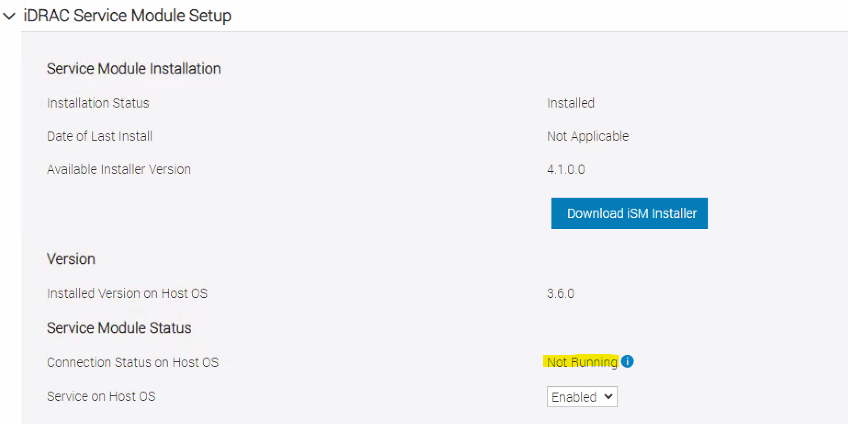
ISM 服务在 iDRAC 中显示为“未运行”,如下所示:
- 活动(未运行)
- 活动(正在运行)前
两种状态(非活动、活动(未运行))会阻止升级启动。
ISM 服务在 iDRAC 中显示为“未运行”,如下所示:
Resolution
要将 ISM 服务更改为“正在运行”状态,请遵循以下指导准则:
1- 以 root 用户身份登录到报告错误的 ESXi。
2- 运行 /etc/init.d/dcism-netmon-watchdog status 要验证 ESXi 主机上 ISM 服务的状态,请执行以下作:
root@idpahypervisor1:~> /etc/init.d/dcism-netmon-watchdog status
iSM is active (not running)
3- 检查 iDRAC 设置/设置选项卡中的 iDRAC 用户界面,以确认“未运行”状态: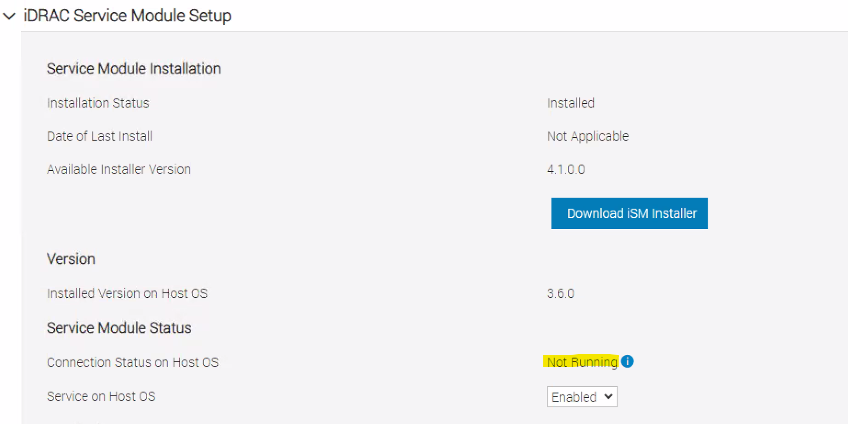
如果两项服务都处于“未运行”状态,请继续执行以下行动计划。无需停机时间:
1.以 root 身份登录 ESXi 服务器。
2.停止 ESXi 上的 dcism 服务:
/etc/init.d/dcism-netmon-watchdog stop
- 停止 sfcdb-watchdog 服务:
/etc/init.d/sfcbd-watchdog stop
- 重新启动 iDRAC:
/opt/dell/DellPTAgent/tools/ipmitool_static mc reset cold
- 等待 iDRAC 再次启动。
- 启动服务 sfcg-watchdog:
/etc/init.d/sfcbd-watchdog start
- 等待几分钟,然后检查 ESXi 和 iDRAC 上 ISM 服务的状态。它应显示为“running”:

Additional Information
可以使用以下命令获取 iDRAC IP:
esxcli hardware ipmi bmc get
如果 iDRAC IP 为默认 IP,则创建隧道:
PowerProtect DP 系列备份一体机和 IDPA:DP4400 如何从 ESXi 通过 SSH 隧道访问 iDRAC UI
或者,通过 ssh 连接到 IDRAC 并运行以下命令:
racadm get idrac.servicemodule
以下文章介绍了相同错误
的其他情况:PowerProtect DP 系列和 IDPA:快速升级检查器实用程序显示“firmware_readiness”检查失败
Affected Products
PowerProtect Data Protection ApplianceArticle Properties
Article Number: 000222521
Article Type: Solution
Last Modified: 17 Feb 2025
Version: 2
Find answers to your questions from other Dell users
Support Services
Check if your device is covered by Support Services.