NetWorker: Nie można uzyskać dostępu do NWUI | Nie można odnaleźć strony
Summary: Interfejs sieciowy NetWorker (NWUI) jest przekierowywany do komunikatu "Nie można odnaleźć strony" podczas próby uzyskania do niej dostępu.
This article applies to
This article does not apply to
This article is not tied to any specific product.
Not all product versions are identified in this article.
Symptoms
Podczas próby uzyskania dostępu NWUI przechodzi poniżej błędu.
Poniżej znajdują się komunikaty dziennika z nwui.raw.
127107 1694068051 1 5 0 822093632 1614 0 *****.backup.cba nwuictld NSR notice 16 Startup complete 0
127105 1695827017 2 5 0 822093632 1614 0 *****.backup.cba nwuictld NSR warning 62 Stop command for daemon %s failed, sending TERM signal instead 1 20 44 /nsr/nwui/monitoring/app/bin/nwui_monitoring
0 1695827017 1 5 0 660702976 1614 0 *****.backup.cba nwuictld NSR notice 6 %s: %s 2 0 15 nwui_monitoring 0 44 ERROR:Unable to get nwui install directory.
0 1695827017 1 5 0 660702976 1614 0 *****.backup.cba nwuictld NSR notice 6 %s: %s 2 0 6 nwuidb 0 38 Stopping NWUI Database (Postgres DB):
0 1695827017 1 5 0 660702976 1614 0 *****.backup.cba nwuictld NSR notice 6 %s: %s 2 0 6 nwuidb 0 35 ERROR: Postgres DB is not running!
127109 1695827020 1 5 0 822093632 1614 0 *****.backup.cba nwuictld NSR notice 17 Shutdown complete 0
Cause
Możliwe przyczyny:
Usługi NWUI mogą nie działać.
Baza danych NWUI (Postgres DB) może nie być uruchomiona.
Uruchom poniższe polecenia, aby sprawdzić, czy usługi NWUI są uruchomione, czy nie.
W systemie Linux:ps -ef | grep nwui
W systemie Windows:tasklist | findstr nwui
Resolution
W systemie Linux:
Musi działać nwui_configure.sh (skrypt) z /opt/nwui/scripts
Jeśli problem nadal występuje, zainstaluj ponownie interfejs NWUI i uruchom polecenie nwui_configure.sh (scenariusz)
Ponowna instalacja NWUI:
Odinstalować:
[root@***** linux_x86_64]# rpm -evh lgtonwuiserv-19.8.0.4-1.x86_64
Preparing...                          ################################# [100%]
NOTE: NetWorker Web UI Server is uninstalled successfully.
Cleaning up / removing...
  1:lgtonwuiserv-19.8.0.4-1          ################################# [100%]
Zainstalowana:
[root@***** linux_x86_64]# rpm -ivh lgtonwuiserv-19.8.0.4-1.x86_64.rpm
warning: lgtonwuiserv-19.8.0.4-1.x86_64.rpm: Header V3 RSA/SHA256 Signature, key ID ff48d101: NOKEY
Preparing...                          ################################# [100%]
Updating / installing...
  1:lgtonwuiserv-19.8.0.4-1          ################################# [100%]
Uruchom nwui_configure.sh (skrypt):
[root@***** linux_x86_64]# /opt/nwui/scripts/nwui_configure.sh
Specify the directory where the Java Standard Edition Runtime Environment (JRE) software is installed [/usr/java/latest]:
Specify the host name of the NetWorker Authentication Service host [*****]:
Specify the host name of the NetWorker Server to be Managed by NWUI [*****]:
Specify the AUTHC port for Networker Server which is managed by NWUI [9090]:
The NetWorker Web UI Server requires a keystore file to configure encryption and to provide SSL support.
EMC recommends that you specify a password that has a minimum of nine characters,
with at least one upper case letter, one lower case letter, one number and one special character.
Do you want to use the existing keystore /nsr/nwui/monitoring/app/conf/nwui.keystore [y]?
Specify password for the existing keystore:ERROR: Keystore password cannot be empty
Specify password for the existing keystore:ERROR: Keystore password cannot be empty
Specify password for the existing keystore:ERROR: Keystore password cannot be empty
Specify password for the existing keystore:
The install will use the existing certificate "emcnwuimonitoring" for nwui services.
A database already exists in /nsr/nwui/monitoring/nwuidb, do you want to retain this database [y]?
The installation completed successfully
W systemie Windows:
Ponownie zainstaluj interfejs NWUI
Aby odinstalować NWUI:
Panel sterowania - wybierz NetWorker - zmień - wyczyść NWUI - zmień.
Aby zainstalować NWUI:
Panel sterowania - wybierz NetWorker - zmień - zaznacz NWUI - zmień.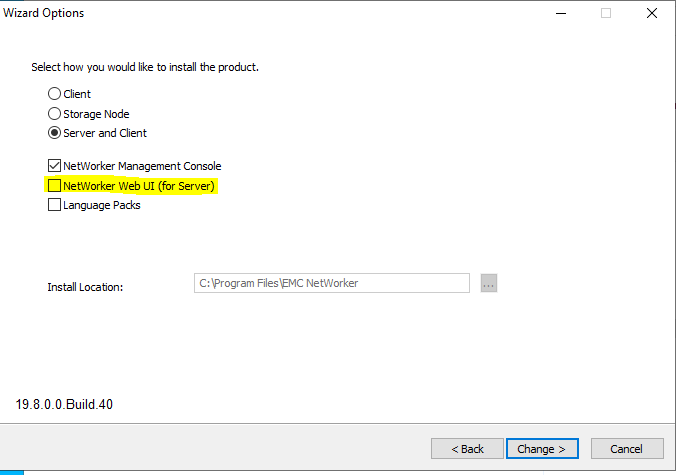
Affected Products
NetWorker FamilyArticle Properties
Article Number: 000222554
Article Type: Solution
Last Modified: 25 Nov 2025
Version: 2
Find answers to your questions from other Dell users
Support Services
Check if your device is covered by Support Services.