Alert M.2 Heat Sink Not Detected on Precision Workstations
Summary: This article provides information about Precision Workstations not responding if the M.2 SSD heat sink assembly is not correctly installed.
This article applies to
This article does not apply to
This article is not tied to any specific product.
Not all product versions are identified in this article.
Symptoms
Affected Platforms:
- Precision 5860 Tower
- Precision 7875 Tower
Precision Workstations may stop during the boot process with an error message Alert M.2 heat sink not detected.

Cause
If the M.2 heat sink is installed incorrectly or removed and then reinstalled, the computer may stop during boot and show an error message.
Resolution
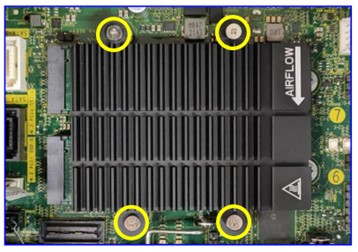
Tightening the M.2 heat sink screws using a Philips screwdriver to tighten screws around the M.2 heat sink may resolve the issue. Ensure that the screws are tightened to the bottom. See the assembly steps in this Dell Knowledge Article:
How to replace the M.2 2230 SSD with M.2 2280 SSD on the motherboard in Precision 5860/7865 Tower

Affected Products
Precision 5860 Tower, Precision 7875 TowerArticle Properties
Article Number: 000222589
Article Type: Solution
Last Modified: 22 Apr 2025
Version: 4
Find answers to your questions from other Dell users
Support Services
Check if your device is covered by Support Services.