How to Identify If 4K Video Content Cannot Be Viewed Due to an HEVC Codec
Summary: The following article provides information about problems with viewing 4K video content using the High-Efficiency Video Coding (HEVC) codec.
This article applies to
This article does not apply to
This article is not tied to any specific product.
Not all product versions are identified in this article.
Instructions
Playing High-Efficiency Video Coding content on a computer or external display may require the purchase of a software HEVC codec or of a third-party media player.
HEVC content streaming is supported on configurations with:
- An optional discrete graphics card
- An optional add-on video graphics card
- An integrated 4K display panel
- Dolby Vision
- A CyberLink Blu-Ray player
The following three scenarios illustrate the differences.
Scenario One:
When selecting a local video file to play HEVC content, the HEVC codec is not available. A message appears in Windows that recommends installing a software codec from the Microsoft store. The message reads, "You need a new codec to play this item. Codecs help the app read and play different files. '[2160p] 4K-HD.Club-2013-Taipei 101 Fireworks Trailer' requires the 'HEVC Video Extension' codec pack, available from the Microsoft Store." The message has options to choose Get or Not now.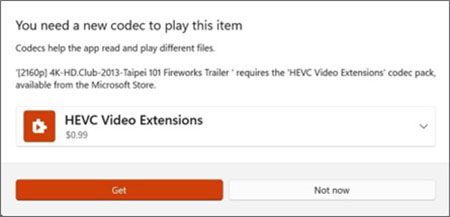
Scenario Two:
A streaming service is accessed using a computer application or a browser without the HEVC codec. The playback experience is still smooth, but the content can only be in high-definition and not in 4K.
Scenario Three:
4K content is attempted to be viewed on an external monitor with a computer that did not have the HEVC codec installed at the factory. The content can only be in high-definition and not in 4K. A 4K resolution is unable to be selected. This cannot be changed even if an HEVC codec is installed later.
Article Properties
Article Number: 000222670
Article Type: How To
Last Modified: 21 Aug 2025
Version: 4
Find answers to your questions from other Dell users
Support Services
Check if your device is covered by Support Services.