使用 USB GBE 以太网适配器和 WinPE 版本 10.0.22000.1 时,网络无法正常工作
Summary: 有关使用 USB GBE 以太网适配器时网络断开连接的信息。
This article applies to
This article does not apply to
This article is not tied to any specific product.
Not all product versions are identified in this article.
Symptoms
客户可能会报告称,在使用 USB GBE 以太网(DA300、WD19 和其他非戴尔适配器)时,遇到 WinPE 11 网络问题。网络在开始时安装正确,但随后 USB 适配器断开连接,并在几秒钟后显示“介质已断开连接”消息。
WinPE 版本:10.0.22000.1
驱动程序包:WinPE11.0-Drivers-A01-28HG7.CAB
Cause
INF rtu53cx22x64sta.inf 1153.10.20.1104 不支持较旧的 ADK (10.0.22000.1) 。
Resolution
最新 ADK 版本
戴尔工程师建议您使用最新的 ADK 版本 (10.0.25398.1)。
解决办法:
默认情况下,将加载 rtu53cx22x64sta.inf (1153.10.20.1104) 驱动程序。如果将其删除,则会加载另一个驱动程序 rtump64x64.inf 10.48.914.2021,并允许网络使用 USB GBE 以太网。
Process:
- 右键单击“开始”,然后选择“设备管理器”(图 1.
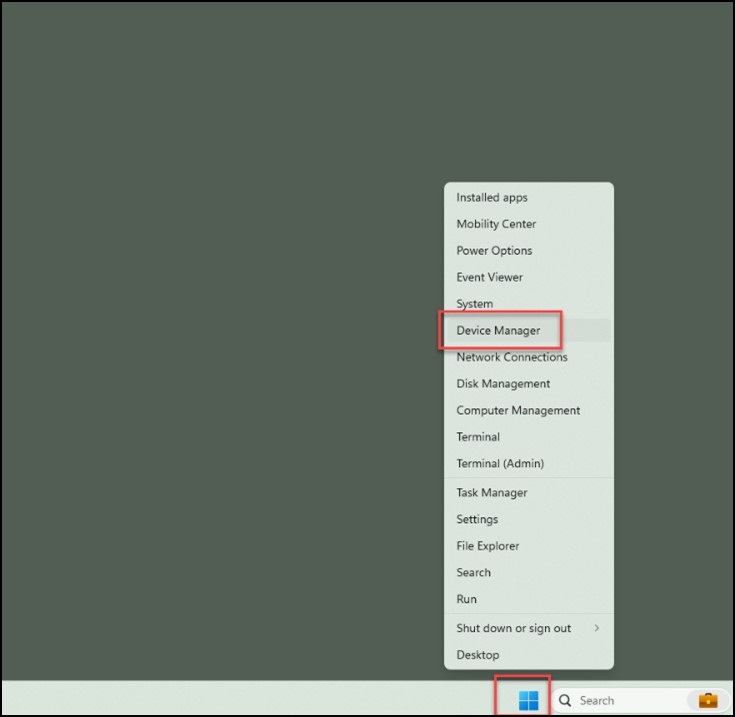
图 1 - 选择“Network Adapters”下拉列表,然后打开“Realtek USB GbE Family Controller”(图 2.
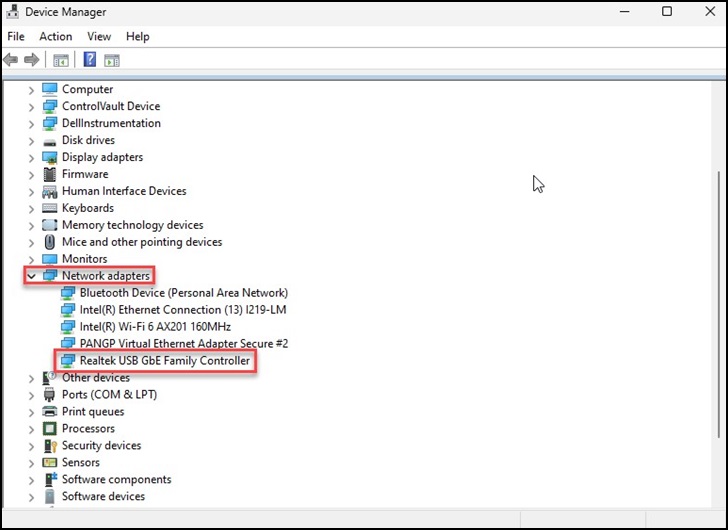
图 2 - 单击顶部的“Driver”选项卡,检查驱动程序版本并确认是否显示“1153.10.20.1104”(图 3.
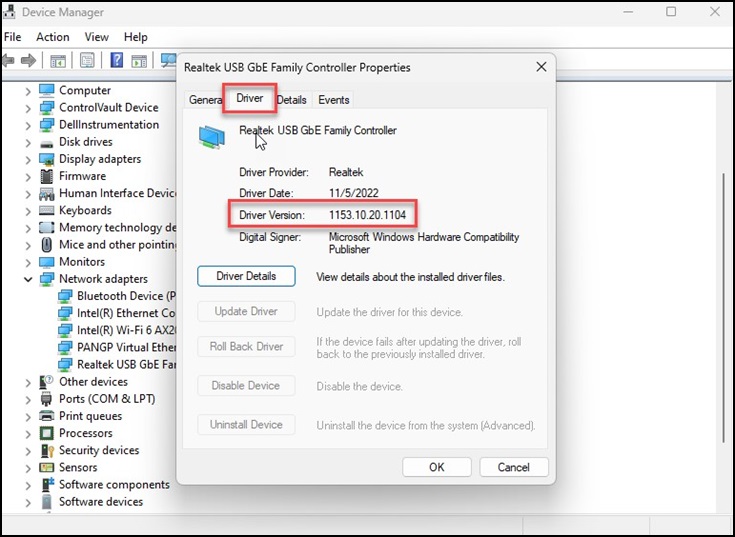
图 3 - 如果您看到“1153.10.20.1104”,请选择“Uninstall Device”,然后单击“OK”(图 4)。
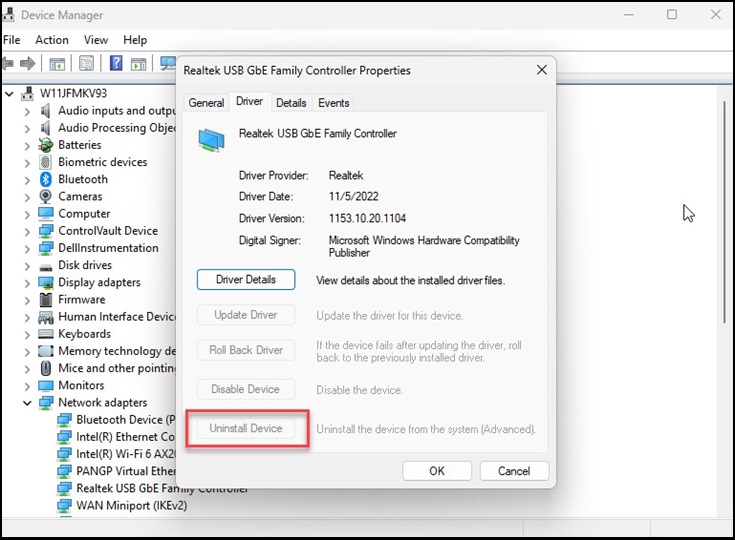
图 4 - 重新启动系统并重复步骤 1-3,以确认版本现在显示“10.48.914.2021”。
提醒:Windows ADK 工具包被视为第三方应用程序,仅限于尽力支持。
Additional Information
ADK 工具中的新增功能:What's new in the ADK tools:ADK 工具中的新增功能
下载并安装 Windows ADK:下载并安装 Windows ADK
Affected Products
Dell Adapter - Dell USB-C Mobile Adapter - DA300, Dell Dock WD19Article Properties
Article Number: 000222732
Article Type: Solution
Last Modified: 24 Apr 2025
Version: 5
Find answers to your questions from other Dell users
Support Services
Check if your device is covered by Support Services.