PowerStore:クライアントとPowerstore GUI間のファイル システムの使用済み領域の不一致(ユーザー修正可能)
Summary: ユーザーがStorage --> File Systems --> Modifyタブを使用してファイル システムのプロパティを開くと、クライアントとPowerstore GUIの間でファイル システムの使用済み領域に不一致があることに気付く場合があります。
This article applies to
This article does not apply to
This article is not tied to any specific product.
Not all product versions are identified in this article.
Symptoms
ユーザーが[Storage] >> [File Systems] >> [Modify]タブからファイル システムのプロパティを開くと、クライアントとPowerstore GUIの間でファイル システムの使用済み領域に不一致があることが確認されました。
例:
Linuxクライアントでは、ファイル システムの使用済み領域は5.7GBです。
![[Storage] --> [File Systems] --> [Modify]を使用したPowerStore GUIファイル システム プロパティのスクリーン ショット](https://supportkb.dell.com/img/ka06P0000010yvJQAQ/ka06P0000010yvJQAQ_ja_2.jpeg)
Powerstore PSTCLIでは、ファイル システムの使用済み領域は2.88GBです。
例:
Linuxクライアントでは、ファイル システムの使用済み領域は5.7GBです。
-bash-4.4# df -h | egrep "Filesystem|export"
Filesystem                   Size  Used Avail Use% Mounted on
10.241.219.176:/test_export   10G  5.7G  4.4G  57% /mnt/test_mp
Powerstore GUIファイル システムのプロパティから、[Storage] --> [File Systems] --> [Modify]を選択すると、ファイル システムの使用済み領域は2.9GBです。
Powerstore PSTCLIでは、ファイル システムの使用済み領域は2.88GBです。
cli> file_system -name test_fs show
id                               = 65e7c24d-8da2-1fb7-ce3a-3aff9b777928
name                             = test_fs
description                      =
nas_server_id                    = 631f5e75-7391-e506-819e-2efcdba0778f
parent_id                        =
filesystem_type                  = Primary
size_total                       = 10737418240 (10.00G)
size_used                        = 3097493504 (2.88G)
config_type                      = General
protection_policy_id             =
access_policy                    = Native
locking_policy                   = Advisory
folder_rename_policy             = All_Forbidden
is_smb_sync_writes_enabled       = no
is_smb_op_locks_enabled          = yes
is_smb_no_notify_enabled         = no
is_smb_notify_on_access_enabled  = no
is_smb_notify_on_write_enabled   = no
smb_notify_on_change_dir_depth   = 512
is_async_MTime_enabled           = no
is_quota_enabled                 = no
grace_period                     = 604800
default_hard_limit               = 0
default_soft_limit               = 0
creation_timestamp               =
expiration_timestamp             =
last_refresh_timestamp           =
last_writable_timestamp          =
is_modified                      =
access_type                      =
creator_type                     =
file_events_publishing_mode      = None
Cause
ユーザーが[Storage] >> [File Systems] >> [Modify]タブの順に選択してファイル システムのプロパティを開くと、Powerstore GUIに誤った使用済み領域が表示されます。この場合、Powerstore GUIは、最新のファイル システム プロパティをフェッチするためのRESTコマンドをSDNASコンテナに発行しないため、GUIはローカル データベースから古いファイル システムの使用済み領域を引き続き表示します。
Powerstore GUIがファイル システムの使用済み領域を更新する方法について詳しく説明します。
1.SDNASコンテナには、使用済み領域を含め、常に最新のファイル システム プロパティがあります。
2.Powerstore GUIには、ローカル データベース(managementDB)からの使用済み領域が表示されます。
3.ユーザーがファイル システムのページを開いた場合にのみ(下のスクリーンショットを参照)、PowerStoreはRESTコールをSDNASに送信して最新のファイル システム プロパティを取得し、ローカルDB/GUIを現在使用されているサイズで更新します。
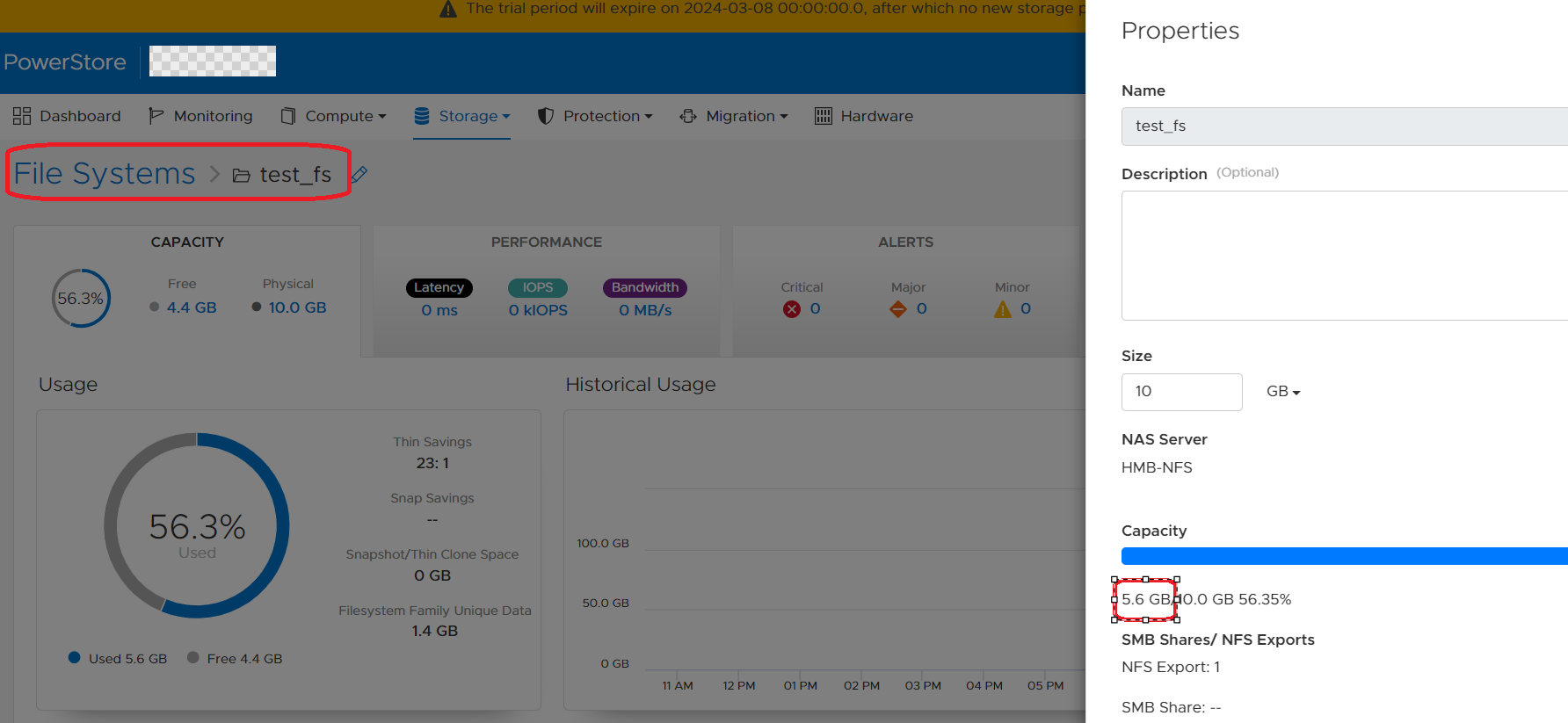
Powerstore GUIがファイル システムの使用済み領域を更新する方法について詳しく説明します。
1.SDNASコンテナには、使用済み領域を含め、常に最新のファイル システム プロパティがあります。
2.Powerstore GUIには、ローカル データベース(managementDB)からの使用済み領域が表示されます。
3.ユーザーがファイル システムのページを開いた場合にのみ(下のスクリーンショットを参照)、PowerStoreはRESTコールをSDNASに送信して最新のファイル システム プロパティを取得し、ローカルDB/GUIを現在使用されているサイズで更新します。
Resolution
回避 策:
回避策は、GUIで[Storage]>> [File Systems]> の順に選択してファイル システム ページを開き、[File system]をクリックします。GUIおよびpstcliでのこのファイル システムの使用済み領域は、5分以内に更新されます。
修正:
将来のPowerStore OSには、ファイル システムの使用状況の詳細がGUIで30秒ごとに更新されるようになる機能拡張があります。
回避策は、GUIで[Storage]>> [File Systems]> の順に選択してファイル システム ページを開き、[File system]をクリックします。GUIおよびpstcliでのこのファイル システムの使用済み領域は、5分以内に更新されます。
修正:
将来のPowerStore OSには、ファイル システムの使用状況の詳細がGUIで30秒ごとに更新されるようになる機能拡張があります。
Affected Products
PowerStore, PowerStoreOSArticle Properties
Article Number: 000222779
Article Type: Solution
Last Modified: 14 May 2024
Version: 3
Find answers to your questions from other Dell users
Support Services
Check if your device is covered by Support Services.