Powerstore:用戶端和 Powerstore GUI 之間的檔案系統已用空間差異 (使用者可修正)
Summary: 如果使用者透過「儲存裝置 --> 檔案系統 --> 修改」標籤開啟檔案系統內容,可能會注意到用戶端和 Powerstore GUI 之間的檔案系統已使用空間差異。
This article applies to
This article does not apply to
This article is not tied to any specific product.
Not all product versions are identified in this article.
Symptoms
如果使用者透過儲存 --> 檔案系統 --> 修改標籤開啟檔案系統內容,則在用戶端和 Powerstore GUI 之間會觀察到檔案系統使用空間差異。
範例:
從 Linux 用戶端來看,檔案系統的已使用空間為 5.7GB。

在 Powerstore PSTCCLI 中,檔案系統的已使用空間為 2.88GB。
範例:
從 Linux 用戶端來看,檔案系統的已使用空間為 5.7GB。
-bash-4.4# df -h | egrep "Filesystem|export"
Filesystem                   Size  Used Avail Use% Mounted on
10.241.219.176:/test_export   10G  5.7G  4.4G  57% /mnt/test_mp
透過「儲存」-> 「檔案系統」-> 「修改」的Powerstore GUI檔案系統屬性,檔案系統的已使用空間為2.9GB。
在 Powerstore PSTCCLI 中,檔案系統的已使用空間為 2.88GB。
cli> file_system -name test_fs show
id                               = 65e7c24d-8da2-1fb7-ce3a-3aff9b777928
name                             = test_fs
description                      =
nas_server_id                    = 631f5e75-7391-e506-819e-2efcdba0778f
parent_id                        =
filesystem_type                  = Primary
size_total                       = 10737418240 (10.00G)
size_used                        = 3097493504 (2.88G)
config_type                      = General
protection_policy_id             =
access_policy                    = Native
locking_policy                   = Advisory
folder_rename_policy             = All_Forbidden
is_smb_sync_writes_enabled       = no
is_smb_op_locks_enabled          = yes
is_smb_no_notify_enabled         = no
is_smb_notify_on_access_enabled  = no
is_smb_notify_on_write_enabled   = no
smb_notify_on_change_dir_depth   = 512
is_async_MTime_enabled           = no
is_quota_enabled                 = no
grace_period                     = 604800
default_hard_limit               = 0
default_soft_limit               = 0
creation_timestamp               =
expiration_timestamp             =
last_refresh_timestamp           =
last_writable_timestamp          =
is_modified                      =
access_type                      =
creator_type                     =
file_events_publishing_mode      = None
Cause
當使用者透過儲存裝置 --> 檔案系統 --> 修改標籤開啟檔案系統內容時,Powerstore GUI 會顯示不正確的已用空間。在此情況下,Powerstore GUI 不會向 SDNAS 容器發出 REST 命令來擷取最新的檔案系統內容,因此 GUI 仍會顯示其本機資料庫中的舊檔案系統已使用空間。
以下是 Powerstore GUI 如何更新檔案系統已使用空間的一些詳細資料:
1.SDNAS 容器始終具有最新的文件系統屬性,包括已使用空間。
2.Powerstore GUI 會顯示其本機資料庫 (managementDB) 中的已使用空間。
3.只有當使用者開啟檔案系統頁面 (請參閱以下螢幕擷取畫面) 時,Powerstore 才會傳送 REST 呼叫至 SDNAS,以擷取最新的檔案系統內容,並使用目前使用的大小更新其本機 DB/GUI。
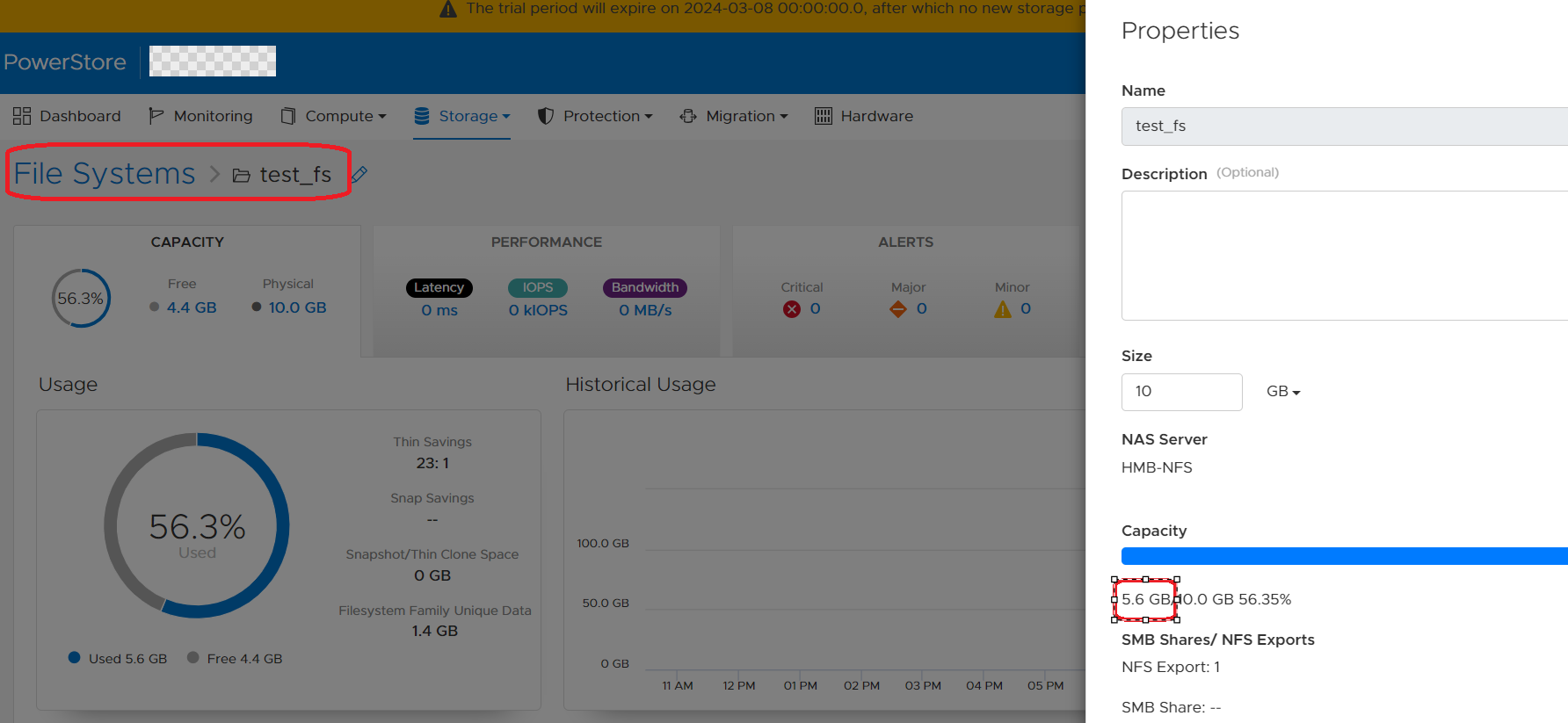
以下是 Powerstore GUI 如何更新檔案系統已使用空間的一些詳細資料:
1.SDNAS 容器始終具有最新的文件系統屬性,包括已使用空間。
2.Powerstore GUI 會顯示其本機資料庫 (managementDB) 中的已使用空間。
3.只有當使用者開啟檔案系統頁面 (請參閱以下螢幕擷取畫面) 時,Powerstore 才會傳送 REST 呼叫至 SDNAS,以擷取最新的檔案系統內容,並使用目前使用的大小更新其本機 DB/GUI。
Resolution
因應措施:
因應措施是透過儲存裝置 --> 檔案系統 --> 按一下檔案系統,在 GUI 中開啟檔案系統頁面。GUI 和 pstcli 中此檔案系統的已使用空間將在 5 分鐘內更新。
修正:
未來的 PowerStore 作業系統具備強化功能,可確保在 GUI 中每 30 秒更新一次檔案系統的使用方式詳細資料。
因應措施是透過儲存裝置 --> 檔案系統 --> 按一下檔案系統,在 GUI 中開啟檔案系統頁面。GUI 和 pstcli 中此檔案系統的已使用空間將在 5 分鐘內更新。
修正:
未來的 PowerStore 作業系統具備強化功能,可確保在 GUI 中每 30 秒更新一次檔案系統的使用方式詳細資料。
Affected Products
PowerStore, PowerStoreOSArticle Properties
Article Number: 000222779
Article Type: Solution
Last Modified: 14 May 2024
Version: 3
Find answers to your questions from other Dell users
Support Services
Check if your device is covered by Support Services.