Powerstore:客户端和 Powerstore GUI 之间的文件系统已用空间差异(用户可纠正)
Summary: 如果用户通过 Storage--> File Systems --Modify 选项卡打开文件系统属性,客户可能会注意到客户端和 Powerstore GUI >文件系统已用空间差异。
This article applies to
This article does not apply to
This article is not tied to any specific product.
Not all product versions are identified in this article.
Symptoms
如果用户通过“存储”-“文件系统”->>“修改”选项卡打开文件系统属性,则观察到客户端和 Powerstore GUI 之间存在文件系统已用空间差异。
例子:
在 Linux 客户端上,文件系统的已用空间为 5.7 GB。
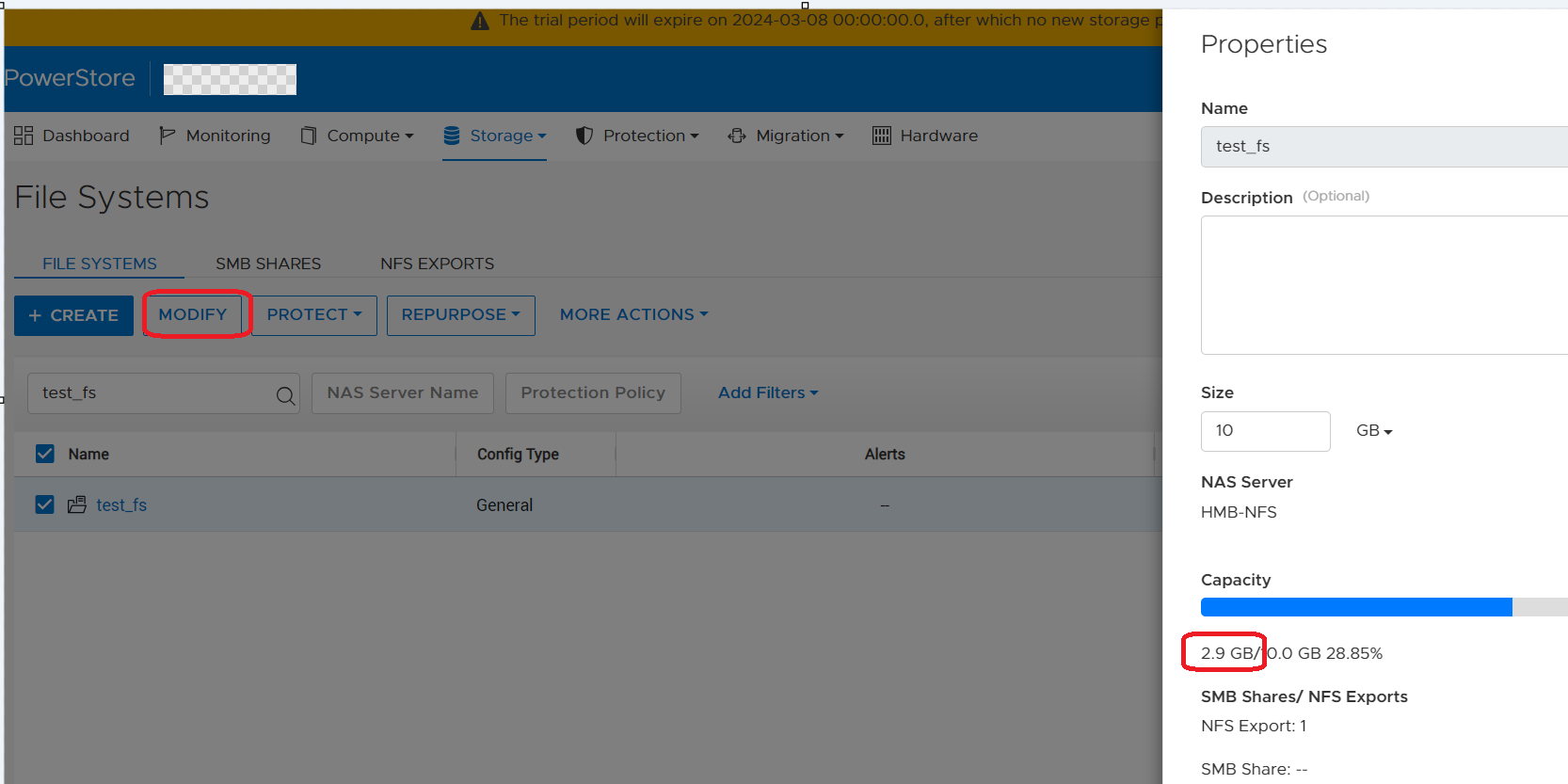
在 Powerstore PSTCLI 中,文件系统的已用空间为 2.88 GB。
例子:
在 Linux 客户端上,文件系统的已用空间为 5.7 GB。
-bash-4.4# df -h | egrep "Filesystem|export"
Filesystem                   Size  Used Avail Use% Mounted on
10.241.219.176:/test_export   10G  5.7G  4.4G  57% /mnt/test_mp
从 Powerstore GUI 文件系统属性中,依次选择“存储”-“> 文件系统”-> “修改”,文件系统的已用空间为 2.9 GB。
在 Powerstore PSTCLI 中,文件系统的已用空间为 2.88 GB。
cli> file_system -name test_fs show
id                               = 65e7c24d-8da2-1fb7-ce3a-3aff9b777928
name                             = test_fs
description                      =
nas_server_id                    = 631f5e75-7391-e506-819e-2efcdba0778f
parent_id                        =
filesystem_type                  = Primary
size_total                       = 10737418240 (10.00G)
size_used                        = 3097493504 (2.88G)
config_type                      = General
protection_policy_id             =
access_policy                    = Native
locking_policy                   = Advisory
folder_rename_policy             = All_Forbidden
is_smb_sync_writes_enabled       = no
is_smb_op_locks_enabled          = yes
is_smb_no_notify_enabled         = no
is_smb_notify_on_access_enabled  = no
is_smb_notify_on_write_enabled   = no
smb_notify_on_change_dir_depth   = 512
is_async_MTime_enabled           = no
is_quota_enabled                 = no
grace_period                     = 604800
default_hard_limit               = 0
default_soft_limit               = 0
creation_timestamp               =
expiration_timestamp             =
last_refresh_timestamp           =
last_writable_timestamp          =
is_modified                      =
access_type                      =
creator_type                     =
file_events_publishing_mode      = None
Cause
当用户通过“存储”-“文件系统”->>“修改”选项卡打开文件系统属性时,Powerstore GUI 显示不正确的已用空间。在这种情况下,Powerstore GUI 不会向 SDNAS 容器发出 REST 命令来获取最新的文件系统属性,因此 GUI 仍显示其本地数据库中的旧文件系统已用空间。
下面提供了有关 Powerstore GUI 如何更新文件系统已用空间的一些详细信息:
1.SDNAS 容器始终具有最新的文件系统属性,包括已用空间。
2.Powerstore GUI 显示其本地数据库 (managementDB) 中的已用空间。
3.只有当用户打开文件系统的页面时(请参阅下面的屏幕截图),Powerstore 才会向 SDNAS 发送 REST 调用,以获取最新的文件系统属性,并使用当前已用大小更新其本地 DB/GUI。
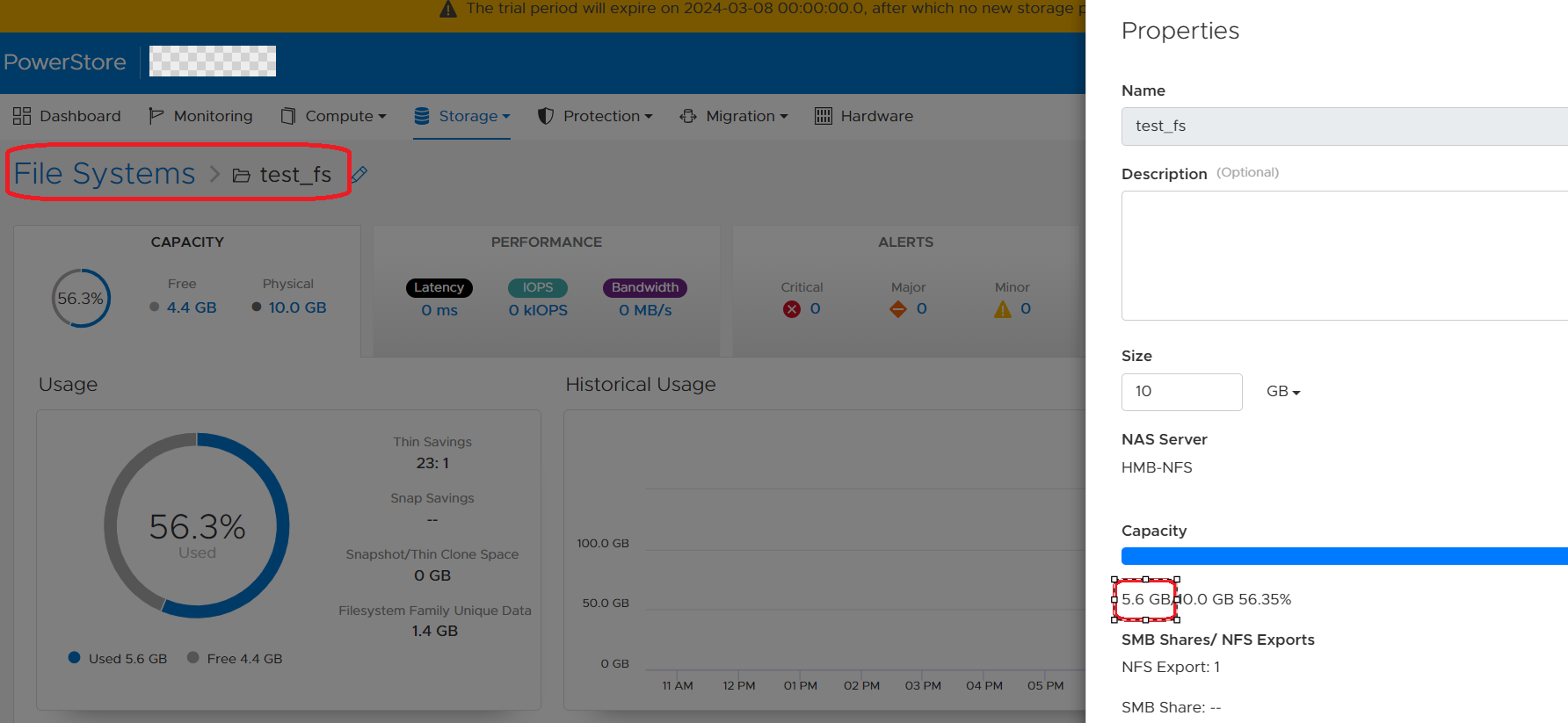
下面提供了有关 Powerstore GUI 如何更新文件系统已用空间的一些详细信息:
1.SDNAS 容器始终具有最新的文件系统属性,包括已用空间。
2.Powerstore GUI 显示其本地数据库 (managementDB) 中的已用空间。
3.只有当用户打开文件系统的页面时(请参阅下面的屏幕截图),Powerstore 才会向 SDNAS 发送 REST 调用,以获取最新的文件系统属性,并使用当前已用大小更新其本地 DB/GUI。
Resolution
解决 方案:
解决方法是在 GUI 中通过 Storage --> File Systems --> 单击 File system来打开文件系统页面。GUI 和 pstcli 中此文件系统的已用空间将在不到 5 分钟的时间内更新。
修复:
未来的 PowerStore 操作系统将提供一项增强功能,确保 GUI 中每 30 秒更新一次文件系统的使用情况详细信息。
解决方法是在 GUI 中通过 Storage --> File Systems --> 单击 File system来打开文件系统页面。GUI 和 pstcli 中此文件系统的已用空间将在不到 5 分钟的时间内更新。
修复:
未来的 PowerStore 操作系统将提供一项增强功能,确保 GUI 中每 30 秒更新一次文件系统的使用情况详细信息。
Affected Products
PowerStore, PowerStoreOSArticle Properties
Article Number: 000222779
Article Type: Solution
Last Modified: 14 May 2024
Version: 3
Find answers to your questions from other Dell users
Support Services
Check if your device is covered by Support Services.