Dell Networking SONiC Como usar o endereço IP em um VRF no MCLAG Link keepalive (source-ip e peer-ip)
Summary: Este artigo explica como usar o endereço IP em um VRF no link Keepalive do MCLAG (source-ip e peer-ip) no Dell Networking SONiC.
This article applies to
This article does not apply to
This article is not tied to any specific product.
Not all product versions are identified in this article.
Instructions
Pré-requisitos Estamos usando a nomenclatura de interface padrão para demonstrar os conceitos. Consulte o artigo Dell Networking série S: Basic Interface Configuration – SONIC 4.0para obter mais informações sobre nomenclatura de interface. |
O link de par MCLAG sincroniza o estado de par e é usado para transportar um heartbeat entre dois pares. Podemos usar o endereço IP atribuído à VLAN, à interface, à interface de gerenciamento para essa finalidade.
Na versão Dell SONiC 4.2, podemos usar o endereço IP no VRF não padrão.
Nota:
| - Certifique-se de que o Peer-IP esteja acessível para o ip-fonte ao configurá-lo como um link Keepalive. Use o comando ping para verificar a conectividade. - Para VRF padrão, não use o comando session-vrf. - Podemos usar endereço IP atribuído em Vlan ou interface de Camada 3 para Keepalive Link - Ao usar a VLAN como o link Keepalive, certifique-se de usar mclag-separate-ip na configuração. Consulte Quando "mclag-separate-ip" deve ser usado no Dell Networking Enterprise SONiC OS MF-CLI para obter mais detalhes. Exemplo de configuração
|
Sintaxe de configuração
| Configuração | Explicação |
|---|---|
admin@ DELLSONiC:~$ sonic-cli |
Faça log-in no Dell MF-CLI |
DELLSONiC# configure |
Entra no modo de configuração. |
DELLSONiC(config)# mclag domain <Domain ID> |
Defina o ID de domínio MCLAG. 1-4095 |
DELLSONiC(config-mclag-domain-1)# peer-ip <IP address> |
Configurar o IP do par para keepalive |
DELLSONiC(config-mclag-domain-1)# source-ip <IP address> |
Configurar o IP de origem para keepalive |
DELLSONiC(config-mclag-domain-1)# session-vrf <VRF-NAME> |
(Opcional) Para VRF padrão, essa configuração não é necessária. |
DELLSONiC(config-mclag-domain-1)# session-vrf mgmt |
(Opcional) Use este comando se estiver usando mgmt. VRF. |
Exemplo de configuração
Objetivo: Permite configurar o link keepalive em um switch par MCLAG 2. A porta de gerenciamento fora de banda é configurada no VRF de gerenciamento com IP 192.168.1.2. O IP do par é 192.168.1.1.
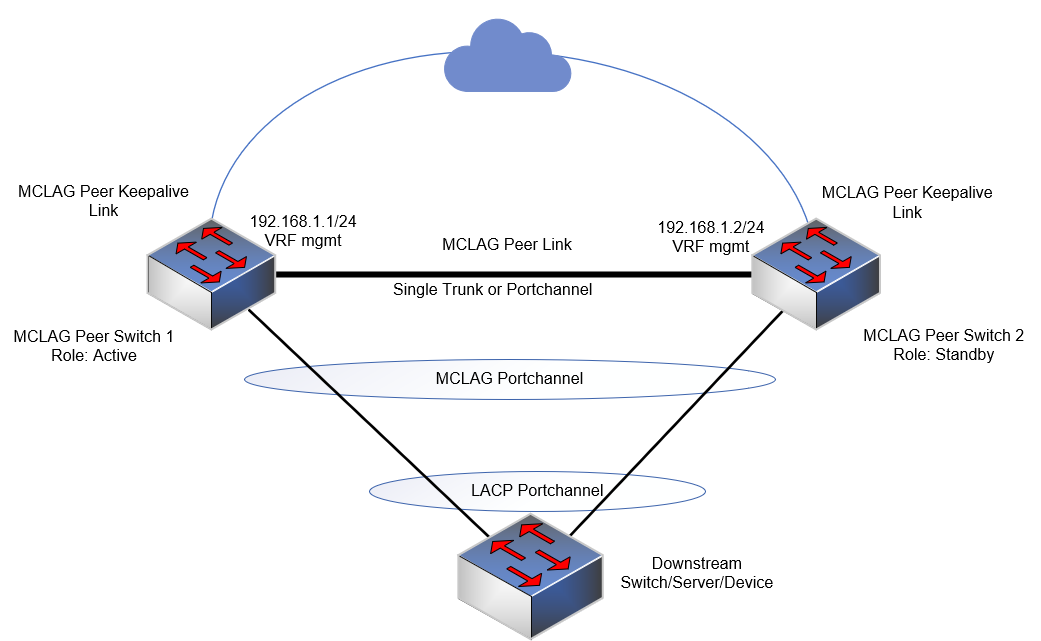
Considere que a porta de gerenciamento (fora de banda) está no gerenciamento de vrf e a usamos como nosso link de Keepalive.
DELLSONiC# show ip vrf VRF-NAME INTERFACES ---------------------------------------------------------------- default mgmt Management0 |
Permite atribuir session-vrf como mgmt no domínio mclag.
admin@DELLSONiC:~$ sonic-cli DELLSONiC# configure DELLSONiC(config)# mclag domain 1 DELLSONiC(config-mclag-domain-1)# source-ip 192.168.1.2 DELLSONiC(config-mclag-domain-1)# peer-ip 192.168.1.1 DELLSONiC(config-mclag-domain-1)# session-vrf mgmt DELLSONiC(config-mclag-domain-1)# exit DELLSONiC(config)# exit DELLSONiC# |
Vamos fazer um teste de ping para garantir que temos conectividade entre source-ip 192.168.1.2 e peer-ip 192.168.1.1 no gerenciamento de vrf.
DELLSONiC# ping vrf mgmt 192.168.1.1 -I 192.168.1.2 sudo: unable to resolve host DELLSONiC: Temporary failure in name resolution PING 192.168.1.1 (192.168.1.1) from 192.168.1.2 : 56(84) bytes of data. 64 bytes from 192.168.1.1: icmp_seq=1 ttl=64 time=4.73 ms 64 bytes from 192.168.1.1: icmp_seq=2 ttl=64 time=1.13 ms 64 bytes from 192.168.1.1: icmp_seq=3 ttl=64 time=0.846 ms 64 bytes from 192.168.1.1: icmp_seq=4 ttl=64 time=4.71 ms 64 bytes from 192.168.1.1: icmp_seq=5 ttl=64 time=4.75 ms 64 bytes from 192.168.1.1: icmp_seq=6 ttl=64 time=1.03 ms ^C --- 192.168.1.1 ping statistics --- 6 packets transmitted, 6 received, 0% packet loss, time 5023ms rtt min/avg/max/mdev = 0.846/2.867/4.746/1.865 ms |
Vamos verificar o status da sessão. Use o comando show mclag brief abaixo.
DELLSONiC# show mclag brief Domain ID : 1 Role : standby Session Status : up ======>We can see keepalive session is up Peer Link Status : up Source Address : 192.168.1.2 Peer Address : 192.168.1.1 Session Vrf : mgmt ======>The Keepalive session use mgmt vrf Peer Link : Eth1/1 Keepalive Interval : 1 secs Session Timeout : 30 secs Delay Restore : 300 secs System Mac : 0c:de:4c:81:00:0a Mclag System Mac : Number of MLAG Interfaces:1 ----------------------------------------------------------- MLAG Interface Local/Remote Status ----------------------------------------------------------- PortChannel1 up/up DELLSONiC# |
Affected Products
PowerSwitch E3200-ON Series, Dell EMC Networking N3200-ON, PowerSwitch S5212F-ON, PowerSwitch S5224F-ON, PowerSwitch S5232F-ON, PowerSwitch S5248F-ON, PowerSwitch S5296F-ON, PowerSwitch Z9100-ON, PowerSwitch Z9264F-ON, PowerSwitch Z9332F-ON
, PowerSwitch Z9432F-ON
...
Article Properties
Article Number: 000222932
Article Type: How To
Last Modified: 11 Mar 2024
Version: 2
Find answers to your questions from other Dell users
Support Services
Check if your device is covered by Support Services.