XPS 16 9640 Right Side Type-C Port Does Not Support Thunderbolt 4.0
Summary: Type-C port on the right side of the XPS 16 9640 does not support Thunderbolt 4 when the computer is configured with NVIDIA GeForce RTX 4070.
This article applies to
This article does not apply to
This article is not tied to any specific product.
Not all product versions are identified in this article.
Symptoms
XPS 16 9640 laptop users may see the following message when they connect a Thunderbolt device to the right-side Type-C port (Figure 1):
Dock is connected to a non-Thunderbolt port and will perform as a standard USB-C dock offering video, data, and power. For optimal speed and resolution, use a Thunderbolt port if available.
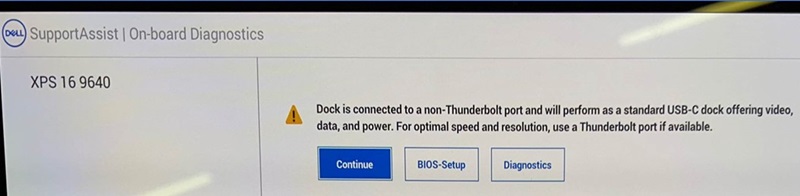
Figure 1. Message shown when a Thunderbolt device is connected to the right-side Type-C port
Affected Platforms:
- XPS 16 9640
Affected Video Card
- NVIDIA GeForce RTX 4070
Cause
This is working as designed.
Resolution
Connect a Thunderbolt device to the left side of the Type-C port.
For more information, reference Manuals and Documentation for your Dell Product and see External Ports section in the XPS 16 9640 Owner's Manual.
Affected Products
XPS 16 9640Article Properties
Article Number: 000223448
Article Type: Solution
Last Modified: 23 Apr 2025
Version: 3
Find answers to your questions from other Dell users
Support Services
Check if your device is covered by Support Services.