APEX Multi Cloud Platform for Azure |AzureポータルでAzureEdgeRemoteSupportが失敗と表示される
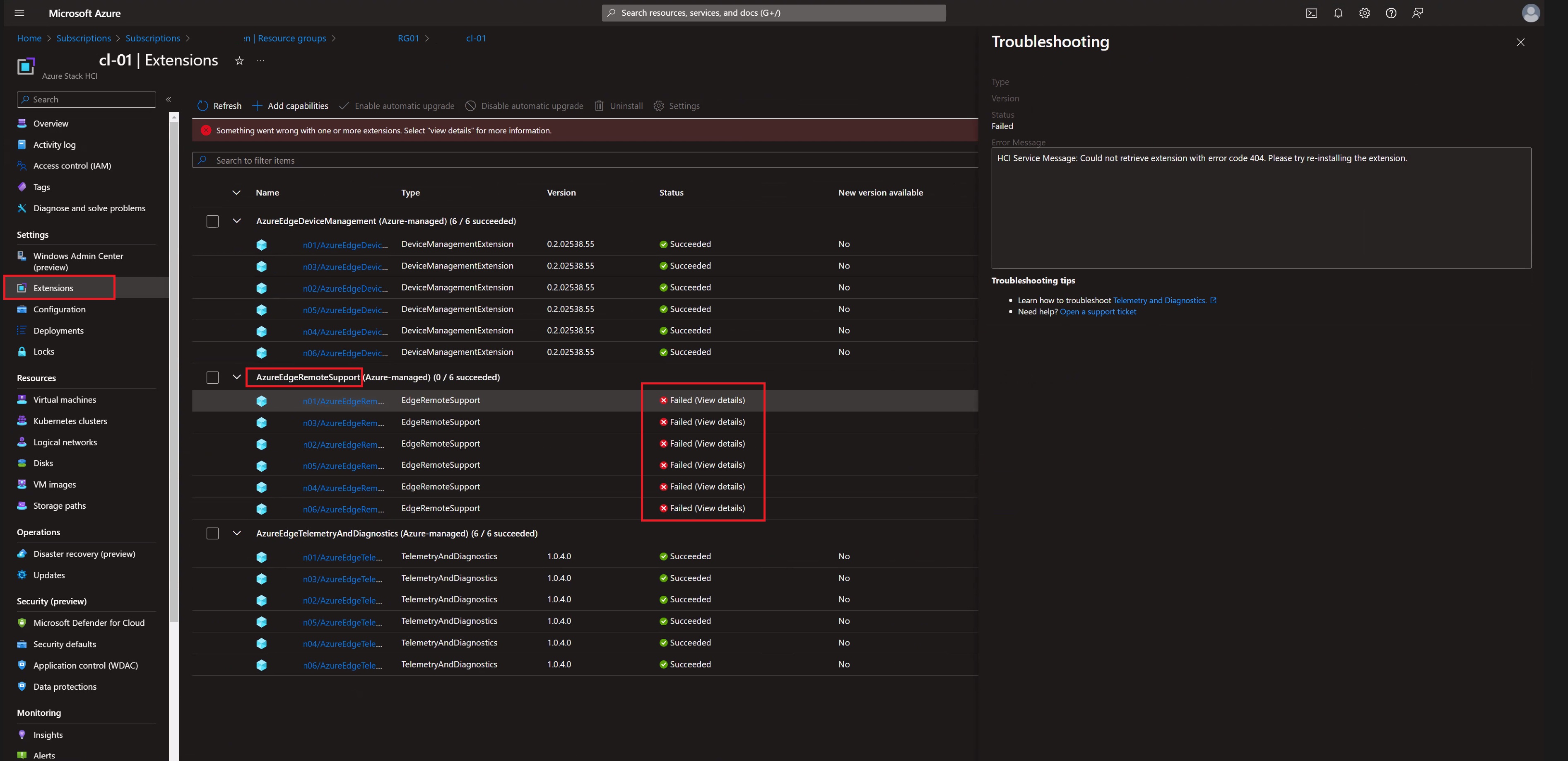
Summary: APEX Multi-Cloud Platform for Azure(バージョン1.01)の導入後、AzurePortalでAzureEdgeRemoteSupportがFailedと表示されます。
This article applies to
This article does not apply to
This article is not tied to any specific product.
Not all product versions are identified in this article.
Symptoms
APEX Multi-Cloud Platform for Azure(バージョン1.01)の導入後、AzurePortalでAzureEdgeRemoteSupportがFailedと表示されます。この設定は、クラスターのリソース グループにあります。これは、[設定]->[拡張機能]の下にあります。
Cause
これは Microsoft の既知の問題です。クラスターのデプロイが完了した後、AzureEdgeRemoteSupport (Azure マネージド) 拡張機能に Azure portal に "失敗" と表示されます。
リモート サポート拡張機能は動作していますが、拡張機能 "EdgeRemoteSupport" と "AzureEdgeRemoteSupport" の名前が一致していないため、アクティブなサービス側の問題があります。
リモート サポート拡張機能は動作していますが、拡張機能 "EdgeRemoteSupport" と "AzureEdgeRemoteSupport" の名前が一致していないため、アクティブなサービス側の問題があります。
Resolution
MicrosoftはAzureクラウドからの修正に取り組んでいますが、今のところ、無視できると述べています。
または、修正が自動的に適用されるのを待ちたくない場合は、次の手順を実行します
。1.ポータルのARCマシン ブレード上の各ARC HCIノードに移動します。
2.リモート サポート拡張機能を誤った名前でアンインストールします。
3.次のコマンドを実行して、クラスター内の任意のノードから強制同期をトリガーします。
または、修正が自動的に適用されるのを待ちたくない場合は、次の手順を実行します
。1.ポータルのARCマシン ブレード上の各ARC HCIノードに移動します。
2.リモート サポート拡張機能を誤った名前でアンインストールします。
3.次のコマンドを実行して、クラスター内の任意のノードから強制同期をトリガーします。
sync-azurestackhci4.HCI RPによって正しい名前で拡張機能が再インストールされ、HCIブレードの障害は解消されます。
Affected Products
APEX Cloud Platform for Microsoft AzureArticle Properties
Article Number: 000223559
Article Type: Solution
Last Modified: 11 Apr 2024
Version: 2
Find answers to your questions from other Dell users
Support Services
Check if your device is covered by Support Services.