VxRail: Upgrading fails with precheck error "Source vSphere ESX Agent Manager (EAM)"
Summary: Upgrading or Patching vCenter Server to 8.0 U2 fails with precheck error "Source vSphere ESX Agent Manager (EAM) upgrade failed to obtain EAM URLs to check against trusted certificates by the System" ...
This article applies to
This article does not apply to
This article is not tied to any specific product.
Not all product versions are identified in this article.
Symptoms
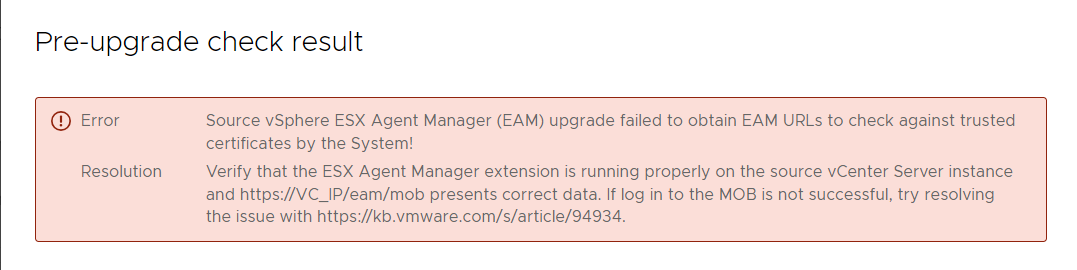
Upgrade pre-check on 8.0 U2 fails with the below error message:
Pre-upgrade check result
Error:
Source vSphere ESX Agent Manager (EAM) upgrade failed to obtain EAM URLs to check against trusted certificates by the System!
Resolution:
Verify that the ESX Agent Manager extension is running properly on the source vCenter Server instance and https://VC_IP/eam/mob presents correct data. If log in to the MOB is not successful, try resolving the issue with https://kb.vmware.com/s/article/94934.
EAM Logs(/var/log/vmware/eam/eam.log):
eam.log:

2024-03-13T10:11:33.816Z |  INFO | vim-async-0 | OpIdLogger.java | 43 | [vim:loginExtensionByCertificate:881dd5a1dbf48356] Failed.
2024-03-13T10:11:33.816Z |  WARN | vim-async-0 | ExtensionSessionRenewer.java | 227 | [Retry:Login:com.vmware.vim.eam:19090b37a54a32a] Re-login failed, due to:
com.vmware.eam.security.NotAuthenticated: Failed to authenticate extension com.vmware.vim.eam to vCenter.
        at com.vmware.eam.vim.security.impl.SessionManager.convertLoginException(SessionManager.java:295) ~[eam-server.jar:?]
        at com.vmware.eam.vim.security.impl.SessionManager.lambda$loginExtension$4(SessionManager.java:154) ~[eam-server.jar:?]
        at com.vmware.eam.async.remote.Completion.onError(Completion.java:86) [eam-server.jar:?]
        at com.vmware.eam.vmomi.async.FutureAdapter.setException(FutureAdapter.java:81) [eam-server.jar:?]
        at com.vmware.vim.vmomi.client.common.impl.MethodInvocationHandlerImpl$ClientFutureAdapter.setException(MethodInvocationHandlerImpl.java:731) [vlsi-client.jar:?]
        at com.vmware.vim.vmomi.client.http.impl.HttpExchangeBase.run(HttpExchangeBase.java:57) [vlsi-client.jar:?]
        at java.util.concurrent.ThreadPoolExecutor.runWorker(ThreadPoolExecutor.java:1149) [?:1.8.0_351]
        at java.util.concurrent.ThreadPoolExecutor$Worker.run(ThreadPoolExecutor.java:624) [?:1.8.0_351]
        at java.lang.Thread.run(Thread.java:750) [?:1.8.0_351]
Caused by: com.vmware.vim.binding.vim.fault.InvalidLogin: Cannot complete login due to an incorrect user name or password.
        at sun.reflect.GeneratedConstructorAccessor56.newInstance(Unknown Source) ~[?:?]
        at sun.reflect.DelegatingConstructorAccessorImpl.newInstance(DelegatingConstructorAccessorImpl.java:45) ~[?:1.8.0_351]
        at java.lang.reflect.Constructor.newInstance(Constructor.java:423) ~[?:1.8.0_351]
Cause
As part of the EAM upgrade pre-checks, an EAM client is created to retrieve all EAM agencies and perform necessary SSL trust checks. This step might not succeed if an EAM client cannot be created because the EAM service is unable to log in to vCenter. This can occur due to a discrepancy between the "vpxd-extension" certificate stored in VECS and the certificate information stored in the vCenter Server Database for the EAM extension.
Resolution
Update the certificate for the Extensions in VPXD by following any of below options:
Note: Follow Option 2 if the source is Windows vCenter Server.
Option 1 - Update extensions using fixcerts script
Option 2 - Update extensions using KB 2112577

Update the extension's certificate using fixcerts script:
- Download the fixcerts script from https://via.vmw.com/fixcerts
- Copy the downloaded script to VCSA
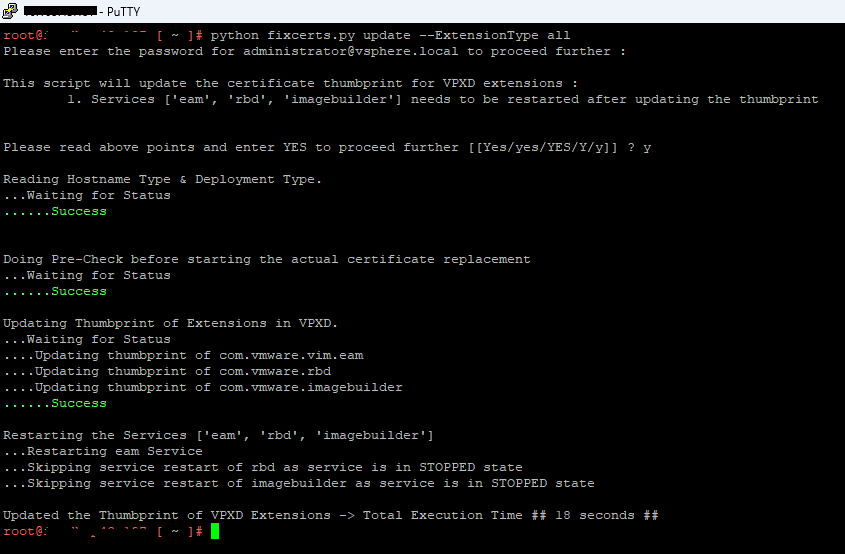
- Run the script using below arguments to update the extensions
python fixcerts.py update --ExtensionType all
Sample screenshot:
Affected Products
VMWare Cloud on Dell EMC VxRail E560F, VMWare Cloud on Dell EMC VxRail E560N, VxRail Appliance SeriesArticle Properties
Article Number: 000223593
Article Type: Solution
Last Modified: 28 Aug 2024
Version: 3
Find answers to your questions from other Dell users
Support Services
Check if your device is covered by Support Services.