PowerProtect: Oracle RMAN 백업을 검증하는 방법
Summary: RMAN을 사용하여 PowerProtect Data Manager에서 생성한 RMAN 백업을 검증하는 방법
This article applies to
This article does not apply to
This article is not tied to any specific product.
Not all product versions are identified in this article.
Instructions
유효성 검사를 위해 RMAN에서 다음과 같은 명령을 사용합니다.
제공할 매개변수는 다음과 같습니다.
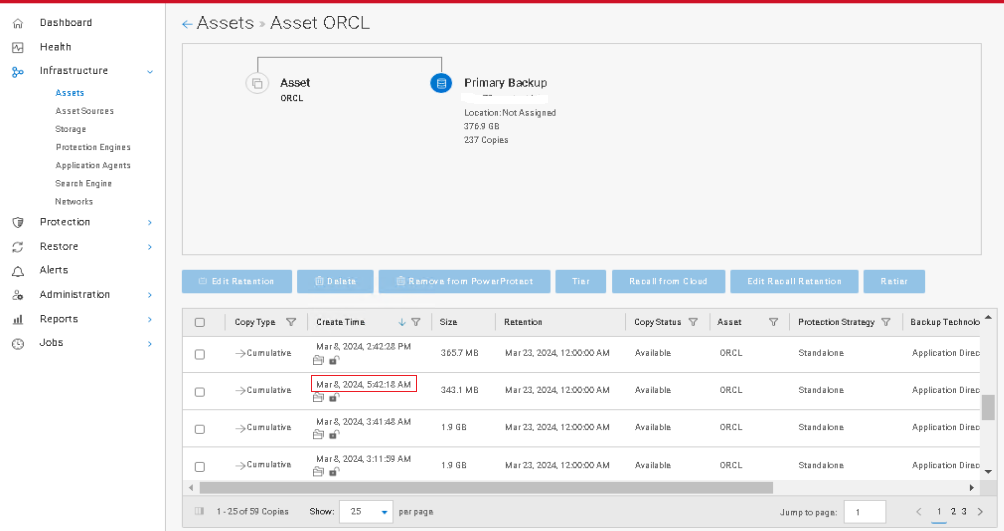
태그는 PowerProtect Data Manager 백업 생성 시간과의 상관 관계 YYYY:MM:DD:HH:MM
을 기준으로 합니다. PowerProtect Data Manager의 Assets에서 Copies를 살펴보면 Create Time을 확인할 수 있습니다.
run { allocate channel c1 type SBT_TAPE parms 'SBT_LIBRARY=/home/oracle/opt/dpsapps/rmanagent/lib/libddobk.so, ENV=(RMAN_AGENT_HOME=/home/oracle/opt/dpsapps/rmanagent, STORAGE_UNIT=DDStorageUnitFromPolicy,BACKUP_HOST=DD_IP_ADDRESS)'; validate backupset BACKUP_SET_ID; release channel c1;} 예:
run { allocate channel c1 type SBT_TAPE parms 'SBT_LIBRARY=/home/oracle/opt/dpsapps/rmanagent/lib/libddobk.so, ENV=(RMAN_AGENT_HOME=/home/oracle/opt/dpsapps/rmanagent, STORAGE_UNIT=OracleDBAuth-ppdm199-99c64,BACKUP_HOST=10.10.0.50)'; validate backupset 24935; release channel c1;}
제공할 매개변수는 다음과 같습니다.
SBT_LIBRARY - if not using default path
RMAN_AGENT_HOME  - if not using default install path
STORAGE_UNIT - DD storage unit name - it's listed in the output from 'list backupset;' for each set
BACKUP_HOST -  DD IP Address
BACKUP_SET_ID -  the numeric id of the backup set of interest. (24935 from the example)
태그는 PowerProtect Data Manager 백업 생성 시간과의 상관 관계 YYYY:MM:DD:HH:MM
을 기준으로 합니다. PowerProtect Data Manager의 Assets에서 Copies를 살펴보면 Create Time을 확인할 수 있습니다.
다음은 RMAN 명령의 샘플 출력입니다.
list backupset;

Affected Products
PowerProtect Data ManagerArticle Properties
Article Number: 000223678
Article Type: How To
Last Modified: 11 Jul 2024
Version: 1
Find answers to your questions from other Dell users
Support Services
Check if your device is covered by Support Services.