PPDM - VM FLR or SQL App Aware backup fails with error "Command 'C:\Windows\system32\msiexec.exe' terminated with exit code 1625.)
Summary: Windows msiexec error encountered when PowerProtect Data Manager tries to install an agent for File Level Restore or App aware backup protection/configuration.
This article applies to
This article does not apply to
This article is not tied to any specific product.
Not all product versions are identified in this article.
Symptoms
- Mount failure encountered when carrying out a Virtual Machine (VM) File Level Restore (FLR) or Search Level Restore (SLR) with error:
"Unable to mount disks. Unable to install vProxy Agent on ''. Command 'C:\Windows\system32\msiexec.exe' terminated with exit code 1625.)"
- VM SQL App ware agent fails to install due to error
"Command 'C:\Windows\system32\msiexec.exe' terminated with exit code 1625."
Cause
The error code 1625 is coming from the Windows msiexe.exe, it resents the following:
The failure is a Windows OS level issue, which must be reviewed on the VM by the local Administrator. It cannot be addressed through a PowerProtect Data Manager configuration. However this can be worked around by installing the FLR or Microsoft App Agent manually on the VM.
Note: Windows exit code numbers can be translated by running: net helpmsg exit code on Windows OS
| ERROR_INSTALL_PACKAGE_REJECTED | 1625 | This installation is forbidden by system policy. Contact your system administrator. |
The failure is a Windows OS level issue, which must be reviewed on the VM by the local Administrator. It cannot be addressed through a PowerProtect Data Manager configuration. However this can be worked around by installing the FLR or Microsoft App Agent manually on the VM.
Note: Windows exit code numbers can be translated by running: net helpmsg exit code on Windows OS
C:\Windows\system32>net helpmsg 1625
This installation is forbidden by system policy. Contact your system administrator.
Resolution
Workaround:
1. Log in to the VM with an administrative account.
2. Go to Programs and Features and check to see if the PowerProtect Data Manager Agents are already installed, if yes uninstall.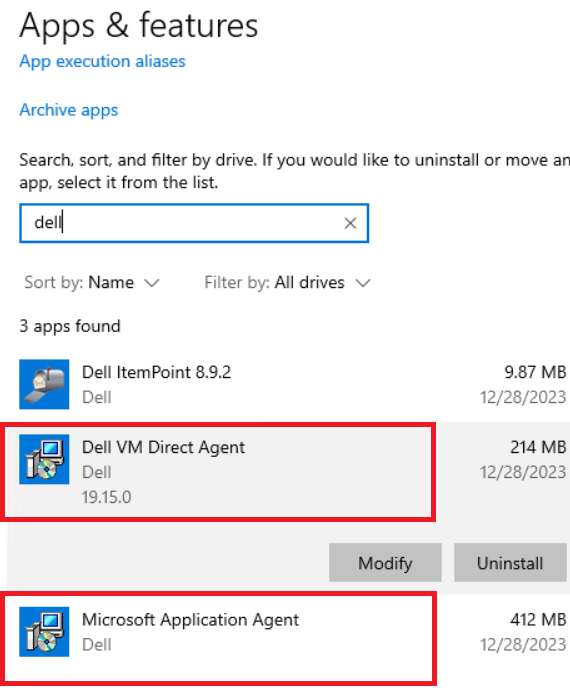
3. Use an SCP agent (FileZilla, WinSCP, or similar) to connect to PowerProtect Data Manager with OS admin user.
4. Copy the installer from PowerProtect Data Manager to the VM.
Windows Installers: /vproxy/sw-repo/vflragent/windows
- FLR Agent (Dell VM Direct Agent):
5. On the VM run the required installers as administrator.
6. Once complete, retry the previous action attempted. EG FLR restore, VM SQL backup, or installation
1. Log in to the VM with an administrative account.
2. Go to Programs and Features and check to see if the PowerProtect Data Manager Agents are already installed, if yes uninstall.
- Dell VM Direct Agent is the vflragent used for File Level Restores and App Aware backups
- Microsoft Application Agent is used for VM App Aware (VM Direct) backups and SQL backups.
3. Use an SCP agent (FileZilla, WinSCP, or similar) to connect to PowerProtect Data Manager with OS admin user.
4. Copy the installer from PowerProtect Data Manager to the VM.
Windows Installers: /vproxy/sw-repo/vflragent/windows
- FLR Agent (Dell VM Direct Agent):
emc-vProxy-FLRagent-#.#.#-###_#.x86_64.msi- Microsoft App Agent:
emcmsappagent-##.##.#.#.exeLinux Installers: /vproxy/sw-repo/vflragent/linux
5. On the VM run the required installers as administrator.
6. Once complete, retry the previous action attempted. EG FLR restore, VM SQL backup, or installation
Additional Information
Windows exit code numbers can be translated by running:
net helpmsg exit code
C:\Windows\system32>net helpmsg 1625
This installation is forbidden by system policy. Contact your system administrator.
Affected Products
PowerProtect Data ManagerProducts
PowerProtect Data Manager SoftwareArticle Properties
Article Number: 000223723
Article Type: Solution
Last Modified: 13 Jun 2024
Version: 1
Find answers to your questions from other Dell users
Support Services
Check if your device is covered by Support Services.