PowerStore: Cluster name change and then verifying data replication connection may lead to node reboot
Summary: Changing a cluster name and running "verify and update" may lead to a node reboot.
This article applies to
This article does not apply to
This article is not tied to any specific product.
Not all product versions are identified in this article.
Symptoms
- Replication is configured between two clusters.
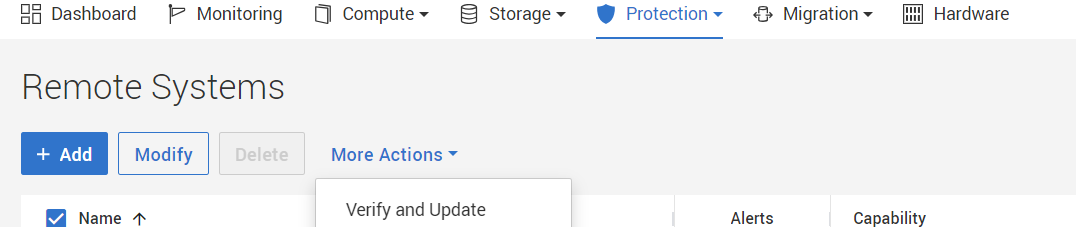
- Changing a cluster name and then later on invoking verify and update may lead to a node reboot.
- Verify and update is located under Protection > Remote Systems, choose relevant remote system and under More Actions choose Verify and Update.
Cause
- This issue affects PowerStoreOS 3.0 and later.
- Due to a software issue when changing the cluster name and running verify and update, a stale object is created in the replication stack.
- The stale object should not cause any issue unless the article PowerStore: After Transport Update to TCP, Replication Sessions are in the System_Paused State (Dell Technologies Correctable) was followed to fix an issue related to changing transport type to TCP.
- As a result of fixing the issue above, a node may unexpectedly reboot.
Resolution
This issue was addressed in PowerStoreOS version 4.1 (or later). This issue was also addressed in version 4.0.0.2.
Workaround
With earlier versions, contact Dell Technical Support to confirm this issue has occurred. Reference this article in the Service Request for expedited handling.
Affected Products
PowerStoreArticle Properties
Article Number: 000223800
Article Type: Solution
Last Modified: 17 Mar 2025
Version: 4
Find answers to your questions from other Dell users
Support Services
Check if your device is covered by Support Services.