Connectrix Brocade B-Series: How to get Gen 5 Fabric OS Upgrade Certificates and what do they mean.
Summary: Explanation on what are Gen 5 Fabric OS certificates, how to get them.
This article applies to
This article does not apply to
This article is not tied to any specific product.
Not all product versions are identified in this article.
Instructions
What is the Brocade Gen 5 FOS Upgrade Certificate?
Beginning with the release of FOS v8.2.3e, all Gen 5 products are required to have a FOS Upgrade Certificate generated and installed on them prior to installing a new version of FOS. These new FOS Upgrade Certificates are available for download from Broadcom’s License Portal and Dell Assist Sites at no cost for any supported Gen 5 switch that has a current support contract.
FOS Upgrade Certificates do not have an expiration date, but rather are associated with a specific version of FOS.
In order to install a new version of FOS (beginning with v8.2.3e), the switch must have a FOS Upgrade Certificate installed that supports the release that will be installed.
FOS Upgrade Certificate can be installed on a switch indefinitely - there is no need to remove the certificate, and it may be installed at any time prior to migrating to the new FOS release.
Where do I go to obtain a Brocade Gen 5 FOS Upgrade Certificate?
Customers with support entitlement may obtain a Gen 5 Fabric OS Upgrade Certificate through Dell Support linked to the Dell OEM Assist Site.
Up to 100 Gen 5 Fabric OS Upgrade Certificates can be requested at a time by entering the license IDs (LIDs), or for bulk requests.
Accessed using:
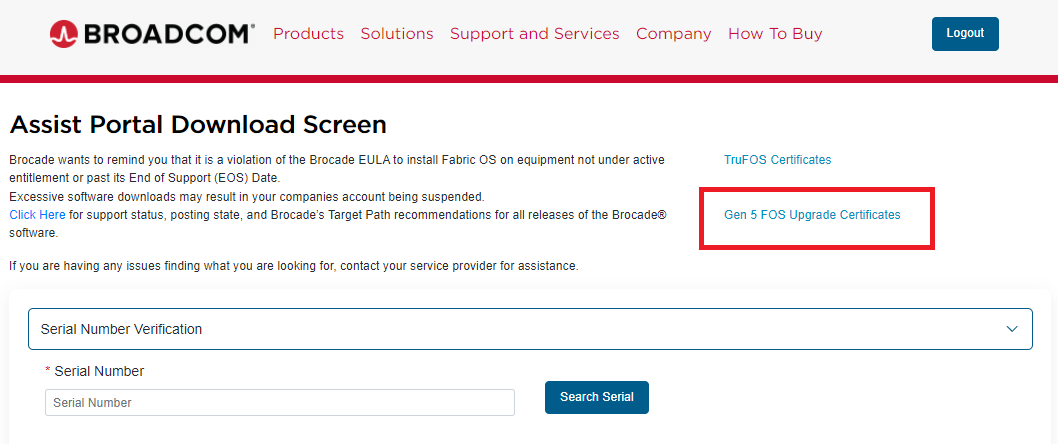
The OEM Assist site: Click the "Gen 5 FOS Upgrade Certificates" link:
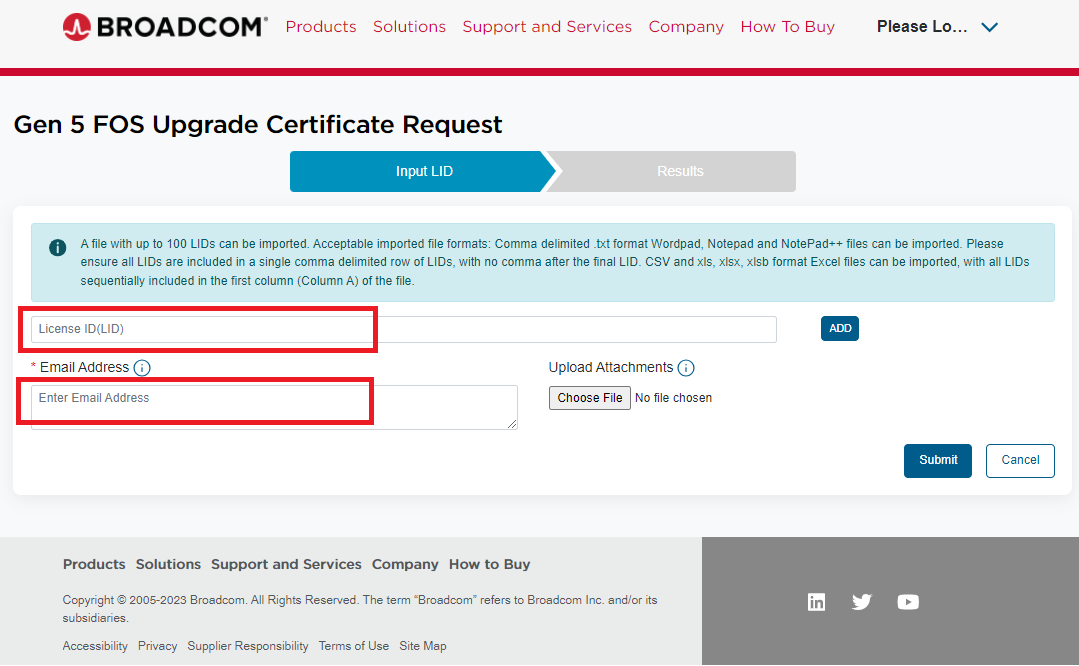
Enter the Gen 5 switch License ID (LID) and the email address that the certificate must be sent to and click "Submit":
Frequently Asked Questions:
Which Brocade switch models require FOS Upgrade Certificates to load new FOS releases?
The following Gen 5 platforms are still supported and able to install FOS Upgrade Certificates:
• Connectrix ED-8510-8B
• Connectrix ED-8510-4B
• Connectrix DS-6520B
• Connectrix DS-6510B
• Connectrix DS-6505B
• Connectrix MP-7840B
Note: Although the Connectrix ED-8510-8B, DS-6510B, and DS-6505B switches have already reached their FOS End-of-Availability (EOA) milestone dates, Broadcom is making the new FOS v8.2.3e release Platform Specific Download (PSD) images available for these platforms.
Future FOS patch releases may not be posted for platforms that are beyond their FOS EOA date. (see the product End of Life (EOL) notice for each individual platform for FOS EOA dates and other End-of-Life milestone information.)
Broadcom EOL document:
https://www.broadcom.com/support/fibre-channel-networking/eol
How do I apply a Gen 5 FOS Upgrade Certificate to a switch?
A FOS Upgrade Certificate can be installed using the same process as installing a FOS feature license.
See FOS Admin Guide documents for additional information.
Example:
Is Switch Status affected by the Gen 5 FOS Upgrade Certificate?
No.
Presence or absence of a Gen 5 FOS Upgrade Certificate does not affect Switch Status in any way.
Is Brocade Trusted FOS (TruFOS) Certificates and the new Gen 5 FOS Upgrade Certificates the same thing?
No.
FOS Upgrade Certificates are only supported on Gen 5 products, whereas Trusted FOS Certificates are only supported on Gen 6 and later products.
In addition, these two types of certificates have different behaviors and provide different benefits.
Do Gen 5 FOS Upgrade Certificates expire?
No.
FOS Upgrade Certificates do not have an expiration date. Once generated for a switch, a FOS Upgrade Certificate works indefinitely, but only for the specific FOS release version (or lower) that the certificate was generated for.
Do Gen 5 FOS Upgrade Certificates cost anything?
No.
They are available for applicable products with a current support contract at no cost.
Do Gen 5 FOS Upgrade Certificates guarantee my switch has a valid support contract?
No.
FOS Upgrade Certificates only require that a switch has a current support contract at the time the certificate is requested and generated.
Can I generate a single Gen 5 FOS Upgrade Certificate and install it on all my Gen 5 switches?
No.
FOS Upgrade Certificates are generated for an individual switch based on its unique License ID (LID). Each Gen 5 switch requires its own unique FOS Upgrade Certificate.
Can I install a Gen 5 FOS Upgrade Certificate on a switch running any version of FOS?
No.
A switch must be running FOS v8.2.3d or later in order to install a FOS Upgrade Certificate.
For a switch running any version prior to 8.2.3d, the proper process would be:
Do all Brocade-branded, and OEM-branded Gen 5 switches support FOS Upgrade Certificates?
Yes
All Gen 5 switches that have not reached EOS support FOS Upgrade Certificates.
Can I generate more than one Gen 5 FOS Upgrade Certificate at a time?
Yes
The Broadcom Software License Portal accessed directly or through Dell Assist sites allows the generation of up to 100 FOS Upgrade Certificates at a time.
Beginning with the release of FOS v8.2.3e, all Gen 5 products are required to have a FOS Upgrade Certificate generated and installed on them prior to installing a new version of FOS. These new FOS Upgrade Certificates are available for download from Broadcom’s License Portal and Dell Assist Sites at no cost for any supported Gen 5 switch that has a current support contract.
FOS Upgrade Certificates do not have an expiration date, but rather are associated with a specific version of FOS.
In order to install a new version of FOS (beginning with v8.2.3e), the switch must have a FOS Upgrade Certificate installed that supports the release that will be installed.
FOS Upgrade Certificate can be installed on a switch indefinitely - there is no need to remove the certificate, and it may be installed at any time prior to migrating to the new FOS release.
Where do I go to obtain a Brocade Gen 5 FOS Upgrade Certificate?
Customers with support entitlement may obtain a Gen 5 Fabric OS Upgrade Certificate through Dell Support linked to the Dell OEM Assist Site.
Up to 100 Gen 5 Fabric OS Upgrade Certificates can be requested at a time by entering the license IDs (LIDs), or for bulk requests.
Accessed using:
The OEM Assist site: Click the "Gen 5 FOS Upgrade Certificates" link:
Enter the Gen 5 switch License ID (LID) and the email address that the certificate must be sent to and click "Submit":
Frequently Asked Questions:
Which Brocade switch models require FOS Upgrade Certificates to load new FOS releases?
The following Gen 5 platforms are still supported and able to install FOS Upgrade Certificates:
• Connectrix ED-8510-8B
• Connectrix ED-8510-4B
• Connectrix DS-6520B
• Connectrix DS-6510B
• Connectrix DS-6505B
• Connectrix MP-7840B
Note: Although the Connectrix ED-8510-8B, DS-6510B, and DS-6505B switches have already reached their FOS End-of-Availability (EOA) milestone dates, Broadcom is making the new FOS v8.2.3e release Platform Specific Download (PSD) images available for these platforms.
Future FOS patch releases may not be posted for platforms that are beyond their FOS EOA date. (see the product End of Life (EOL) notice for each individual platform for FOS EOA dates and other End-of-Life milestone information.)
Broadcom EOL document:
https://www.broadcom.com/support/fibre-channel-networking/eol
How do I apply a Gen 5 FOS Upgrade Certificate to a switch?
A FOS Upgrade Certificate can be installed using the same process as installing a FOS feature license.
See FOS Admin Guide documents for additional information.
Example:
ck_br6510b_fid128:FID128:admin>
ck_br6510b_fid128:FID128:admin> licenseadd YYLZD7KmQ9R9aKPrAGDWQBgEGgtR39tPY9SWQLGAGRLmBWFHHFX9Wm7JQPGr1234567

License Added [YYLZD7KmQ9R9aKPrAGDWQBgEGgtR39tPY9SWQLGAGRLmBWFHHFX9Wm7JQPGr1234567]
ck_br6510b_fid128:FID128:admin>
ck_br6510b_fid128:FID128:admin>
ck_br6510b_fid128:FID128:admin> licenseshow
fMGCC94a4mCtmgSLmKX9NTJg7BGEQDHgB74EG:
    Integrated Routing license
W4Y3XgtaXtgBFTEEKLRXNHtWJ4JPrQNMBSBJE:
    First Ports on Demand license - additional 12 port upgrade license
EWHLYLSDmLDWmgNFBCLCSLZgG3GCB7t3BJCtQ:
    Extended Fabric license
    Fabric Watch license
    Performance Monitor license
    Trunking license
    Adaptive Networking - obsolete license
    Server Application Optimization - obsolete license
    Fabric Vision license
YYLZD7KmQ9R9aKPrAGDWQBgEGgtR39tPY9SWQLGAGRLmBWFHHFX9Wm7JQPGr1234567:
    Fabric OS Upgrade Certificate, valid for all FOS v8.2.3e releases
License Id:
10:00:88:94:71:59:14:50
ck_br6510b_fid128:FID128:admin>
Is Switch Status affected by the Gen 5 FOS Upgrade Certificate?
No.
Presence or absence of a Gen 5 FOS Upgrade Certificate does not affect Switch Status in any way.
Is Brocade Trusted FOS (TruFOS) Certificates and the new Gen 5 FOS Upgrade Certificates the same thing?
No.
FOS Upgrade Certificates are only supported on Gen 5 products, whereas Trusted FOS Certificates are only supported on Gen 6 and later products.
In addition, these two types of certificates have different behaviors and provide different benefits.
Do Gen 5 FOS Upgrade Certificates expire?
No.
FOS Upgrade Certificates do not have an expiration date. Once generated for a switch, a FOS Upgrade Certificate works indefinitely, but only for the specific FOS release version (or lower) that the certificate was generated for.
Do Gen 5 FOS Upgrade Certificates cost anything?
No.
They are available for applicable products with a current support contract at no cost.
Do Gen 5 FOS Upgrade Certificates guarantee my switch has a valid support contract?
No.
FOS Upgrade Certificates only require that a switch has a current support contract at the time the certificate is requested and generated.
Can I generate a single Gen 5 FOS Upgrade Certificate and install it on all my Gen 5 switches?
No.
FOS Upgrade Certificates are generated for an individual switch based on its unique License ID (LID). Each Gen 5 switch requires its own unique FOS Upgrade Certificate.
Can I install a Gen 5 FOS Upgrade Certificate on a switch running any version of FOS?
No.
A switch must be running FOS v8.2.3d or later in order to install a FOS Upgrade Certificate.
For a switch running any version prior to 8.2.3d, the proper process would be:
- To migrate to FOS v8.2.3d (following suggested migration paths in FOS Release Notes).
- Generate a FOS Upgrade Certificate for the switch.
- Install the certificate on the switch.
- Then upgrade to FOS v8.2.3e (or later).
Do all Brocade-branded, and OEM-branded Gen 5 switches support FOS Upgrade Certificates?
Yes
All Gen 5 switches that have not reached EOS support FOS Upgrade Certificates.
Can I generate more than one Gen 5 FOS Upgrade Certificate at a time?
Yes
The Broadcom Software License Portal accessed directly or through Dell Assist sites allows the generation of up to 100 FOS Upgrade Certificates at a time.
Affected Products
Connectrix B-SeriesProducts
Connectrix, ConnectrixArticle Properties
Article Number: 000224168
Article Type: How To
Last Modified: 29 Jul 2025
Version: 4
Find answers to your questions from other Dell users
Support Services
Check if your device is covered by Support Services.