PowerProtect Data Manager Unable to add license
Summary: Unable to add to PowerProtect Data Manager appliance.
This article applies to
This article does not apply to
This article is not tied to any specific product.
Not all product versions are identified in this article.
Symptoms
Unable to add license to PowerProtect Data Manager:

Or

In sysmnr.log:
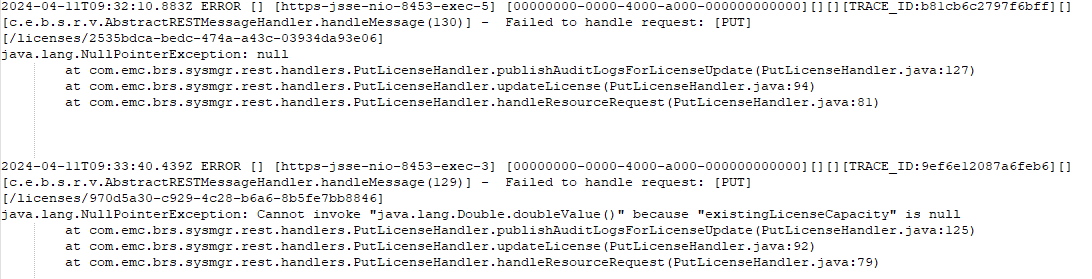
Code=500, reason=An unexpected error prevented the server from fulfilling your request: Null
Or
In sysmnr.log:
Cause
PowerProtect Data Manager does not support multiple license keys, one for evaluation capacity and another one for subscription socket.
PowerProtect Data Manager has more than one license.
PowerProtect Data Manager has more than one license.
Resolution
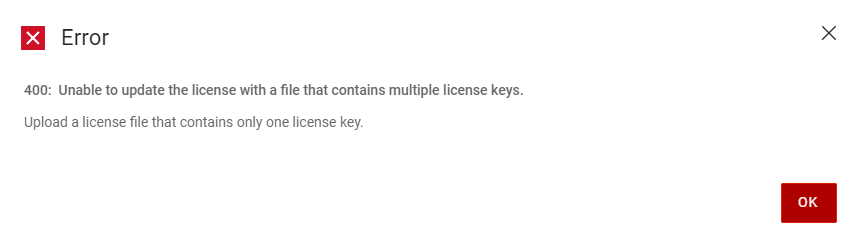
On PowerProtect Data Manager 19.17, this scenario is better handled and the following message is displayed:
Contact support to get assistance to reset the license number and/or type.
Contact support to get assistance to reset the license number and/or type.
Article Properties
Article Number: 000224525
Article Type: Solution
Last Modified: 29 Apr 2024
Version: 1
Find answers to your questions from other Dell users
Support Services
Check if your device is covered by Support Services.