Dell Gaming Laptop 在连接到 USB 充电设备时显示电源适配器警告消息
Summary: 本文提供有关某些戴尔游戏笔记本电脑在连接到 USB 充电设备时出现错误消息提示的信息。
This article applies to
This article does not apply to
This article is not tied to any specific product.
Not all product versions are identified in this article.
Symptoms
将出现一条错误消息:“您已将电源适配器连接到不接受电源的端口。将电源适配器连接到系统的电源端口。”
连接交流适配器和支持 USB-C 充电的 Type-C 设备时出现此提示。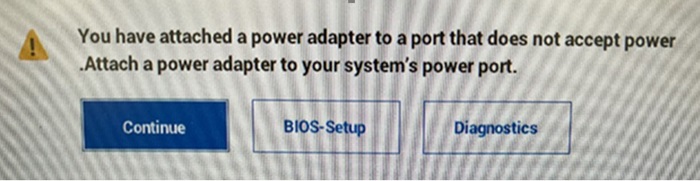
受影响的平台:
- Dell G15 5530
- Dell G16 7630
- 戴尔 G16 5520
- 戴尔 G16 5521
Cause
系统不支持 USB-C 充电。连接提供 USB-C 充电的外部设备将显示此消息。
Resolution
Affected Products
Dell G15 5520, Dell G15 5521 Special Edition, Dell G15 5530, Dell G16 7630Article Properties
Article Number: 000224769
Article Type: Solution
Last Modified: 24 Sep 2025
Version: 3
Find answers to your questions from other Dell users
Support Services
Check if your device is covered by Support Services.