Intune kan ikke implementere Dell Optimizer version 4.2.2, når den downloades fra Microsoft Store
Summary: Oplysninger om, at Intune ikke implementerer Dell Optimizer version 4.2.2, hvis den downloades fra Microsoft Store.
This article applies to
This article does not apply to
This article is not tied to any specific product.
Not all product versions are identified in this article.
Symptoms
Appen har ikke en gyldig fejl om den seneste pakkeversion
Intune viser fejlmeddelelsen "Den valgte app har ikke en gyldig seneste pakkeversion" (Figur 1).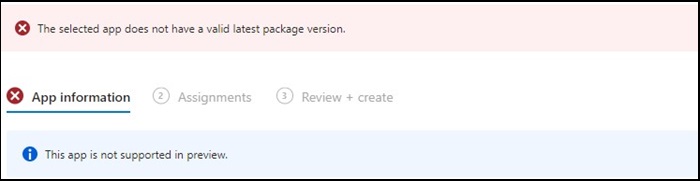
Figur 1
Bemærk: Kun tilgængelig på udvalgte Dell Latitude-, Precision-, OptiPlex- og Rugged-computere.
Cause
Dell Optimizer bestod ikke Intune-verifikationen, der kræver, at apps installeres på al hardware (Dell og ikke-Dell).
Resolution
Manuel implementering af Dell Optimizer
For at løse problemet kan it-administratorer prøve følgende for manuelt at implementere Dell Optimizer via Intune.
- Download installationsprogrammet til Dell Optimizer fra Dell.com
- Følg nedenstående instruktioner:
- Installer softwaren ved hjælp af denne kommando:
Install command: Dell-Optimizer-Application_xxxxx_WIN_x.x.x.x_A00.EXE /passthrough /silent /InstallDotNet=true /FACTORY=TRUE

Bemærk: Brug følgende kommando til at afinstallere:
Uninstall command: Dell-Optimizer-Application_xxxxx_WIN_x.x.x.x_A00.EXE /passthrough /silent /remove
Affected Products
Alienware, Inspiron, OptiPlex, Vostro, XPS, G Series, G Series, Alienware, Inspiron, Latitude, Vostro, XPS, Fixed Workstations, Mobile WorkstationsArticle Properties
Article Number: 000224821
Article Type: Solution
Last Modified: 17 Jul 2025
Version: 7
Find answers to your questions from other Dell users
Support Services
Check if your device is covered by Support Services.