Windows Defender 0x80070003: 指定されたパスが見つかりません。
Summary: Windows Serverマシンに、Windows Defender保護が実行されていないことを示す警告が表示されることがあります。 原因として、次のエラー コードが提供されます。 0x80070003: 指定されたパスが見つかりません。
This article applies to
This article does not apply to
This article is not tied to any specific product.
Not all product versions are identified in this article.
Symptoms
-
イベント ビューアーには、次のエントリーが含まれる場合があります。
Windows could not start the Windows Defender Antivirus Service service on the local computer. Error 2: the system cannot find the file specified.
-
Defender サービス自体がサービス コンソールで停止中と表示される場合があります。起動しようとすると、次のエラーが発生します。エラー126: The specified module could not be found.
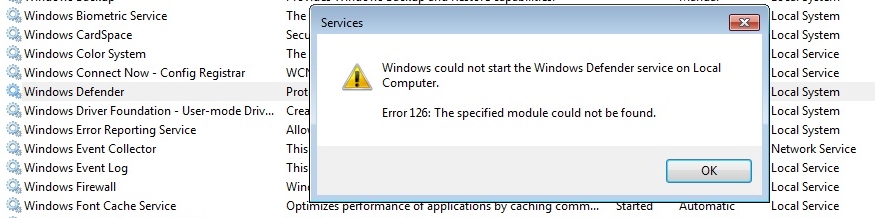
-
また、次のエラー コードがサーバー マネージャーに表示されるか、イベント ビューアーのシステム ログまたはアプリケーション ログに表示される場合があります。
0x8007007e: Antimalware protection has stopped functioning for an unknown reason.
0x80070003: The system cannot find the path specified.
-
以下に示すような標準の修復コマンドでは、この状態を解決できません。
SFC /ScanNow
DISM.exe /Online /Cleanup-image /Restorehealth
Cause
この現象の考えられる原因は、影響を受けるシステム上の次のフォルダー(またはそのコンテンツ)が意図せず削除されたことです:
C:\ProgramData\Microsoft\Windows Defender\Platform\<Platform Version>
これは、システムにインストールされている別のサード パーティー製ウイルス対策ソフトウェアの積極的な設定が原因である可能性があります。
Resolution
C:\ProgramData\Microsoft\Windows Defender\Platform\<Platform Version> ディレクトリが見つからないか空の場合は、オペレーティング システムとWindows Defenderプラットフォーム バージョンが類似しているシステムから影響を受けるシステムに、そのディレクトリ (およびその内容) をコピーできます。
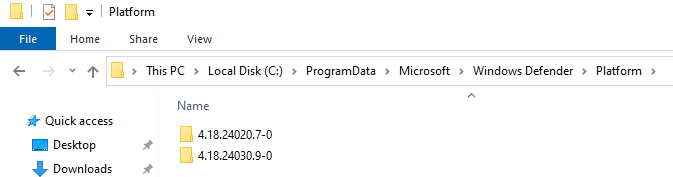
この後、再起動すると、Windows Defenderサービスが起動します。
Additional Information
Microsoft 以外の 2 つ目のウイルス対策ソフトウェアが存在する場合は、 ここ
Affected Products
Microsoft Windows Server 2016, Microsoft Windows Server 2019, Microsoft Windows Server 2022Article Properties
Article Number: 000224862
Article Type: Solution
Last Modified: 01 Jan 2025
Version: 2
Find answers to your questions from other Dell users
Support Services
Check if your device is covered by Support Services.