Windows Defender 0x80070003:系統找不到指定的路徑。
Summary: Windows Server 機器可能會顯示警告,指出 Windows Defender 保護未執行。 系統會提供下列錯誤代碼作為原因: 0x80070003:系統找不到指定的路徑。
This article applies to
This article does not apply to
This article is not tied to any specific product.
Not all product versions are identified in this article.
Symptoms
-
事件檢視器可能包含下列項目:
Windows could not start the Windows Defender Antivirus Service service on the local computer. Error 2: the system cannot find the file specified.
-
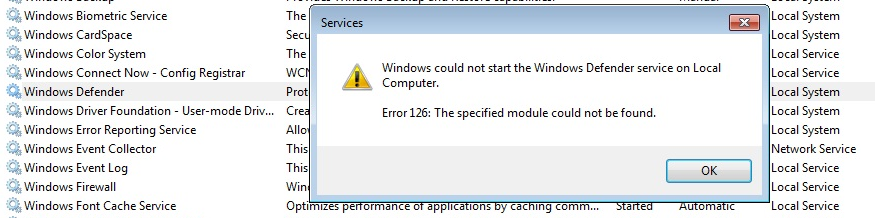
Defender 服務本身可能會在服務控制台中顯示為已停止。嘗試啟動它會導致以下錯誤:錯誤 126:找不到指定的模組。
-
此外,以下錯誤代碼可能會顯示在伺服器管理器中,或在事件檢視器系統或應用程式日誌中可見:
0x8007007e: Antimalware protection has stopped functioning for an unknown reason.
0x80070003: The system cannot find the path specified.
-
以下列出的標準修復命令無法解決此狀況:
SFC /ScanNow
DISM.exe /Online /Cleanup-image /Restorehealth
Cause
此行為的可能原因是意外刪除受影響系統上的以下資料夾 (或其內容):
C:\ProgramData\Microsoft\Windows Defender\Platform\<Platform Version>
這可能是系統上安裝了另外第三方防毒軟體的嚴苛設定所導致。
Resolution
如果 C:\ProgramData\Microsoft\Windows Defender\Platform\<Platform Version> 目錄遺失或為空,您可以將其 (及其內容) 從具有類似作業系統和 Windows Defender 平台版本的系統複製到受影響的系統上。
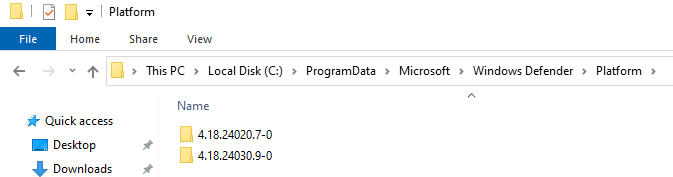
在此並重新開機後,Windows Defender 服務會啟動。
Additional Information
如果有第二個非 Microsoft 防毒軟體,請按照 此處
Affected Products
Microsoft Windows Server 2016, Microsoft Windows Server 2019, Microsoft Windows Server 2022Article Properties
Article Number: 000224862
Article Type: Solution
Last Modified: 01 Jan 2025
Version: 2
Find answers to your questions from other Dell users
Support Services
Check if your device is covered by Support Services.