Dell Unity: Unisphere does not show the correct number of Hosts for NFS Shares (User Correctable)
Summary: After upgrade to OE5.3.1, Unisphere shows the number of Hosts column as 0 on NFS Shares, however it was correct before the NDU.
This article applies to
This article does not apply to
This article is not tied to any specific product.
Not all product versions are identified in this article.
Symptoms
When Share Name is displayed in ascending order, the value of Hosts is not displayed correctly.
When Share Name is displayed in descending order, the value of Hosts is displayed correctly.
When CSV is downloaded using Export Table Data, the value of Hosts is displayed correctly.
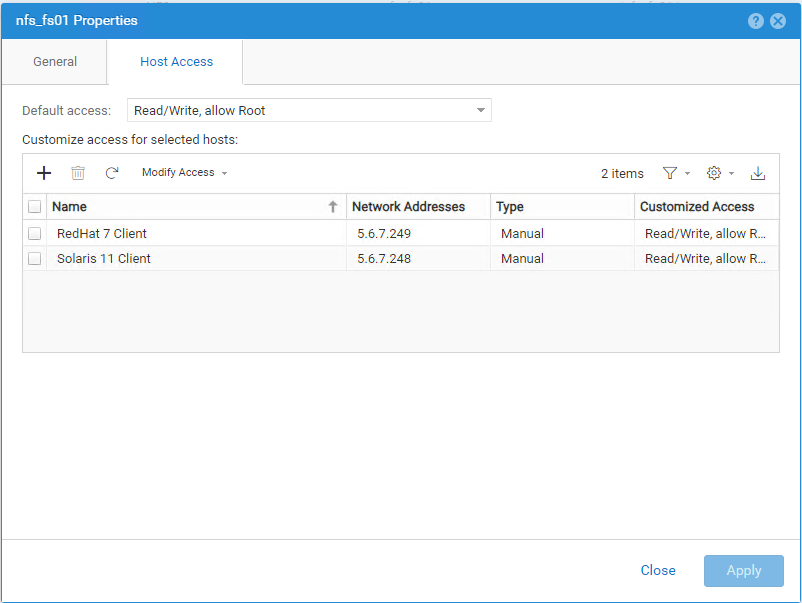
[Two hosts are registered on the subject NFS share.]
[Hosts are not displayed in ascending order(↑).]
[Hosts are displayed in descending order(↓).]
Cause
This is a known issue with Unisphere using OE 5.1 or later code.
Resolution
This problem is fixed in OE 5.5.
As a workaround, sorting by "share name" in descending order can be used to obtain the correct Hosts value.
Additional Information
Affected Products
Dell EMC Unity FamilyArticle Properties
Article Number: 000224917
Article Type: Solution
Last Modified: 10 May 2024
Version: 1
Find answers to your questions from other Dell users
Support Services
Check if your device is covered by Support Services.