Windows Server: Essentials 2022 Licensing Bullet Points
Summary: This article lists licensing concepts applicable to Windows Server Essentials 2022.
This article applies to
This article does not apply to
This article is not tied to any specific product.
Not all product versions are identified in this article.
Instructions
Windows Server Essentials 2022 Licensing Takeaways
Consider the following when working with Windows Server Essentials 2022:- OEM only: Windows Server Essentials is an OEM only option. This means that it cannot be purchased separately. It has to be purchased along with a PowerEdge Server.
- 1 CPU / 10 Cores: You can purchase Windows Server Essentials 2022 only for servers that have a single CPU with 10 cores or less.
- CALs not required: When using Windows Server Essentials 2022, You do not need to purchase per-user or per-device CALs for those users connecting to the server. But there is a maximum of users that you can have. See next bullet point.
- 25 users / 50 devices maximum: To comply with the Windows Server Essentials 2022 End User License Agreement (EULA) a maximum of 25 users (including the administrator's account) and 50 devices can exist in the network.
- No special installation media: When a server is ordered with Windows Server Essentials 2022, it arrives with a COA sticker that has a product key. To activate the operating system, you can use this product key in a DISM command that looks like this:
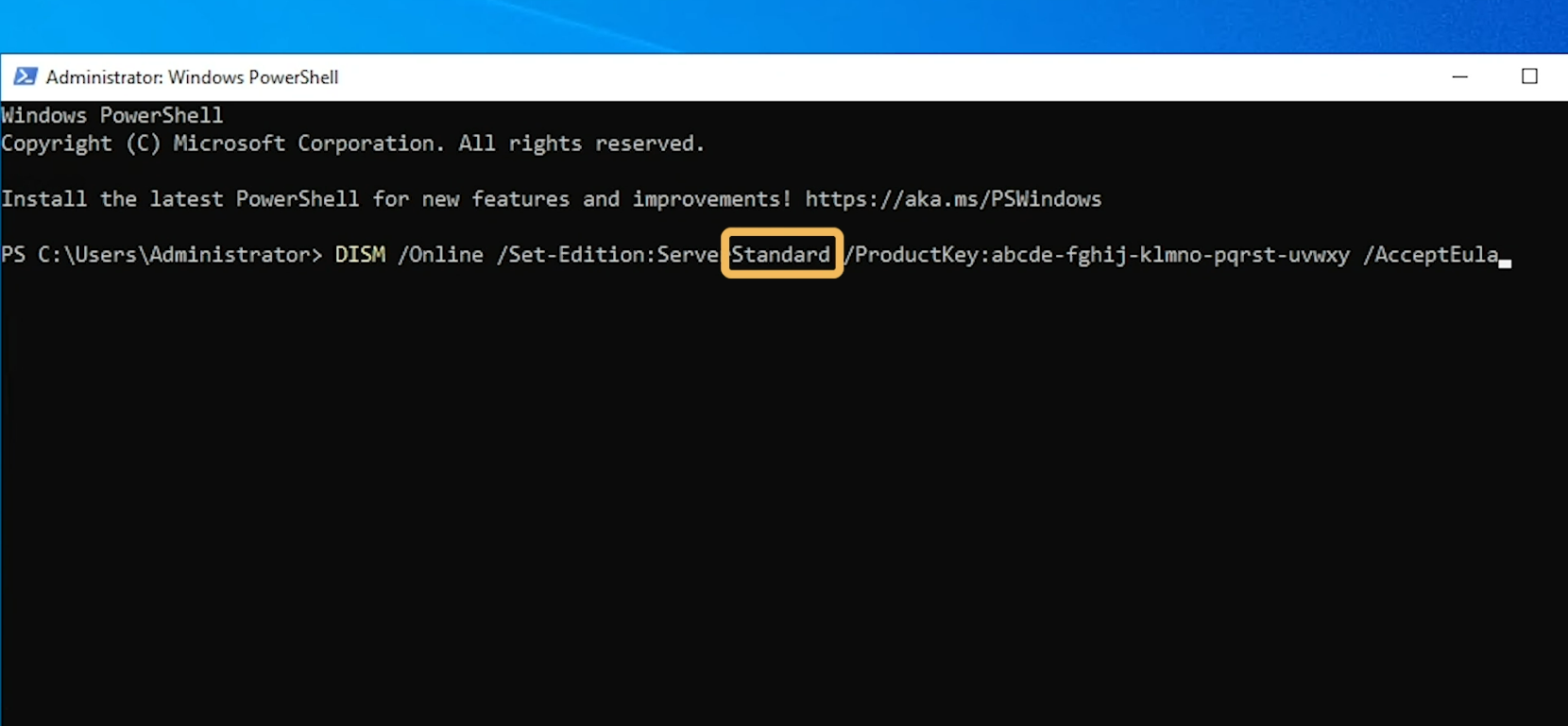
Note: Notice that you must specify the Standard edition even though the Product Key is for the Essentials edition. This is because there is no specialized installation media for Windows Server Essentials. Licensing compliance is enforced by the product key.
- Non-Compliance shutdowns: A Server with Windows Server Essentials 2022 will begin to automatically shut down if it detects that there are more than 25 users or 50 devices.
Additional Information
You can find more information about the Essentials edition in these articles:
Microsoft Windows: Server 2022 Essentials Shows as Standard with No Features
PowerEdge: Windows Server 2022 Essentials Branding Explained
See this video:
Windows Server Essentials 2022 Licensing
Affected Products
Microsoft Windows Server 2022Products
PowerEdge R250, PowerEdge R260, PowerEdge R350, PowerEdge R360, PowerEdge R450, PowerEdge R550, PowerEdge R650, PowerEdge R650xs, PowerEdge R6515, PowerEdge R6525, PowerEdge R660, PowerEdge R660xs, PowerEdge R6615, PowerEdge R6625, PowerEdge R750
, PowerEdge R750XA, PowerEdge R750xs, PowerEdge R7515, PowerEdge R7525, PowerEdge R760, PowerEdge R760XA, PowerEdge R760xd2, PowerEdge R760xs, PowerEdge R7615, PowerEdge R7625, PowerEdge R860, PowerEdge R960, PowerEdge T150, PowerEdge T160, PowerEdge T350, PowerEdge T360, PowerEdge T550, PowerEdge T560
...
Article Properties
Article Number: 000225025
Article Type: How To
Last Modified: 04 Jan 2025
Version: 3
Find answers to your questions from other Dell users
Support Services
Check if your device is covered by Support Services.